Never available again
View alternatives in the sidebar
View alternatives in the sidebar
According to our access point expert
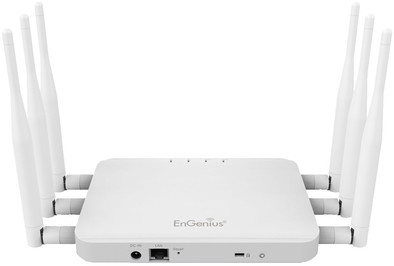
The EnGenius ECB1750 access point is EnGenius's top model and is very suitable for offices or restaurants. The powerful WiFi antennas ensure a stable and strong WiFi signal. You can set up 16 separate wireless networks, each with their own rights. This way, you can make sure that your guests can access for example the WiFi network, but not your internal files.
Frequency bands | Simultaneous dual-band | |
|---|---|---|
Ethernet speed | Gigabit Ethernet (1000Mbps) | |
PoE support | ||
5GHz band speed | 1300 Mbit/s | |
Seamless roaming |
5 stars
5
4 stars
9
3 stars
0
2 stars
2
1 star
0
This Router has an enormous transmitting power, and is now under-above-attic-garden throughout the house and gives maximum reception.
r van den broek
1 June 2016
Automatically translated from Dutch
I bought the ECB1750 to have a good WIFI signal in the whole house; a newly built house (5 years old) with concrete floors. The ECB1750 on the 1st floor of the house connected as an access point. On the 1st floor itself the signal was very good, both 2.4 and 5 GHz. But on the ground floor and in the attic, the signal was a lot weaker; the signal on the 5 GHz channels was negligible and the signal on the 2.4 GHz slightly better than my current TP-Link TL-WR1043ND (with extra long antennas) which is in the same spot.
My expectations of this ECB1750 were apparently too high. I cannot replace my WIFI routers on the ground floor and 1st floor with this access point. So you have to keep switching between the WIFI channels when you walk through the house with your tablet.
Fortunately, you can return your purchase at Cool Blue without any problems.
There seems to be a quirk in the software. Changed settings were not saved properly for me... For example changing the SSID name, and enabling a second SSID or changing the IP address. The trick that worked for me was after a setting was adjusted, then changing the "green" setting (the option that allows you to adjust the signal strength afterwards). After changing this "green" setting, a reboot is performed and the settings are saved.
Hans Remmerswaal
8 May 2015
Automatically translated from Dutch
There may be a defect in the software Which makes it possible to set this but then does nothing Or the WiFi keeps dropping This is my 3rd the 5GHz works but the 2.4GHz has a malfunction so it doesn't work Furthermore, the 5 GHz is far enough to use it as is.
Jeffrey Start
30 July 2018
Automatically translated from Dutch
Product number | 558270 | |
|---|---|---|
Manufacturer code | ECB1750 | |
Brand | EnGenius | |
Warranty | 2 years | |
Processing of your defect | Carry-in warranty |
Speed class | Mid-range | |
|---|---|---|
Quality of Service (QoS) | ||
Suitable for IPv6 | ||
Guest network | ||
Bridge option | ||
Repeater function | ||
IGMP Snooping | ||
Beamforming | ||
Seamless roaming | ||
Can be expanded with extra stations | ||
On/off switch | ||
Mounting possible |
WLAN security | 802.1X, WPA, WPA-PSK, WPA2 | |
|---|---|---|
Number of WiFi antennas | 6 | |
Frequency bands | Simultaneous dual-band | |
5GHz band speed | 1300 Mbit/s | |
2.4GHz band speed | 450 Mbit/s | |
External antennas | ||
Number of external antennas | 6 | |
Signal transmission | Omnidirectional | |
Antenna connection type | Standard antenna | |
Replaceable WLAN antennas | ||
MAC address filter | ||
MIMO | ||
MU-MIMMO |
Ethernet speed | Gigabit Ethernet (1000Mbps) | |
|---|---|---|
Number of Ethernet ports | 1 | |
WAN ports | 0 | |
PoE support | ||
Type of PoE | 802.3at (PoE+) | |
Number of PoE ports | 1 |
Material | Plastic |
|---|---|
Height | 2,6 cm |
Width | 14 cm |
Depth | 18,9 cm |
Weight | 0,406 kg |
Color | White |