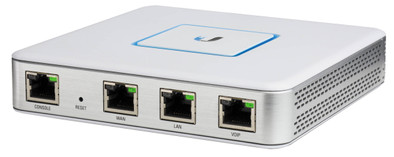
Ubiquiti UniFi Security Gateway

Never available again
View alternatives in the sidebar
View alternatives in the sidebar
Product number | 725136 | |
|---|---|---|
Manufacturer code | USG | |
Brand | Ubiquiti | |
Warranty | 2 years | |
Processing of your defect | Via Coolblue |
Type router | Business router | |
|---|---|---|
WiFi speed class | Basic | |
Number of stations | 1 | |
Can be expanded with extra stations | ||
Built-in modem |
Jumbo frame support |
|---|
Ethernet speed | Gigabit Ethernet (1000Mbps) | |
|---|---|---|
Network connector | ||
Number of Ethernet ports | 3 | |
PoE support | ||
USB port |
Automatically switches to 3G/4G | ||
|---|---|---|
Mobile data connection | No | |
SIM card slot |
Quality of Service (QoS) | ||
|---|---|---|
MU-MIMMO | ||
Seamless roaming | ||
Beamforming | ||
Port forwarding | ||
LACP Link aggregation |
Parental controls | ||
|---|---|---|
Firewall | ||
Firewall type | NAT Firewall | |
Guest network | ||
VPN support | ||
VPN server | ||
VPN client | ||
VPN passthrough |
Mounting possible | ||
|---|---|---|
Width | 13,5 cm | |
Height | 2,83 cm | |
Depth | 13,5 cm | |
Weight | 366 g | |
Color | White | |
Material | Metal |
Power supply type | Power grid |
|---|
anything for a smile
Ethernet speed | Gigabit Ethernet (1000Mbps) | |
|---|---|---|
Number of Ethernet ports | 3 | |
Type router | Business router | |
Number of stations | 1 |
According to our router expert
The router is able to transfer one million packages per second.
Simultaneously manage the gateway from multiple locations.
The router doesn't have WiFi for connecting devices wirelessly.
The Ubiquiti UniFi Security Gateway is a professional router with firewall for completely protecting small company networks against outside threats. The router is able to transfer up to one million packages per second, making it ideally suited for peer-to-peer networking or website hosting, for example. The UniFi Security Gateway has many useful business functions. For instance, easily block access to certain website or establish secure connections via VPN.
Range
Installation ease
Speed
Design
unboxing: The Ubiquiti USG comes in a small cardboard box that contains no plastic and therefore appears durable. The box contains the following items: Unifi Security Gateway, Power Adapter, Power Cord, Wall Mounting Kit, Quick Start Guide.
In use with: I use the USG with these products: Ziggo Modem/Router, Unifi Switch 8-60W, Unifi AP-AC-LR and of course the free software from ubiquiti to manage everything (Controller software)
Installation: Because I didn't want to bother my girlfriend too much with my hobby in the network, I chose not to include the USG in my current lan but to build a new lan. This allowed me to configure the USG, Switch and AP without any downtime.
The USG defaults to IP 192.168.1.1 and has a DHCP scope 192.168.1.1/24 preconfigured. If you connect the switch to LAN port 1 and your laptop or desktop there, it will get an IP in this series. My Controller software runs on an HPE Microserver Gen 10, which I also connected to the switch and opened the controller from there. The controller immediately shows the USG and asks if you want to add it. This will take about 2 minutes and your USG is up and running. Via the controller software it is possible to set things like: Firewall, Vlan, DHCP scopes, and much more.
If you still want to include the USG in your own network, this is also possible. As I mentioned, the USG is standard provided with the IP 192.168.1.1. If you want to replace the IP address with an IP from your current range, connect a device to the lan port. You will then get an IP from the DHCP of the series: 192.168.1.1/24. Then go to 192.168.1.1 in your browser and you will arrive at the internal web interface of the USG where you can change the IP settings.
controller software: The USG can be managed via the controller software. Things you can configure for the USG are, Networks with own subnets, vlans, DHCP scopes etc. Static routes, Firewall rules, GeoIP Filtering (Beta) IPS (Beta) DPI to see what kind of traffic is going over the network. Radius, SIP, DHCP, SNMP,UNP,NTP, Site-to-Site VPN, Client VPN.
It is an advanced router with many possibilities that actually comes into its own if you have both a USG, Switch and Accesspoint from Ubiquiti.
In the pictures you can see the functions, Firewall, DPI, Networks, Dashboard.
Jan Mulder
16 June 2018
Automatically translated from Nederlands
This USG is the right replacement for my "standard" router in combination with my UniFi AP-AC-Pros.
Very easy to set up with the controller software. However, if you want just a little more in terms of settings of, for example, the firewall, you should currently have some knowledge in CLI programming.
Software/firmware is regularly updated ++
DPI looks very slick.
Only in terms of temperature it is a has head. Do not place this gateway in a space that is too small. In my meter cupboard, the USG reaches an average temperature of 41.2°C Not really cool blue but more red hot ;-)
Peter van den Bosch
2 July 2017
Automatically translated from Nederlands
Had to search a bit to get the router working in an existing network where the subnet was different. Controller installed on my nas was difficult about that. Unfortunately, ubiquiti doesn't support that. Only via cloudkey or via controller installed on a PC. I don't want to run my PC 24/24 and 7/7 and I found cloudkey useless if I could still run the controller on my nas. After a bit of searching, it worked. For the rest very smooth router with a lot of possibilities. A nice option is deep packet inspection (dpi). This device in combination with the unifi aps is great! Speedtest via lan 398Mbps down and 39Mbps upload. Speedtest over WiFi on unifi ap's 307Mbps down and 40Mbps upload. (old mac from 2010). Go and keep going lol. Data speed between devices has not yet been tested, but will certainly be top.
Vanovertveldt Miguel
6 February 2018
Automatically translated from Nederlands