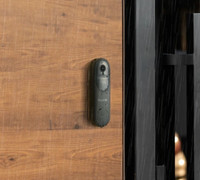
Ring Video Doorbell Pro

Never available again
View alternatives in the sidebar
View alternatives in the sidebar
To stream live footage from your smart doorbell, you need a strong and stable WiFi signal at your front door. Walls and doors limit the wireless signal. Read how to get WiFi at your front door here.

Product number | 734699 | |
|---|---|---|
Manufacturer code | 8VR4P6-0EU0 | |
Brand | Ring | |
Warranty | 2 years | |
Processing of your defect | Carry-in warranty |
Video resolution width | 1080 pixels | |
|---|---|---|
Video resolution height | 1920 pixels | |
Horizontal viewing angle | 160 ° | |
Vertical viewing angle | 100 ° | |
Optical zoom function | ||
Night mode |
Review event | ||
|---|---|---|
Motion detection sensor | ||
Built-in microphone | ||
2-way audio | ||
Monthly costs | 3 euros | |
Recording function | ||
Cloud recording function | Paid | |
Year introduced | 2017 | |
Introduction month | January |
Built-in WiFi | ||
|---|---|---|
Controls via app | ||
Controlled via Apple app | ||
Controlled via Android app | ||
Smart home platform | Amazon Alexa, Homey, IFTTT, Samsung SmartThings | |
Power supply type | Power grid |
Height | 11,4 cm | |
|---|---|---|
Width | 4,7 cm | |
Depth | 2 cm | |
Color | Black, Silver | |
Material | Plastic | |
Water-resistant | ||
IP certification | IP24 |
Review event | ||
|---|---|---|
2-way audio | ||
Smart home platform | Amazon Alexa, Homey, IFTTT, Samsung SmartThings |
According to our doorbell expert
Thanks to the included gong, you'll hear an alert tone when someone rings the bell.
You can connect the doorbell to your existing doorbell wiring.
Install the motion sensor to the desired location, so you won't get a false alarm when someone's at your neighbors door.
This doorbell can be tricky to install, so we also offer an installation service in the most part of the Netherlands.
You need a strong WiFi signal at your front door to use this doorbell, with a WiFi amplifier you can create a strong WiFi network at your doorbell.
The Ring Video Doorbell Pro is a compact WiFi video doorbell. Attach the doorbell to your existing 16 of 24 volt wiring. Once connected, you can see and speak anyone in front of your door using the app on your smartphone. The app will send you a notification when someone rings your door. You'll immediately know who's ringing. The Full HD camera has a field of view of 160 degrees. Opposite to the basic Ring Video Doorbell, you can set the motion sensor the way you wish. Videos can be easily recorded and stored in the cloud. Thanks to the infrared LED lights, you'll even be able to see your visitors at night. The Doorbell Pro comes with 4 removable face plates. In other words, always a color suitable for your front door.
Note: you need a Ring Protect subscription to use all options, for example if you want to store and share footage. After a 30-day trial, the subscription costs € 3 per month.
5 stars
159
4 stars
99
3 stars
13
2 stars
6
1 star
4
Installation ease
Functionality
After an attempted break-in at our home and enthusiastic stories from colleagues about smart doorbells and having read me online, I initially opted for the Skybell HD Trim (also via Coolblue), especially because of. free online storage and the good reviews here and there, but because it eventually turned out not to be compatible with my wife's phone (sony Xperia Z1) (and the fact that the connection once shared with others turned out to be no longer revocable), I exchanged it for the Ring Pro. Fortunately, this was no problem at all with Coolblue.
The first Ring Pro model I got I connected without any major problems, except that it did nothing after booting (didn't set up a WIFI network). This was sent back via Coolblue and a new one in the house after two days. This one did right away. I have to point out that this is definitely not something you just do if you don't know anything about electricity. The information is also very limited. I am at home with it myself, so this was done in no time (by the way, this is much more user-friendly than with the Skybell, you do not receive any information there at all (just look online) and in most cases you have to buy additional things yourself, such as resistors or adapters).
Unfortunately my bell no longer works (by default it is also connected in such a way that it no longer works with the Ring). This was also the case with the Skybell, but that had to do with the fact that I had an AC bell and it is only compatible with a DC doorbell.
The Skybell had a viewing angle of 180 degrees, this Ring is slightly smaller. I thought this would be a disadvantage, but when you hang it in the corner, it turns out to be the opposite. instead of an extremely distorted fisheye shot, you get to see a little more in the image. In hindsight logical, but apparently I had to see it.
After installation, define the movement areas as well as set the times (these are not intuitive in my opinion, because you set the times when you do NOT want it to work - small thing).
I personally think the sound quality is mediocre. The sound suffers from distortion quite a lot, especially if you set it relatively loud. That said, he is good enough to understand each other well.
What also really disappointed me with the Skybell was the motion detection (or rather the lack of it) in the dark. During the day he saw everything, in the dark max 3 - 4 meters. So I was prepared for the same to be the case with the Ring. With the Ring, this is better during the day than the Skybell (somewhat depending on which zones you set and which sensitivity you choose. Sensitive is also really sensitive (think of leaves in the wind in front of the door, cars 50 meters away, etc.). In the dark, on the other hand, it is less good. You can't actually get more than 2 meters. Maybe three meters, but this also depends on where you hang it. If you hang it neatly in the corner (which I did), then walk people straight to the bell, this is actually detrimental to the detection, it is better that people pass from left to right (or vice versa) from the camera perspective.
What also disappointed me about the Ring (certainly versus the Skybell) is how early it transitions to night mode. Where the Skybell still shows color in the dark, the Ring immediately switches to infrared and therefore black-and-white image as soon as it starts to get dark. This even despite the fact that we still have a lamp hanging.
What is an absolute plus (and in my opinion also decisive) compared to the Skybell, is that it reacts much faster after something has already been observed. For example, the Skybell needs more than half a minute after detection before it can respond to movement again (and when something happens in front of the door, you soon suffer from this).
The support for smart home solutions was a bit disappointing (but I knew this in advance), while this is an excellent product that lends itself to this. For example, no API has been made available and it looks like Ring does not want to provide it either. Instead, you are pushed to use their own solution, but its capabilities are limited, especially if you want to integrate it more widely into existing solutions. However, there is IFTTT support.
My biggest criticism, however, is that Ring pretty much forces you to pay for their product. Personally, I think that with a product that is already so expensive to purchase, you should offer a minimum storage time, just like Skybell. In practice, you never look further than a few hours back (one night) because you receive notifications immediately. If something special happens that you would like to keep, you should save it anyway. Paying for a month of storage is actually completely unnecessary. Without a subscription you will immediately see nothing at all, so not even if there is movement and you are just too late. For me this is actually a serious shortcoming of the product, because sometimes you literally do not see who was actually at your door and therefore has nothing to do with added value such as storage over a period. You just need this, because without it it just won't work well.
That you miss events, happens quickly. I've also experienced several times that I don't receive messages until three hours later, but this is a different problem (probably a delay on the servers at Ring) and fortunately the exception rather than the rule. What is true in practice is that you receive a message when you move (or ring the bell). If you are not at home and the house looks somewhat deserted, people usually don't wait that long.
On average, I have about 2-5 seconds (varies a bit) between the time I ring the bell and the time I receive the signal on my phone or watch. Then you still have to grab your phone (you can't answer via watch, only receive the notification) and you'll be a few seconds further if it's not in front of you. Then if you click on the notification directly, you first have to unlock your phone, and then wait for the app to start and connect, which usually also takes 3 to 5 seconds. If it all goes fast I'll soon be about 10 seconds further, which is simply too late. If things go wrong, it can just be 15 to 20 seconds and you are actually already too late by default. Then you have to look back and that does not work without a subscription.
I myself have a good signal, but my router is also very close to the bell. Something to keep in mind during installation (otherwise it is recommended to buy a repeater for your network). We have also mounted a steel frame on the door in front of the glass. This obviously disrupts the WiFi signal. This is also something to keep in mind when hanging.
The design is partly a matter of taste and partly you get interchangeable fronts. Unfortunately, there is no neat included solution to hang it in the corner, so if you want this and don't want to film half of your wall and don't have slanted door frames, you will have to fabricate something yourself. There is also an LED around the button, which looks nice in itself, but I would like to be able to turn it off in the dark so that it is less noticeable. Unfortunately you cannot set this anywhere.
All in all, I definitely think it is a product that has added value. But although I would also like to tell myself that it was a very good investment, in retrospect, knowing what I know now, I would not buy it so quickly for this amount. I may be very critical, but for such an amount you can expect better I think.
Niels
8 January 2018
Automatically translated from Nederlands
Bought this doorbell as a Second Chance after having been looking for such a doorbell with camera functionality for a while. Most devices in this category are large cabinets that are clearly a camera. Looks a bit weird at your door. This Ring Pro most resembles a slightly oversized normal doorbell. The camera inside is almost invisible.
What I found very confusing was that on the Ring website and webshops where it is sold you can read very varying information about how this bell should work and what comes with the product. The texts at Coolblue also did not help. The product description stated that this Ring Pro would work with an existing 8 volt adapter. So this one does NOT do that. In the reviews, people complained that they couldn't find a good 16/24 volt adapter for it. That is also strange, because it is included with the product. This is nowhere to be found in the Coolblue product description. Coolblue customer service could not tell me this either, but according to Ring itself, the web shops in Europe should provide this standard. And so it was.
The disadvantage of the 24 volt adapter is that you can no longer use your existing doorbell/gong. Fortunately, Ring has also thought about that and the package also includes a Ring Chime. This is also not mentioned anywhere on the Coolbue website.
Ring support is very good. Answer within a day, reachable by phone 24/7 and very helpful. They even wanted to send me the power adapter + Ring Chime for free if Coolblue didn't have it in the package after all. Very neat.
The Windows 10 App for desktops is a bit buggy. After you receive a notification, you can no longer start the app and it crashes on startup. Only uninstall/reinstall fixes this. It works fine on Windows 10 Phone (Lumia 930) and no problems on Android (Samsung Galaxy S6).
Image quality is reasonable, but certainly not very great. You recognize who is at the door, yes, but don't expect an HD super image. The night vision is also decent, but no more than that. Make sure that you don't hang the bell next to a wall or something, because the infrared will then reflect on the stones, so that you get a large white haze in the image in the dark. I ordered the Ring Pro Corner Kit myself directly from Ring because it doesn't seem to be available anywhere else in Europe. Costs 30 USD including shipping and is just below the VAT-free/import-duty-free border of the Dutch customs. This allows you to mount the Ring Pro at an angle so that it no longer "sees" the wall next to it. Hopefully that clears up the white haze for me.
They say so nicely with this bell that the 30 USD/year subscription is optional. In reality that is virtually not in my opinion. Without a subscription, you will indeed receive a notification on an unlimited number of Windows 10/Android/Apple devices when someone walks by (motion) and when someone presses the doorbell (ring). However, no images are recorded. So you see a nice message that there was motion on day-month-year hour:min:sec, but who or what, no idea. Only with the subscription do you get a picture so that you know what it is about. As far as I'm concerned, this is a must have for this doorbell.
Installation via the WiFi was fairly easy. Especially with the average home WiFi network where everything is open to the outside. You do not need to map ports from the internet to this device. All traffic goes through the Ring servers. They have a document online with the exact ports used, if you like a more boarded-up network.
There is certainly still room for improvement in the software. I gave them a wish list. Hopefully something will happen.
Expensive thing, but handy and fun for the home automation geek, like myself.
Koen Zomers
6 March 2017
Automatically translated from Nederlands
I have had the Ring Video doorbell Pro for 1 week now. Chosen for the Pro version because it has smaller and nicer dimensions. See photo 1 Happy with!!!
In this review a few notes about the installation. The Ring Video doorbell Pro works great, but I had to make some adjustments beforehand and also some tinkering before everything functions properly.
The Video doorbell Pro works on 24 volts and not on 8 or 12 volts like the usual doorbells in NL. For this, the supplied 24 volt transformer must be placed in the meter box/group box. First remove the old 8/12 volt transformer from the rail and mount the new one. I think that many people, just like me, don't tinker with the group box in their meter box at home every day or never, so this is new for many and maybe some even find it a bit scary. It's not difficult; yet.... Fortunately, there are many youtube videos and the like so that you can figure it out after a bit of research. The Ring Video doorbell itself does not contain any instructions on how to do this. When in doubt I would say; don't do it and get someone who knows about it. After this adjustment to the group box, the placement of the doorbell is also simple. The Set up of the doorbell via the app also works fine.
As Ring also indicates, you really need a strong WiFi signal for a good/fast response to movement and for good camera images. If not, you can order the WiFi amplifier, also from Ring.
I think many should also check the WiFi channels setting in their router. The Video doorbell Pro does not work / does not work well on WIFI channel 12. (this is also confirmed by Ring) In my case, the (KPN) router was set to "Find WIFI channels = Auto", which means that when making contact with the Video doorbell Pro, it searches for a free WIFI channel. And so more than once ends up on channel 12, which resulted in no or bad connection. Annoying of course. So now I have "fixed" the router on (Ring's) recommended WIFI channel 6, so that this problem is also solved. So now everything works properly. :-)
Conclusion: Good product, satisfied, but Plug and play is not quite right. This is only true after some technical adjustments have been made in the meter box and you have checked and possibly adjusted your WIFI settings in your router. Perhaps this is all simple for some, but for others it may be difficult and a threshold. But if you have made these adjustments (or have had them done), then this is a perfectly working and innovative product. I'm already enjoying it a lot.
I hope it continues to work well for years to come, because it isn't cheap of course.
Jos Ouwerling
7 January 2018
Automatically translated from Nederlands