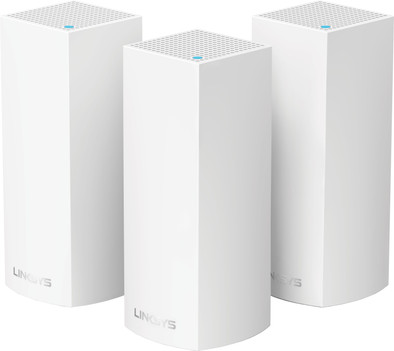
Linksys Velop Tri-band Mesh WiFi (3-pack White)
Never available again
View alternatives in the sidebar
View alternatives in the sidebar
Product number | 759396 | |
|---|---|---|
Manufacturer code | WHW0303-EU | |
Brand | Linksys | |
Warranty | 3 years | |
Processing of your defect | Via Coolblue |
Type router | Mesh WiFi system | |
|---|---|---|
WiFi speed class | Basic | |
Living situation | Large apartment, Single-family home | |
Number of stations | 3 | |
Can be expanded with extra stations | ||
Built-in modem |
Frequency bands | Tri-band | |
|---|---|---|
WiFi speed | AC2200 | |
2.4GHz band speed | 400 Mbit/s | |
5GHz band speed | 867 Mbit/s | |
Number of WiFi antennas | 6 | |
Jumbo frame support |
Ethernet speed | Gigabit Ethernet (1000Mbps) | |
|---|---|---|
Network connector | ||
Number of Ethernet ports | 2 | |
PoE support | ||
USB port |
Automatically switches to 3G/4G | ||
|---|---|---|
SIM card slot |
Quality of Service (QoS) | ||
|---|---|---|
MU-MIMMO | ||
Seamless roaming | ||
Beamforming | ||
Port forwarding | ||
LACP Link aggregation |
Parental controls | ||
|---|---|---|
WLAN security | 802.1X, WEP, WPA, WPA-PSK, WPA2, WPA2-PSK | |
Firewall | ||
Firewall type | DoS, NAT Firewall, SPI Firewall | |
Guest network | ||
VPN support | ||
VPN server | ||
VPN client | ||
VPN passthrough |
Mounting possible | ||
|---|---|---|
Width | 7,5 cm | |
Height | 18,5 cm | |
Depth | 7,5 cm | |
Weight | 492 g | |
Color | White | |
Material | Plastic |
Power supply type | Power grid |
|---|
Ethernet speed | Gigabit Ethernet (1000Mbps) | |
|---|---|---|
Frequency bands | Tri-band | |
WiFi speed | AC2200 | |
Number of Ethernet ports | 2 | |
Type router | Mesh WiFi system | |
Number of stations | 3 | |
Living situation | Large apartment, Single-family home |
According to our router expert
Multi-room WiFi allows you to create 1 large WiFi network with a strong signal throughout your house.
With simultaneous tri-band, your router installs 3 wireless networks at the same time.
This router supports MU-MIMO, which ensures a more stable wireless connection.
This router only supports WiFi 5, so your wireless internet is less stable than with WiFi 6 if you're online with many devices at the same time.
Create a WiFi network that covers your entire home with the Linksys Velop tri-band with 3 stations. This mesh system will even provide large houses with a fast and stable wireless connection. Place the base station next to your modem, and distribute the other stations throughout the house. The stations are connected to each other and will seamlessly switch to the strongest connection. This way, your internet connection will no longer drop while you're roaming the house with your smartphone or tablet. Still got pockets of weak WiFi at home? You can expand your network by simply adding an extra station to your Linksys Velop.
5 stars
212
4 stars
122
3 stars
18
2 stars
12
1 star
7
Range
Installation ease
Stability
Speed
Design
First I ordered a Netgear Orbi through Coolblue. Too many technical problems (wifi signal often dropped), Netgear's helpdesk couldn't solve it either. After talking to Coolblue, I traded the Orbi for this Linksys Velop. Perfect service from Coolblue! I am now very happy with the Velop. Really big difference in my situation with the Orbi, much more stable range throughout the house!
Robin Luiting
23 April 2017
Automatically translated from Nederlands
We have a 2 storey house (all reinforced concrete), 8.3m x 5m floor space and a backyard ~11m deep with front yard ~5m deep. With the parent node downstairs in the bottom middle and 1 in the bedroom (1st fl) I have in the back of the garden and on the top fl. I still reach 70-90% and I still get the 150mbit that Ziggo offers. So great in that regard. And with this seamless roaming it is a relief that I only need 1 connection everywhere in the house. No more nagging about unwanted switching to a stronger but slower connection. Really speed everywhere in the house!
Be careful with Ziggo modem router: this is in collaboration with Put Ziggo in bridge mode first, because the Velop takes over the router function. The parent node of Linksys (which you connect to the Ziggo modem) must be configured during setup with the option modem&router. The firewall function of the Ziggo router is taken over by the Linksys router. If you encounter any problems, you can call Linksys tech support. This is a 020 number that can only be reached on working days. If you are willing to speak English, you can opt for the English support option through the same number. Then you will be connected free of charge to the Philippines for 24/7 support.
The included app works very well. Starts up a bit slow for the sake of it, but gives a lot of info. Even when you are away from home, you can (sometimes!) log in.
The only downside is that it sometimes takes several attempts to complete the installation procedure. Linksys told me that in case of persistent problems (due to interference from other WiFi systems) using the channel finder option (just search in the app under WiFi settings) you can first search for the optimal channel on the already connected nodes. I wanted to put the 3rd node in the attic, but got no connection several times. However, I already had good coverage there, so I put the 3rd node downstairs in the meter cupboard, with a good connection immediately. In retrospect I would have had enough with 2 nodes and could therefore save €100. Therefore, consider purchasing 2 separate nodes.
M.W.P. van der Poel
26 May 2017
Automatically translated from Nederlands
I can't help but praise this product. My somewhat know-it-all colleague advised me to buy Velop. At first I had a lot of doubts because my colleague often shouts something, but after a lot of nagging, I went to his home to see it in action live. It costs something.. but then you really have top quality. As soon as you unpack the box, you notice that the product has been well thought out. Everything will be neatly packed and there is even a nice reusable reel around the cords. No difficult books, but an app that simply explains from A to Z in Jip and Janneke language how everything should be installed.
I have 300Mbit fiber optic here, and I just get it wirelessly! Only in the attic I do not reach here, I get 200mbit there, but compared to what I had that is an improvement of 600%-1000%.
I can really recommend it to everyone.
Jeffrey van Rooijen
2 May 2017
Automatically translated from Nederlands