Intel Skull Canyon NUC6I7KYK
Never available again
View alternatives in the sidebar
View alternatives in the sidebar
According to our barebone expert
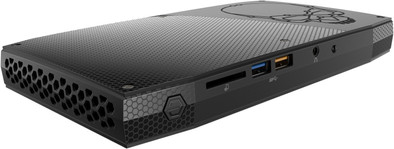
The Intel Skull Canyon NUC6I7KYK barebone has a decent video card and a quad-core processor. It's suitable for (casual) games or university researchers. Carry out complex calculations on the built-in quad-core i7 processor or play games at a 1080p resolution and on medium settings. The 3 video connectors let you perform simulations in 4K on one screen and on the other two, you can work on your latest video review with Adobe Premiere Pro. With the compact size of a book, the NUC won't take up much space on your desk.
Processor family | Core i7 | |
|---|---|---|
Built-in WiFi | ||
Memory type | DDR4 | |
Maximum internal memory | 32 GB | |
Number of HDMI connectors | 1 | |
Bluetooth | ||
Integrated video card |
5 stars
8
4 stars
2
3 stars
0
2 stars
0
1 star
0
I bought this computer for the better computing: virtual machines and processing large amounts of data. Because the intention is that the machine has to run for a long time (days) the amount of noise has been an important consideration. The fact that the computer came without a Windows operating system is also important to me, as I don't want to pay for something I'm not going to use anyway. Linux (Fedora 25) installed without any problems.
AH
18 May 2017
Automatically translated from Dutch
I am quite satisfied with the device. It is small and quiet yet powerful.
Installing Ubuntu Linux went very smoothly. I did have to install some extra memory in the end: 8GB was not enough, also because the GPU uses part of that memory.
Then about the GPU: according to Intel, the system can handle three 4K screens, but that seems only partly correct. The Linux drivers only allow a "virtual" resolution of 8192x8192 pixels. This means that you cannot place three 4K screens next to each other, but that 1 of the screens must be placed "below" the 2 others. With some X11 cursor trickery (using a program called Taralli) you can make sure that your mouse moves over the 3 screens as you would expect.
But even then, there's still a problem: the third 4K screen, over HDMI, is only occasionally detected. Sometimes it will work over 60hz, sometimes over 30, sometimes over 25, sometimes it just stays black. And if that wasn't bad enough: Gnome Shell will always try to put the 3 screens next to each other, which obviously doesn't work.
Jelle De Loecker
1 June 2018
Automatically translated from Dutch
We can be brief about the device itself: this is my second, machine is used for virtualization and is just as good as its predecessor.
I am less happy with "second chance" and that is the reason for this review. There was an offer: "without packaging, without instructions for use" but chose this option because of discount and the environment. Upon arrival, it turned out that the wrong, too light power supply had been supplied with the device. I was able to take along no packaging, no instructions for use, but a power supply that cannot supply enough is a problem.
Calling resulted in the fact that one could "order a different power supply from the supplier" but that took two weeks, and I didn't have that much time because the thing must have been deployed at that time. In the end, the device was exchanged for a new one, with a modest discount, less than 5%.
Although I am happy with the smooth handling, "second chance" does not bring a smile. The device was clearly not sufficiently checked before it was sold again, otherwise the wrong power supply would have been seen. I did get a discount, but it caused a lot of extra hassle and that wouldn't have been necessary if second chance had checked things properly.
My conclusion is that I will probably leave second chance in the future for what it is.
Geert Jan
21 May 2019
Automatically translated from Dutch
Product number | 773005 | |
|---|---|---|
Manufacturer code | BOXNUC6i7KYK2 | |
Brand | Intel | |
Warranty | 3 years | |
Processing of your defect | Carry-in warranty |
Processor brand | Intel | |
|---|---|---|
Processor family | Core i7 | |
Processor code name | Skylake | |
Processor cores | Quad-Core (4) |
Clock speed | 2600 MHz | |
|---|---|---|
Overclockable | ||
Turbo speed | 3500 MHz | |
Cache memory | 6 MB |
Memory type | DDR4 | |
|---|---|---|
Total number of RAM slots | 2 | |
Maximum internal memory | 32 GB | |
Voltage RAM | 1.2V |
Integrated video card | ||
|---|---|---|
Chipset brand | Intel |
M.2 SSD connector type | M |
|---|
Bluetooth | ||
|---|---|---|
Bluetooth version | 4.2 | |
Built-in WiFi | ||
WiFi standards | Wireless AC | |
Number of Ethernet ports | 1 |
HDMI connector | ||
|---|---|---|
Number of Female HDMI type A 1.4 ports | 1 | |
DisplayPort connector | ||
Thunderbolt connector | ||
Number of Female Thunderbolt 3 (USB-C) ports | 1 |
Headphone jack | ||
|---|---|---|
Number of female 3.5mm TS Audio Jack ports | 1 | |
Microphone connector | ||
Number of microphone connectors | 1 | |
Type of microphone connection | 3.5mm jack | |
Digital optical connector |
Width | 211 mm |
|---|---|
Height | 2,8 mm |
Depth | 11,6 mm |
Weight | 0,5 kg |
Color | Black |
Material | Plastic |
