Intel Baby Canyon NUC7i5BNH
Never available again
View alternatives in the sidebar
View alternatives in the sidebar
According to our barebone expert
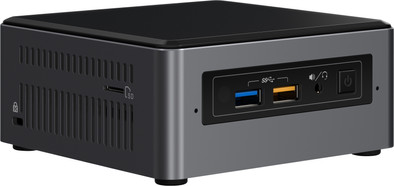
The Intel NUC7i5BNH barebone has a powerful shared video card and i5 processor. This makes it suitable for coding programs or editing photos and videos. Place a 2.5-inch HDD or SSD in this NUC in addition to an M.2 SSD. That way, you won't run out of space any time soon despite all your RAW photos. Edit your latest vlog and upload it to YouTube, and relax at the end of the day with an exciting movie in 4K. The Intel Optane memory ensures better cooperation between the RAM and the hard drive, which means Windows 10 and all your programs will boot just a bit more quickly. Thanks to the Thunderbolt 3 input, you can transfer large files up to 8 times faster than with USB 3.0. Since the compact size makes it no bigger than a lunchbox, you can neatly keep it on your desk.
Processor family | Core i5 | |
|---|---|---|
Built-in WiFi | ||
Memory type | DDR4 | |
Maximum internal memory | 32 GB | |
Number of HDMI connectors | 1 | |
Bluetooth | ||
Integrated video card |
5 stars
16
4 stars
12
3 stars
2
2 stars
1
1 star
0
The extra hardware (DDR4-2133 SODIMMs, the M.2 SSD and 2.5" HDD is very simple, installing Windows 10 afterwards works perfectly out of the box.
Keep in mind that Windows 10 is the only supported OS (important if you want to install Linux, for example). The installation of Windows 10 is smooth and can be done easily via a USB stick. After that, immediately after installing Windows 10, it is super important to immediately download the driver bundle from https://downloadcenter.intel.com/product/95067/Intel-NUC-Kit-NUC7i5BNH and patch everything completely. Otherwise, you may encounter some issues that can be easily resolved. This is especially important if you want to use the NUC for 4K. Be sure to follow the manual on this site otherwise you will have problems with flickering on the screen. Don't forget the BIOS update either, otherwise you may have issues with HDR output.
The adjustable LED ring and power LED on the front is a nice plus, especially because you can set the functionality of both in the bios. The Processor itself is pleasantly fast for what is essentially a mobile device. At 2.2GHz with a turbo to 3.4GHz you have enough power to use this Nuc as a full desktop replacement. The graphic performance of the Iris Plus 640 is more than sufficient for photos and video playback and some simple (2D) games, but for the more demanding gamer, this Nuc has an extra trump card. You can connect an external GPU via the Thunderbolt connection and thus provide the NUC with more graphic violence, but then of course you lose in compactness.
Fortunately, thanks to the hardware-moderate support for both h264 and HVEC (h265) video, the sound production during video playback (1080p h264, 2160p h265 with HDR) almost completely disappears. Furthermore, this processor has some nice assets. Think e.g. to Intel InTru 3D support (for 3D Blueray), Intel Clear Video (HD) (for better color reproduction) and full 4K UHD support. These features make this NUC perfectly usable as a Media Center (via the Kodi App) with the great advantage that it simply plays everything you put in front of it and that the VESA bracket is just in the box. After the firmware updates mentioned above, this NUC has no problem with higher resolutions or even more demanding audio output. Especially the combination of a fast m2 SSD for speed with a regular 2.5" HDD for more (affordable) storage is ideal.
In addition, it is perfectly usable as a compact desktop PC, but you have to take the noticeable noise production into account. On default settings I have to admit that if you ask more of the CPU, the fan can make a fairly annoying noise. Fortunately, the BIOS is fairly flexible in that regard, so selecting the Cool option in the BIOS can make the sound much more pleasant.
Ryazame
25 September 2017
Automatically translated from Dutch
I bought this NUC to replace my outdated Mac Mini. After installing MacOS, this makes the perfect hackintosh: Smaller than the Mini, with selectable memory and SSD.
Stefaan Henninck
26 December 2017
Automatically translated from Dutch
I use this Intel Nuc as an extra TV post over the internet. Linux Mint 18.x runs like a charm (8GB internal memory and a 120GB SSD).
Alain A
21 August 2018
Automatically translated from Dutch
Product number | 773186 | |
|---|---|---|
Manufacturer code | BOXNUC7i5BNH | |
Brand | Intel | |
Warranty | 3 years | |
Processing of your defect | Carry-in warranty |
Processor brand | Intel | |
|---|---|---|
Processor family | Core i5 | |
Processor code name | Kaby Lake | |
Processor number | 7260U | |
Processor cores | Dual-Core (2) |
Clock speed | 2200 MHz | |
|---|---|---|
Overclockable | ||
Turbo speed | 3400 MHz | |
Cache memory | 4 MB |
Memory type | DDR4 | |
|---|---|---|
Total number of RAM slots | 2 | |
Maximum internal memory | 32 GB | |
Voltage RAM | 1.2V |
Integrated video card | ||
|---|---|---|
Chipset brand | Intel |
M.2 SSD connector type | M |
|---|
Bluetooth | ||
|---|---|---|
Bluetooth version | 4.2 | |
Built-in WiFi | ||
WiFi standards | Wireless AC | |
Number of Ethernet ports | 1 |
HDMI connector | ||
|---|---|---|
Number of Female HDMI type A 1.4 ports | 1 | |
DisplayPort connector | ||
Thunderbolt connector | ||
Number of Female Thunderbolt 3 (USB-C) ports | 1 |
Headphone jack | ||
|---|---|---|
Number of female 3.5mm TS Audio Jack ports | 1 | |
Microphone connector | ||
Number of microphone connectors | 1 | |
Type of microphone connection | 3.5mm jack | |
Digital optical connector |
Width | 11,5 cm |
|---|---|
Height | 5,1 cm |
Depth | 11,1 cm |
Weight | 0,5 kg |
Color | Gray |
Material | Metal |
