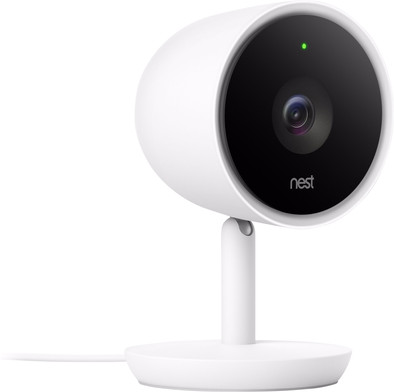
Google Nest Cam IQ Indoor

Never available again
View alternatives in the sidebar
View alternatives in the sidebar
Product number | 782245 | |
|---|---|---|
Manufacturer code | NC3100EX | |
Brand | Google Nest | |
Warranty | 2 years | |
Processing of your defect | Carry-in warranty |
Type of image definition support | Full HD (1080p) | |
|---|---|---|
Video resolution width | 1920 pixels | |
Video resolution height | 1080 pixels | |
Horizontal viewing angle | 130 ° | |
Vertical viewing angle | 130 ° | |
Image quality according to customers | Excellent | |
Pan | ||
Tilt | ||
Zoom (IPcam) | ||
Digital zoom | 12 | |
Fisheye | ||
Frames per second | 30 fps |
Number of cameras | 1 | |
|---|---|---|
IP camera type | HD camera, Night camera, WiFi camera | |
Usage location | Indoors | |
Alarm system needed for use | ||
Subscription needed for full use | ||
Motion detection sensor | ||
Infrared lighting | ||
Infrared light range | 8 m | |
Infrared motion sensor | ||
Suitable for placement behind glass | ||
Dynamic DNS client | ||
2-way audio | ||
Built-in microphone | ||
Review event | ||
Number of seconds to review event | 3 hours | |
Streaming |
Power supply type | Power grid | |
|---|---|---|
Battery (power source) | ||
Storage options | Cloud | |
SD card slot | ||
Number of days you can view for free | 3 hours | |
Installation ease according to customers | Very simple | |
Built-in WiFi | ||
PoE support | ||
UPnP AV support | ||
ONVIF certified | ||
PSIA certified |
Height | 12,5 cm | |
|---|---|---|
Width | 7,4 cm | |
Depth | 7,4 cm | |
Color | White | |
Mounting possible | ||
Water-resistant | ||
Water resistance | Splash proof | |
Waterproofness certification | Not certified |
Controls via app | ||
|---|---|---|
Controlled via Android app | ||
Controlled via Apple app | ||
Smart home platform | Amazon Alexa, Google Assistant |
Guaranteed support with updates | 36 months after release date | |
|---|---|---|
Year introduced | 2017 | |
Introduction month | October |
Usage location | Indoors | |
|---|---|---|
Subscription needed for full use | ||
Storage options | Cloud | |
Smart home platform | Amazon Alexa, Google Assistant | |
2-way audio | ||
IP camera type | HD camera, Night camera, WiFi camera |
According to our IP camera expert
Save camera images in the cloud and watch them later with Google Nest Aware (30-day free trial). You can view the last 3 hours for free via the Nest app.
With the 'supersight' function, the camera automatically zooms in and follows every movement of a person, with a clear display of the field of view.
The camera recognizes preset faces, so you can set it to, for example, send a push notification when your children come home.
Google Nest Aware is only available separately as a subscription starting at 5 euros per month.
You need a good WiFi signal where you're installing the camera, a WiFi extender can be used to create a strong WiFi network near your camera.
The Google Nest Cam IQ Indoor Security Camera: a smart IP camera that recognizes people. With the 'supersight' function, the camera automatically zooms in and follows every movement of the person, with a clear display of the field of view. You'll receive a push notification on your phone when the camera detects people it doesn't recognize or when your children come home from school. The camera has 3 integrated microphones and a speaker that is 7 times more powerful than its predecessor's. In combination with the noise and echo suppression, you're in contact with the person in your home loud and clear. If you expand your Google Nest IQ with a Google Nest Aware subscription, it will also recognize the person in the picture, since the camera adds known faces. That's how you can ensure that you'll only get a notification when your partner comes home, but a recording is started when an unknown or unwanted person comes into view.
5 stars
457
4 stars
166
3 stars
18
2 stars
4
1 star
3
Installation ease
User friendliness
Image quality
Options
The Google Nest Cam IQ is an IP camera with a beautiful design. As I am used to from Nest, even the packaging looks slick. I like the camera better than the regular Nest Cam. This is mainly due to its color and the fact that the camera is attached to the holder.
High quality materials I think the Nest IQ looks good. Many IP cameras are made of cheaper material, for example with a shiny plastic housing. That is not the case with this camera. It has a sleek design and matte finish. This makes it not very noticeable, but it does look nice on my closet. Judging by the looks and the price, this is a high-end camera, I'm curious about the functionality.
Quickly finished the installation The Nest Cam IQ is installed in a jiffy. After opening the Nest app on my phone, I press 'add product' in the app settings. After that, all I need to do is scan the QR code on the camera and go through some steps. All in all, it takes me less than 5 minutes to see the first camera images in the app. If you don't already have an account, the installation may take a minute longer. Creating an account also takes little effort.
Excellent image quality What strikes me at first use is the high quality of my camera images. Due to the good WiFi signal where my Nest IQ is located, there is no delay in the images. The camera automatically zooms in on moving people without much loss of quality. I think image quality in the dark is important, because this often disappoints me with IP cameras. With this camera, however, faces are quite distinguishable. Excellent image quality in the dark!
Motion Detection and Notifications I notice that the camera reacts quickly when it detects movement. I regularly receive notifications so that I am immediately aware of activity. He does this consistently and without errors: there are no incorrect movement reports. After a few days of trying, I don't feel that the camera lacks movement. My experience is that the motion detection works fine.
Subscription Fee The main drawback of the Nest Cam IQ is that you need a subscription to store images and use other features. You pay a monthly amount for this. You actually need the subscription to make full use of the camera. For example, facial recognition and setting activity zones without a Nest Aware subscription is not possible. Because several useful options expire without a subscription, I recommend taking a subscription. Therefore, take into account additional monthly costs after purchasing the camera.
Daan. Ip-cameraspecialist.
20 March 2020
Automatically translated from Nederlands
On December 30, I already posted a review about this camera here. I bought it for the backyard and my conclusion was that this camera is perfect for the backyard, but not suitable for the front of my house. The camera is equipped with a 22 mm thick USB plug. Since I (and most of me) don't have access to a socket at the front of the house, it takes quite a bit of effort to lead that thick plug through a window frame or wall. If you wanted to drill a hole that big..... So I really didn't intend to and with that the expansion of my Nest cameras came to an end. Or not?
It wouldn't let go and the only option I could imagine was to cut the cable, drill a small hole, feed the cable through and reassemble it. With a camera of €199.00, that is a very expensive experiment... So I first bought a short USB extension cable, cut it and put it back together and connected the camera to it. And guess what.....the camera worked like a charm!
So then I took the gamble. Cut the wire 20 cm from the plug. Drilled a small hole through the door frame and threaded the wire inside. Then the mounting plate of the camera is screwed tightly onto the cable on the frame and the cam is attached. This makes the cable sit tight under the foot and is therefore much less easy to sabotage.
The cable consists of four wires: A red and black wire for the power supply and a white and green wire for the data (the nest cam only uses the power wires and not those for the data). Put the wires back together, each wrapped with a piece of aluminum foil and then taped around with insulating tape. Plug in the socket inside the house and a super working outdoor cam in the front of my house!!
In the photos the confirmation of the camera and the quality of the image.
Gambled and won!
This Nest Cam Outdoor will become an option for many more people in this way! Please note: I did this at my own risk and this method also voids the warranty on this product!! This option is therefore entirely at your own expense and risk!! But successful for me! :-)
Peter Tros
8 January 2017
Automatically translated from Nederlands
I already owned two Nest Cams for indoor use. They liked it very much! It is very easy to install and the images are super sharp. In addition, the cam also looks nice (=personal) and that is also very important to me at home. Through the app I always have an overview of my house, belongings and my cats. Really a top product!
I had previously taken out a subscription with Nest for these Nest Cams. That subscription is necessary to be able to use all functions of the camera, such as reviewing the images, recording clips and setting security zones. After a subscription for the first product (€ 10.00 p/m) you will receive a 50% discount on the subscription price for every product you add afterwards (so € 5.00 per extra product). Quite pricey, but then you also get something....
I've been looking forward to an outdoor version of the Nest Cam for a long time. I wanted a cam in my backyard and at the front door. Surely it is better to catch someone who wants evil before he/she is already in your house. And when that cam finally launched, I was happy but also quite disappointed!
Nest had decided to design a camera that has the cable at the bottom of the camera (and is therefore quite easy to cut) and has also provided that cable with a MEGA thick (water-resistant) USB plug of 20 mm to connect.
When installing the Outdoor Cam, Nest assumes that you have a socket on the outside of your house and legitimizes (on request) the cable at the bottom of the cam by stating that the person who wants to sabotage that cable will case is on cam .... That is straight talk which is crooked.
In my opinion, the outdoor cam is therefore primarily designed for the American market and not for the European/Dutch market. In the suburbs there are mainly wooden houses where it is easier to run the cable inside. Here in the Netherlands you usually don't have a socket at the front of your house and you therefore have to drill a 22mm (!) hole through your wall to be able to connect things indoors. And so I'm not going to do that.
Finally bought a Nest Cam Outdoor at Coolblue for my backyard. I have a socket there so that I can connect the cam outdoors and (indeed) before someone is at the cam and would want to sabotage it, I already have a message and he / she is already on recorded video.
The installation took me about an hour. Registering the Outdoor Cam on the previously installed Nest app was done in 5 minutes. Egg. You do that at home before you go outside with the cam. Once in the garden it becomes a "thing". First of all, you have to determine the location where you are going to hang the Outdoor Cam and there must therefore be a good WiFi range and there must be a socket nearby. The latter is not really a challenge, because you get all together 7.5 meters of cable! Make sure that your WiFi range is sufficient outside, otherwise it really makes no sense! Then it just won't do it. It is wise to check this in advance before ordering!
With the Nest app on my iPhone in one hand and the Outdoor Cam in the other, I looked for the best location. Nest advises to hang the cam between 2 and 3 meters high and who am I to argue with that... After determining the location, drilled two holes to screw the supplied metal plate against the wall. The magnetic holder for the cam fits there, which is immediately wall-mounted. You can then attach and aim the Outdoor Cam there. And fixed is really fixed!. The cam is hanging! Then neatly fix the wire along the door frame with the supplied clips. Nest really supplies everything you need to install the Outdoor Cam. Top!
Overall, I'm very pleased with this addition to the Nest range. An Outdoor Cam that looks neat with a perfect picture and sound. But for the backyard.
In the images accompanying this review you can see my installation of the Outdoor Cam on the outside wall of my garden and the quality of its image. I am satisfied!
I would have liked to order a second Nest Outdoor Cam for my front door, but unfortunately I don't see any options for installing it there due to the size of the USB plug.
In my eyes a huge miss from Nest.
Anyone have a tip?
Peter Tros
30 December 2016
Automatically translated from Nederlands