Dell Dockingstation Thunderbolt 3
Never available again
View alternatives in the sidebar
View alternatives in the sidebar
According to our dock for laptops expert
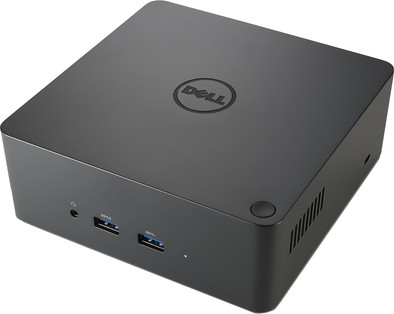
With the Dell Dockingstation Thunderbolt 3, you can connect all of your peripherals to a Thunderbolt 3 equipped laptop. You can use 2 screens with a high resolution (3840x2160) via the Thunderbolt 3 connection and the DisplayPort connection on the back of the docking station, or use the HDMI or VGA port. The docking station has a total of 5 USB ports to which you can connect peripherals. This way, there's always room for your mouse, headset, or laptop stand, for example.
Note: this product is suitable with the following systems: Precision 7710, Latitude 5580, Precision 7510, Precision 3510, Precision 5510, Latitude 5480, Precision 5520, Precision 7520, Precision 3520, and Precision 7720
Connectors: Thunderbolt 3, DisplayPort, mini DisplayPort, USB 3.0 (3x), USB 2.0 (2x), 3.5mm mini jack (2x), Ethernet (1x).
Type of main connector | USB-C | |
|---|---|---|
Number of connectable monitors | 2 | |
Type of USB port | Standard USB-A, USB-C | |
Cable length | 1 m |
5 stars
3
4 stars
3
3 stars
1
2 stars
0
1 star
0
(+)My Dell XPS laptop is now connected to all peripherals with 1 Thunderbolt. (+) If you need a lot of USB3 connections, you need an extra USB hub. For example, the identification of the ports (grey on black) is difficult to read. Tip: First take a picture of the front and back before you start connecting, then you use the ports optimally.
Bruno Ghise
1 May 2018
Automatically translated from Dutch
Has enough ports available and works immediately after connecting to my Dell XPS laptop. The message does come up that the power supply via the Thunderbolt plug is not heavy enough to charge the battery during use.
Piet Kuiken
17 September 2018
Automatically translated from Dutch
I bought this dock because my xps15 needed a 240 W power supply. Charging and connecting is done via one cable as promised, that's great. The docking station itself is the same size as a NUC and you can't attach it behind your monitor, so it is present on your desk. It really is a very solid device and feels very solid. The connection cable is (too) short, so you have little option to place the dock out of sight. The thunderbold connection in combination with a Dell XPS 15 is not completely free of interference. Occasionally the connected (4K) screen will blink briefly. The dock also has a large power supply, which is not included in the pictures, but is really a lot bigger than a laptop power supply. The biggest advantage of this dock compared to the cheaper (USB) models is that you no longer have to connect a power supply, but you also pay a lot for that.
Pieter van Andel
14 January 2019
Automatically translated from Dutch
Product number | 782256 | |
|---|---|---|
Manufacturer code | TBDOCK-240W | |
Brand | Dell | |
Warranty | 2 years | |
Processing of your defect | Carry-in warranty |
Made for laptop models | Apple MacBook, Chromebook, Microsoft Surface, Windows laptop |
|---|
Laptop docking station suitable for | Connect 2 monitors, Connect mouse and/or keyboard, [Charge laptop], [Connect Headphones], [Work with wired internet] | |
|---|---|---|
Type of main connector | USB-C | |
Number of USB ports | 5 | |
USB function | Charge, Data transfer, Device connection, Play media, Software updates | |
Type of USB port | Standard USB-A, USB-C | |
Number of female standard USB-A ports | 5 | |
Female standard USB-A port version | 2.0, 3.0 | |
Number of USB-C ports | 1 | |
Protocol Female USB-C port | Thunderbolt Alternative Mode | |
Number of HDMI connectors | 1 | |
Female HDMI Type A port version | 1.4 | |
Number of Ethernet ports | 1 | |
Ethernet speed | Gigabit Ethernet (1000Mbps) | |
Number of female standard VGA ports | 1 | |
Type of VGA connector | Standard VGA | |
Number of Female Thunderbolt 3 (USB-C) ports | 1 | |
Type of DisplayPort connector | mini DisplayPort, standard DisplayPort | |
Number of Female Standard DisplayPort 1.4 ports | 1 | |
Version Female Standard DisplayPort port | 1.4 | |
Version Female mini DisplayPort port | 1.4 | |
Protocol mini DisplayPort port | DisplayPort, Thunderbolt | |
Number of headphone jacks | 2 | |
Type of headphone connection | 3.5mm (TS) | |
Memory card reader | ||
Number of connectable monitors | 2 |
Cable length | 1 m | |
|---|---|---|
Color | Black |