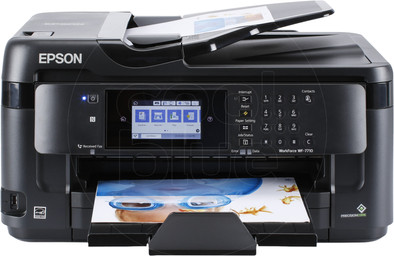
Epson WorkForce WF-7710DWF
Never available again
View alternatives in the sidebar
Print technology | Inkjet | |
|---|---|---|
Printer type | All-in-one | |
Automatic duplex printing | ||
Automatic document feeder (ADF) | ||
Automatic duplex scanning | ||
Color printer | ||
Maximum print size | A3 | |
Photo paper drawer |
According to our printer expert
The Epson WorkForce WF-7710DW is a professional All-in-one A3 inkjet printer for small to medium-sized companies. You can easily manage your scans and create searchable PDF files with the accompanying software. The printer has a separate paper tray with a capacity of up to 250 A3 and A4 sheets. In other words, you can switch between standard A4 text documents and large format paper for brochures, flyers, and posters without having to manually change the paper. The device also features duplex printing, allowing you to print on both sides of the paper. Do you regularly make copies or scans? The 35-page automatic document feeder (ADF) can scan your invoices, letters, or other documents in quick succession. Print directly from your laptop, desktop, or smartphone by holding your device next to the printer.
5 stars
30
4 stars
23
3 stars
3
2 stars
1
1 star
1
Installation ease
Options
Print quality
This printer can scan and print A3 and is not that much bigger than a regular A4 MFP (multifunctional printer). In addition, this printer can print and scan double-sided. 4 cartridges are included: 3 color and 1 black. All cartridges are the same size. Since the majority of my printouts will be black and white, I expect to run through black pretty quickly. Fortunately, you can buy larger black cartridges so that is not a problem. The MFP has one paper tray in the front. If you have A4 in it, the paper tray is completely under the printer, but with A3 it sticks out a bit. This arrangement limits the size of the MFP. The paper tray in A3 position is neatly closed with a lid so that no dust gets into it. At the back of the printer is an additional feed for single sheets of paper or for thick paper. That input is also neatly closed so that no dust gets in. The installation of the WiFi connection is very simple. The installation of the supplied software as well. It does take a long time to update the firmware. It only indicates that it is in progress during the update, but there is no indicator showing how far the firmware update has progressed. For me, the firmware upgrade took about 15 minutes and you don't know if it's still working on a firmware update or if it's stuck. During a firmware update it is not a good idea to turn the printer off and on so now is the time for a cup of coffee and it will be ready when you get back. Furthermore, the installation is going very smoothly. The touchscreen is intuitive because you can easily find the different options. You can pre-program network drives (NAS) and email addresses so that you can save scans directly to your NAS at the touch of a button or send them as attachments in an email. Overall a very complete printer with great ease of use that gives a lot of value for money. I've worn out quite a few MFPs, but this MFP is definitely number one: A3, double-sided printing and scanning, easy saving on NAS and e-mail with attachment, simple installation and a relatively low price for the functionalities offered were THE reason for me to buy this to buy a printer. In short: This Epson WorkForce WF-7710DWF is highly recommended!
Selwyn
12 September 2018
Automatically translated from Dutch
Does everything I wanted in terms of functionalities (I wanted A3 and photo quality among other things because I'm a hobby photographer), and that for a surprisingly low price!
Caroline Depoorter
20 June 2019
Automatically translated from Dutch
You get a very large box, but after unpacking it turns out that the printer is not that much bigger than an A4 MFP (multifunctional printer). But this MFP can even scan and print A3 and both. There is 1 paper tray. I have standard A4 in it. If I want to print A3, the A4 paper has to come out and the A3 paper in. If there is A3 paper in the drawer, the paper drawer protrudes a little at the front, but the drawer is neatly closed with a lid so that no dust gets in. With this setup, the format of the MFP remains within properties. Installing the printer WiFi connection and the PC software is easy. and smooth. During installation, a firmware is also updated. Don't get impatient, this takes 10-15 minutes where you get little information other than 'I'm busy'. A status bar would be a valuable addition because turning the printer off and on during a firmware update is not a good idea but you have no idea if the MFP is still updating its firmware or if it has crashed. This is a good time for a cup of coffee. After your coffee, the firmware update is ready and you can continue installing. The MFP's touch screen is intuitive. All necessary settings are easy to find and there is a help button that provides additional information if desired. You can make preferences on the printer, after which you can email scans to pre-programmed email addresses with 1 push of a button; saves a lot of time scanning. You can also connect the MFP to a network drive (NAS) so that scans can be stored directly on the NAS. On the website (IP address of the printer) you will receive extensive information about how many prints and scans have been made and how much ink is left. This MFP comes with 3 color cartridges and 1 black cartridge.
Overall: a top MFP for a very reasonable price! This is the best MFP I've owned so far and I've worn out quite a few over the years! Easy installation, paper size up to A3, double-sided printing and scanning, touchscreen work intuitively, easily email scans and save to a NAS. Real value for money. If I had to buy another printer now, I would choose this one again. So highly recommended!
van den haak
10 September 2018
Automatically translated from Dutch
Receive more coverage in case of damage than with your standard warranty. Coolblue takes care of everything: from taking out the insurance to repairs. Is a repair not possible? You receive the purchase price as CoolblueCredit.
XCover is allowed to arrange and process insurances on behalf of the insurer. The insurances are governed by Belgium law. If you have a complaint, you can contact the or our customer service.
First, add your printer to your shopping cart. On the next page, choose the Protection Plan below. You always have a 30-day return window and pay no deductible in case of damage.
The insurance can be canceled every year, even if you have paid in advance. If you cancel earlier, you will receive a refund for the overpaid amount.
Product number | 794998 | |
|---|---|---|
Manufacturer code | C11CG36413 | |
Brand | Epson | |
Warranty | 2 years | |
Processing of your defect | Carry-in warranty |
Printer size | Large | |
|---|---|---|
Width | 56,7 cm | |
Depth | 48,6 cm | |
Height | 34 cm | |
Color | Black | |
Weight | 18,5 kg |
Printer type | All-in-one | |
|---|---|---|
Photo printer | ||
Portable (mobile use) |
Cartridge line | Epson 27 | |
|---|---|---|
Print technology | Inkjet | |
Number of cartridges/toner cartridges | 4 | |
Color printer | ||
Print speed black (ISO) | 18 ppm | |
Print speed color (ISO) | 10 ppm | |
First black page ready after | 10 seconds | |
Usage costs per page | 0,078 euro | |
Maximum print resolution height | 2400 dpi | |
Maximum print resolution width | 4800 dpi | |
Maximum print size | A3 | |
Automatic duplex printing | ||
Borderless printing | ||
Maximum print size duplex printing | A3 |
Scan functionality | ||
|---|---|---|
Automatic duplex scanning | ||
Maximum optical scan resolution width | 1200 dpi | |
Maximum optical scan resolution height | 2400 dpi | |
Scanner type | File scanner, Flatbed scanner | |
Maximum scan size | A3 (29.7x42cm) | |
Automatic document feeder (ADF) | ||
Maximum paper size ADF | A3 | |
Scan sizes | A3, A4, A5, A6, A7 | |
Scan speed (PPM) | 10 ppm | |
Color depth output | 24 bpp | |
Scan to | Dropbox, Email address, Evernote, FTP, Google Docs, Microsoft SharePoint Connector, PC (network), USB | |
ADF capacity | 35 | |
OCR |
Copying functionality |
|---|
Fax functionality | ||
|---|---|---|
Color fax |
Built-in screen | ||
|---|---|---|
Color screen | ||
Touchscreen |
Compatible with operating system | Android, ChromeOS, Linux, Windows, Windows Phone, iOS, macOS | |
|---|---|---|
Connection type | Wired, Wireless | |
Apple AirPrint | ||
Email print | ||
WPS (Wireless Protected Setup) | ||
Female standard USB-A port version | 2.0 | |
Number of Ethernet ports | 1 | |
NFC | ||
Built-in WiFi | ||
Bluetooth | ||
WiFi direct | ||
USB port |
Manual input tray | ||
|---|---|---|
Photo paper drawer | ||
Output capacity output drawer | 100 | |
Maximum print size standard paper tray | A3, A4 | |
Input capacity standard paper tray | 250 | |
Number of standard paper trays | 1 |
Memory card reader |
|---|