Wacom Intuos M Bluetooth Green
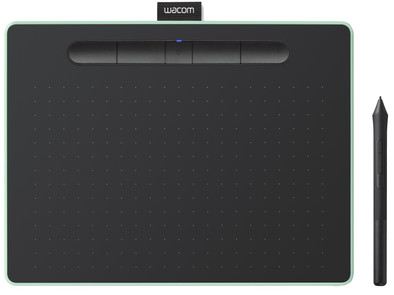
Never available again
View alternatives in the sidebar
View alternatives in the sidebar
Product number | 807459 | |
|---|---|---|
Manufacturer code | CTL-6100WLE-S | |
Brand | Wacom | |
Warranty | 2 years | |
Processing of your defect | Via Coolblue |
Drawing tablet has integrated screen | ||
|---|---|---|
Lines per inch (LPI) | 2540 lpi | |
Height of active drawing area | 135 mm | |
Width of active drawing area | 216 mm | |
Multi-touch | ||
Number of buttons | 4 | |
Programmable buttons | ||
Tilt sensitive | ||
Compatible with operating system | Windows, macOS |
Connection type | Wired | |
|---|---|---|
Bluetooth | ||
Bluetooth version | 4.2 |
Weight | 410 g | |
|---|---|---|
Width | 26 cm | |
Depth | 20 mm | |
Height | 0,9 cm |
Power source | ||
|---|---|---|
Power supply type | Rechargeable battery | |
Cable length | 1,5 m |
anything for a smile
Compatible with operating system | Windows, macOS | |
|---|---|---|
Multi-touch | ||
Connection type | Wired | |
Width | 26 cm | |
Depth | 20 mm |
According to our drawing tablet expert
Thanks to the pen with 4096 pressure levels, you can work professionally and accurately.
The ExpressKeys can be set individually, which allows you to use your own shortcuts.
You can use this drawing tablet wirelessly thanks to Bluetooth, which gives you a lot of freedom of movement when you draw.
Because it doesn't have an integrated screen, you'll need an external monitor to track your work.
This drawing tablet doesn't support multi-touch, so you can only use it with a suitable Wacom stylus.
Cable problems are in the past with this wireless Wacom Intuos S Bluetooth. Unlike its predecessor, you can use this Intuos with both a USB cable and wirelessly via Bluetooth. The active area of 21.6 by 13.5 centimeters gives you a bit more space to work on than the S version. You can accurately determine how thick or thin you want the lines to be with the included pen, because 4096 pressure points transfer your movements just like on paper. The pen includes 3 extra tips and a tool to remove the tips. You have full control over your workflow thanks to the 4 programmable ExpressKeys at the top of the tablet.
Accuracy
Screen quality
Size
A relief after years of using an Intous3, especially because the buttons are positioned next to each other on top. I'm left-handed and always swiped the back of my hand over the buttons on my previous drawing tablet, triggering something unwanted again.
You can set the buttons per program, it took me a while before I got a grip on it, but it's very nice.
I find that you can adjust the Tablet-screen relationship. If your hand wants to rest your hand in one specific place, for example to be able to cover your entire canvas in a drawing program instead of moving all over your tablet, I find it very pleasant.
Only thing I have a little trouble with is storing the pen. I can somewhat imagine that this drawing tablet with loop, in which you can store the pen, can be practical when transporting it in, for example, a backpack, but I would have preferred something like a pen holder/Pen Stand.
A loop looks a bit cheap compared to the rest of the drawing tablet, really has to kill to get the pen in.
Nothing but praise.
B Duijndam
4 September 2018
Automatically translated from Nederlands
Works very well wired (if it works). Often unfortunately already had problems after Windows updates that it is no longer detected. Reinstalling the Wacom software often solves the problem.
Friso Hofker
20 June 2018
Automatically translated from Nederlands
My 10-year-old daughter likes to make drawings with this drawing tablet. There are 3 free software downloads that are quite extensive. One of the programs is a photo editing program and the other two are drawing programs (1 completely free - other program is free for 2 years). She definitely wanted a drawing tablet and this one does what it's supposed to do. The programs may be a bit too extensive for a ten-year-old, making it complicated at times, but she soon made some nice drawings. You can see and feel that it is a quality product, recommended!
Wim
24 July 2019
Automatically translated from Nederlands