Zhiyun Smooth 4 Gimbal Black
Never available again
View alternatives in the sidebar
View alternatives in the sidebar
Product number | 811043 | |
|---|---|---|
Manufacturer code | F004101 | |
Brand | Zhiyun | |
Warranty | 2 years | |
Processing of your defect | Carry-in warranty |
Material | Metal | |
|---|---|---|
Weight | 0,547 kg | |
Color | Black | |
Compatible with product type | Smartphone | |
Made for brand | Universal | |
Maximum load capacity present | ||
Maximum load capacity | 209 g |
Image stabilization type | Mechanical image stabilization | |
|---|---|---|
Number of gimbal axes | 3 | |
Type of gimbal handle | Single handle | |
Controlled via buttons on device | ||
Pan range | 300 ° | |
Tilt range | 240 ° |
Power supply type | Rechargeable battery | |
|---|---|---|
Replaceable battery |
anything for a smile
Maximum load capacity | 209 g | |
|---|---|---|
Weight | 0,547 kg | |
Controlled via buttons on device | ||
Tilt range | 240 ° |
According to our gimbal expert
Use the ZY Play app to control both the gimbal and the smartphone with the handle.
Object tracking enables the gimbal to follow a moving subject.
The ZY Play app isn't suitable for Windows phones.
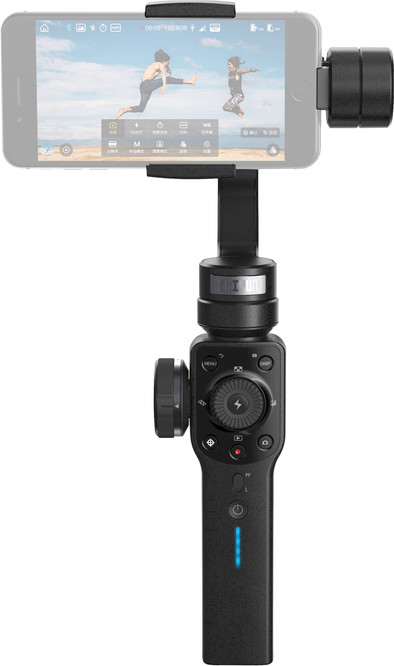
With the Zhiyun Smooth 4 Gimbal, you can make professional movie shots using your smartphone. The gimbal stabilizes your phone, allowing you to record images that aren't blurry. You can control both the gimbal and your smartphone with the buttons on the handle. To do this, download the ZY Play app and connect the stabilizer to your phone. This means you won't have to touch the screen of your smartphone to control the camera. Use the wheel on the side to zoom in and out. Press the FN button, then focus with the wheel. Do you want to follow a moving subject such as a cyclist? Do this with object tracking. Select the subject and the stabilizer will follow it automatically.
Note: compatible smartphones include: iPhone 6, 6s, 7, 8, X and the Plus versions, Google Pixel2, Google Pixel2 XL, Google Pixel, Google Pixel XL, Google Nexus 6, Google Nexus 6p, Google Nexus 5x, Samsung S8, Samsung S8+, Samsung S7, Samsung S7 edge, Samsung S6, Samsung S6 edge, Samsung S5, Samsung Note8, Samsung Note7, Huawei P10, Huawei P10 Plus, Huawei P9, Huawei Mate 10, Huawei Mate 9, Huawei Mate 8, Huawei Mate S, Oneplus 5, Oneplus 5T, Oneplus 3, Oneplus 3T, Xiaomi 6, Xiaomi 5, Xiaomi 5s, Xiaomi 4, Redmi Note 4x, Redmi Note 3, LG G6, LG G5, Smartisan NUT Pro 2, Smartisan U1 Pro, Oppo R9s, Vivo X7.
All other smartphone models are not fully compatible with this gimbal.
Stability
Battery life
Weight
Design
I have a Samsung S9 and the app does not work well with android devices. I therefore sent the Gimbal back. Because you can't fully use the buttons. There are better alternatives and cheaper.
Ikke
4 June 2018
Automatically translated from Nederlands
For the real filmmakers with smartphones. Many options that are perfectly operable in Filmic Pro. Fun to learn and play with everything. Very good battery life. Are you hesitating between the Smooth 4 and the Osmo Mobile 2? Choose the Smooth 4 if you film with iPhone and if you work with Filmic Pro. Do you want to shoot fast images with little practice? Then you better go for the Osmo Mobile 2.
Matthias Maerevoet
5 January 2019
Automatically translated from Nederlands
No previous experiences with Gimbal, so it took some getting used to. After I had gone through the manual and Filmic Pro videos on Youtube, it just wakes up well and you experience added value of all options.
Rinke Andriessen
28 August 2019
Automatically translated from Nederlands