Intel Hades Canyon NUC8i7HVK
Never available again
View alternatives in the sidebar
View alternatives in the sidebar
Product number | 813305 | |
|---|---|---|
Manufacturer code | NUC8i7HVK2 | |
Brand | Intel | |
Warranty | 3 years | |
Processing of your defect | Via Coolblue |
Processor brand | Intel | |
|---|---|---|
Processor family | Core i7 | |
Processor code name | Kaby Lake | |
Processor number | 8809G | |
Processor cores | Quad-Core (4) |
Clock speed | 3100 MHz | |
|---|---|---|
Overclockable | ||
Turbo speed | 4200 MHz | |
Cache memory | 4 MB |
Memory type | DDR4 | |
|---|---|---|
Total number of RAM slots | 2 | |
Maximum internal memory | 32 GB | |
Voltage RAM | 1.2V |
Integrated video card | ||
|---|---|---|
Chipset brand | AMD | |
GPU chipset number | AMD Radeon RX Vega M |
M.2 SSD connector type | M |
|---|
Bluetooth | ||
|---|---|---|
Bluetooth version | 4.2 | |
Built-in WiFi | ||
WiFi standards | Wireless AC, Wireless G, Wireless N | |
Number of Ethernet ports | 2 |
HDMI connector | ||
|---|---|---|
Number of Female HDMI type A 1.4 ports | 2 | |
DisplayPort connector | ||
Thunderbolt connector | ||
Number of Female Thunderbolt 3 (USB-C) ports | 3 |
Headphone jack | ||
|---|---|---|
Number of female 3.5mm TS Audio Jack ports | 1 | |
Microphone connector | ||
Number of microphone connectors | 1 | |
Type of microphone connection | 3.5mm jack |
Width | 15 cm | |
|---|---|---|
Height | 11 cm | |
Depth | 11 cm | |
Weight | 1,9 kg | |
Color | Black | |
Material | Plastic |
anything for a smile
Processor family | Core i7 | |
|---|---|---|
Built-in WiFi | ||
Memory type | DDR4 | |
Maximum internal memory | 32 GB | |
Type of SSD | 2.5-inch SATA, M.2 SATA (B+M key) | |
Number of HDMI connectors | 2 | |
Bluetooth | ||
Integrated video card |
According to our barebone expert
The Intel Core i7 Quad-Core processor is powerful enough for the most demanding programs.
The graphics chip is powerful enough for playing mid-range games and 4K videos.
This NUC has two M.2 Type M connectors - 2242 and 2280 - for SATA or PCIe SSDs.
This barebone is missing several key parts, such as RAM, an SSD, and an operating system. Order these in a bundle to get started immediately.
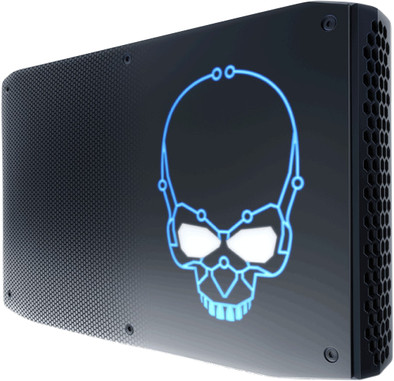
The Intel Hades Canyon NUC8i7HVK is a mini computer with a striking appearance. You can use this NUC as a console for playing mid-range games or as a media center. The integrated AMD Radeon RX Vega M graphics chip is powerful enough to play videos in 4K. Install your own RAM and up to 2 M.2 SSDs in this NUC. They're not included.
Installation ease
Connection options
Graphics
User friendliness
Speed
Finally a quad core i7 Nuc with huge connectivity options in a super small size!. Perfect for a range of applications.
With the previous nucs quite nice lab setups were also possible for virtualization adepts ( VMware ESX , Nutanix , etc .... ) but I was waiting for this one for a while :-)
Now run an ESX 6.7 on it yourself, followed by an Untangle virtual firewall and three more Virtual machines and it does that on its own. have 1x 500 GB NVMe in the 2 M2 slots and a 1TB SSD in the other (2 Datastores). And now all the physical junk in the trash (including the overpriced and slow firewall that never delivered the througput with all the software blades on :-) ).
It is a pity that the NUC is limited to 2 x 16 GB sodimm for the time being, Intel states 64 GB addressable in the CPU specs. (it is unknown whether this will be/can be increased later to 64 GB (2 x 32 sodimm) via bios upgrade), those 32 GB sodimm's are also still too scarce and much too expensive at the moment.
The power brick is quite large, and is almost as large as the nuc itself. Technically, that's not a bad thing, so you have more stability when overclocking.
The number of thunderbolt ports allows you to add a number of network ports via USBtoEthernet, if you also want to create a DMZ for example or want a slightly more complex virtual network setup (teaming / failover ... etc). (The ax88179-esxi65.vib to accomplish this, by the way, runs just as well on ESX 6.7). you can just as easily screw the included VESA standard under your desk or against the technical wall.
Mini private cloud on the wall :-).
for other Virtualization adepts : (Before you start with the ESX 6.7 installation, FIRST upgrade your intel NUC bios to latest version !)
and euh Intel : next version please a NUC with 10Gbps nics ( whisfull thinking )
Gunther
18 November 2018
Automatically translated from Nederlands
So far great. It is very quiet and has been well tested with a 3096 score with 3DMark and a VRMark score of 5057. Installing the SSD and the RAM memory is done quickly and easily. I installed Windows 10 myself, which was a bit of a hassle. The tip that helped me is use the intel-driver-support-assistant to properly install all your drivers at once. It is full of connections for screens completely plug and play. I am currently using 1 HDMI/DVI cable and 1 MiniDisplay/DVI cable. There are also two ethernet ports on the NUC through which I can connect a wired internet connection and also connect the TPCast (for wireless VR) to it. The device is wonderfully quiet. The Game GTA V runs fine with the graphics settings on high and extra high and I suspect I can improve this if I connect a modern monitor to it. All in all, you can of course get cheaper, but for the compactness, the design and the convenience for me to be able to take my complete VR installation everywhere I go is really wonderful. If you have it and you enjoy the best of the best in a small package, you're in the right place with this NUC.
Nick den Breems
25 October 2018
Automatically translated from Nederlands
I carefully researched whether a laptop, a desktop or this powerful NUC would be the best solution for me. A desktop provides the most power for the budget, of course, but I found this NUC with comparable specs hardly more expensive and the portability is a major plus for me. I occasionally provide business streaming sessions, so it's handy to be able to take a ready-made quick directing system with me. The large container under the desktop is not so handy after all, and it fell off for that reason. A comparable laptop is still more expensive than the NUC, which is understandable because the keyboard and screen are integrated. But I realized that I have a screen for almost all work situations, usually even several or very large ones, which is nice for the overview. The NUC can power up to 6 4K displays simultaneously. All connections for this are built-in, so no extra Thunderbolt boxes, boxes or splitters. Just plug into the system and you're done! Find a laptop in this price range that can do that. In my home office, the NUC is linked to a 46-inch screen that can display up to 4 4K cameos. the NUC can connect to screens, beamers and war-room walls. I have built the NUC with a 1Tb SSD and 16Gb RAM and I think it's a great feeling that I have more than enough performance at my disposal in all situations to date and if necessary, I can easily double my internal memory and SSD storage in the still free slots. With the super-fast connections for External Disks, you can also easily connect colossal storage spaces. I only use one of the double ethernet connections, but for the intensive (private) cloud user and NAS owners it is also a wonderfully powerful beast. The network drivers are perfectly configurable to maximize bandwidth utilization and optimize network speed and stability. For video editors, Photoshop/Lightroom photographers, directors, programmers, system and network administrators, vloggers and community moderators etc. who prefer to work on large screens or multiple screens simultaneously, the NUC Canyon Hades is an alternative to a powerful laptop or even a large desktop PC, which I think is too often overlooked. The NUC is often put down as a gaming computer in the tests and is a good sub-topper with the integrated graphics card. I understand very well that hard core gamers opt for a thick overclockable gaming desktop with the most powerful graphics card that you can also pimp nicely with all kinds of LED lighting in the case. But if the ultimate gaming speed is not necessarily your goal and you are looking for lots of connectivity options and computing power and more than enough speed for 4K content production and live streaming etc, then the NUC Hades Canyon is the ultimate portable powerhouse PC. That you have to put the memory modules in yourself (just a piece of cake!) and install the operating system (not difficult either, as long as you keep the order that you first update the BIOS and drivers first) is for the advanced user who wants this kind of computing power , hardly a disadvantage. And any digitally literate user who is really hesitant to do the installation probably knows a handy computer nerd in the neighborhood or circle of friends who would like to get the system up and running. I'm sure that computer geek will be amazed and admiring what this little fast box can handle. And that skull logo, well, as far as I'm concerned the reason why this system is often misunderstood. It suggests that this is primarily intended by Intel as a gaming computer. And while you can game with decent performance in frames per second, to me it's a portable powerhouse that doesn't really have any comparable competition for purposes other than gaming. An absolute must, too often overlooked!
Peter de Weerdt
8 April 2020
Automatically translated from Nederlands


