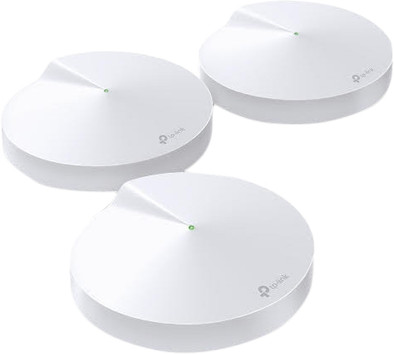
TP-Link Deco P7 Hybride Powerline Multi-room WiFi 3-Pack
Never available again
View alternatives in the sidebar
According to our router expert
With the TP-Link Deco P7 Multi-room WiFi system, you ensure a fast and reliable Internet connection throughout your entire house. The 3 stations communicate with each other via a separate frequency, so there's no loss of speed. You can place the 3 stations in different areas in your house, creating a mesh network. Thanks to the hybrid Powerline connection established by the stations, they can also smoothly communicate with each other if they're farther apart. This way, you have WiFi in every part of your house. Your wireless devices automatically choose the station with the strongest connection, even when you're walking around the house. As a result, you won't lose your connection during a video call, for example.
Ethernet speed | Gigabit Ethernet (1000Mbps) | |
|---|---|---|
Frequency bands | Simultaneous dual-band | |
WiFi speed | AC1300 | |
Number of Ethernet ports | 6 | |
Number of stations | 3 |
5 stars
130
4 stars
27
3 stars
0
2 stars
1
1 star
0
We have a new house where the previous network did not penetrate the walls properly. Finally opted for this more expensive network, so far I have not regretted it, in fact: I should have done this sooner.
Units are easy to install via the app, where you get advice where to place them. We have placed the main unit next to the router. The other two on the first floor and in the attic. Beeped within 20 minutes.
For the gadget range (Sonos, Spotify, Netflix, Philips Hue, Google Home, Chromecast, etc) like me, has a unit with 1 UTP port (for internet cable). Buy a switch, so you can connect everything to 1 network and continue to operate it. Ideal! In the attic I had no internet cable, but I did have an (old) TV without WiFi. Connect the internet cable between the Deco unit and the TV and the TV has internet through the unit. Problem solved without laying and running cables! And a very stable connection in the attic. We have now also bought a separate fourth unit, so we have even better internet in the garden, because the range is just good and strong. Expansion is done within minutes.
You can manage all logged in connections via the Deco app. For example, you can indicate whether telephones/televisions, laptops or gadgets should be given priority in order to achieve the highest speed. In addition, you can create layouts and ensure that certain members are restricted at a time. Handy for the kids. You can also see how much internet is being used by the members. If a wrong site is opened, Deco's (automatically built-in) firewall does its job right immediately.
The investment for the P7 is certainly there, but the result is impressive. No more lost connection, bad signal or complaining family members! Every day that you are still in doubt is an extra day with irritations!
Richard Dieteren
17 August 2019
Automatically translated from Dutch
Very simple and quick installation (installation did not go well via bluetooth at first, but fortunately it did via WiFi; the app indicates it all clearly so no worries). And with all three units in use there was adequate coverage in our three-story home).
The speed is not achieved at greater distances and the coverage there is also a notch less than full, but everywhere in the house above 40Mb with a 200Mb subscription and in the living room generally between 125Mb and 200Mb.
Setting a fixed IP address for our NAS and printer is also super easy via the app. And there is also WPS on board, so connecting our printer went perfectly and quickly.
We are satisfied so far (running more than 2 hours on it now).
Michiel
30 March 2019
Automatically translated from Dutch
We live in an old house, with thick stone walls, partly underground. After years of hick ups in the WiFi, losing signal, despite new expensive routers and extenders, we have now made the step to a WiFi mesh system / multi-room WiFi. The P7 chosen, with 3 transmitters (hubs) that are wirelessly connected to each other and via the electricity network. So no pulling cables.
This means no more repeaters/extenders that all have their own network (even if you give them the same name, they always remain separate networks). Problems arise there when switching your device from one network to another: that doesn't always go smoothly, then you get those drops in signal. Or more annoying (especially in our multi-storey house, including a part underground): your iPhone is, for example, still connected to a weak (so slow) network, while there is already a stronger one nearby because you are moving. But.. your iPhone does not automatically pick up the strongest signal: it only switches if your signal is really too weak or completely disappears. Can't you change. Even if you set the extender as an Access Point wired, you will still have that problem.
With a mesh system, that is a thing of the past as promised everywhere. So was very curious.
Apple esteem nicely packaged. The user manual was 1 sentence: “install the app and follow the instructions”. Fully installed within half an hour.
So installation via the app that places the 3 white satellite channels (smoke detector model) in the best location. Result: everywhere, also in the garden, all floors up to the basement, 3 bars of signal and enormous speeds. Up to more than 200 Mbps close to the transmitter, and 40 Mbps to the farthest point in the garden.
Expectations more than fulfilled. So ... never complain about the WiFi again, highly recommended and well worth the money.
PS: The main unit only has 1 UTP connection free, but with a switch of a few tens that problem is solved.
Marc Teuwsen
21 November 2018
Automatically translated from Dutch
Product number | 813771 | |
|---|---|---|
Manufacturer code | Deco P7 (3pack) | |
Brand | TP-Link | |
Warranty | 3 years | |
Processing of your defect | Via Coolblue |
Number of stations | 3 | |
|---|---|---|
Can be expanded with extra stations |
Frequency bands | Simultaneous dual-band | |
|---|---|---|
WiFi speed | AC1300 | |
2.4GHz band speed | 400 Mbit/s | |
5GHz band speed | 867 Mbit/s | |
Number of WiFi antennas | 4 | |
Jumbo frame support |
Ethernet speed | Gigabit Ethernet (1000Mbps) | |
|---|---|---|
Network connector | ||
Number of Ethernet ports | 6 | |
PoE support | ||
USB port | ||
Type of USB port | USB-C | |
Number of USB ports | 1 |
Automatically switches to 3G/4G | ||
|---|---|---|
SIM card slot |
Quality of Service (QoS) | ||
|---|---|---|
MU-MIMMO | ||
Seamless roaming | ||
Beamforming | ||
Port forwarding | ||
LACP Link aggregation |
Parental controls | ||
|---|---|---|
WLAN security | WPA, WPA-PSK, WPA2, WPA2-PSK | |
Firewall | ||
Firewall type | DoS, NAT Firewall, SPI Firewall | |
Guest network | ||
VPN server | ||
VPN client | ||
VPN passthrough |
Mounting possible | ||
|---|---|---|
Width | 12 cm | |
Height | 3,8 cm | |
Depth | 12 cm | |
Weight | 1 kg | |
Color | White | |
Material | Plastic |
Battery level indicator |
|---|