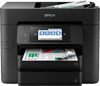
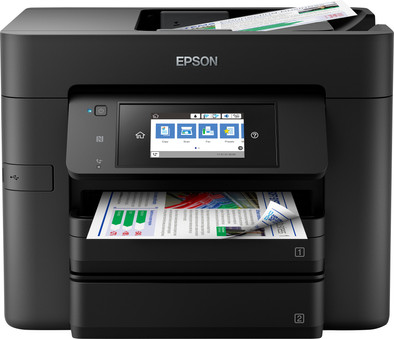
Epson WorkForce Pro 4740DTWF
Never available again
View alternatives in the sidebar
According to our printer expert
You can print, scan, copy, and fax with your whole office, thanks to the Epson WorkForce Pro 4740DTWF inkjet printer. Connect this printer to your WiFi network so you and your colleagues can print wirelessly from your PC. The 4740DTWF has a print speed of 24 pages per minute and 2 paper trays with a capacity of 250 sheets each. With the duplex automatic document feeder, you can copy and scan duplex documents without having to turn them over manually. Print detailed graphs and tables in color with a resolution of 4800x1200 DPI. You can easily operate your printer with the convenient 11-inch color touchscreen.
Print technology | Inkjet | |
|---|---|---|
Printer type | All-in-one | |
Automatic duplex printing | ||
Automatic document feeder (ADF) | ||
Automatic duplex scanning | ||
Color printer | ||
Maximum print size | A4 | |
Photo paper drawer |
5 stars
2
4 stars
3
3 stars
0
2 stars
0
1 star
0
This WorkForce Pro WF-4740DTWF replaces my broken Canon Pixma MX952. I was looking for a device that could print but also (automatically!) double-sided scanning via an ADF (automatic document feeder) under 200 EUR, preferably no HP. Then the rinse becomes thin... Unfortunately I couldn't find many independent reviews about this Epson, but what I found was positive, so I took a chance. Installation was a bit tricky: the supplied CD started the installation, but it kept hanging. Then downloaded the latest version from the Epson site and the installation ran smoothly. The steps are self-explanatory and can't really go wrong. Preferences are easy to set via the large color LCD. Without a manual (I didn't find it online until later) I filled one paper drawer with blank A4 and the other with pre-printed letterhead. If I print on 'Letterhead' while printing, this printer automatically picks up the correct tray. Also created without help presets for scanning to a network folder. Via the business preset, the scan automatically goes to a business network folder. The private scans go to a private folder with a separate name. Connection to wireless went smoothly (it didn't recognize a 5GHz network, only 2.4 GHz). Later I saw that it also had a fixed network connection, so I still used it for extra stability. The printer wakes up very quickly when it needs to print something. The first print comes out in seconds. Scanning is also very simple and fast. Finally, a subjective plus: as far as a printer can be beautiful, I think it looks 'sleek'. It is somewhat higher than its Canon predecessor, but its desk surface is slightly smaller. After installation on PC and laptops (with the downloaded drivers), installation on the Macbook and Ipad was a breeze: the printer was already detected and could be used immediately. I have installed Epson iPrint on my Android phone. Not really used yet but 'on the outside' it looks good. You can get a preview of the scan made on your phone. Nice is not it? Are there any downsides? Well, a few but no deal breakers for me: First, I haven't been able to find (even in the downloaded manual) is how to copy 2 single pages to one double sided print. Second, the prints are collected on a fold-out paper tray. Unlike the Canon, this does not open automatically, so if you want to print something from a distance, the entire floor is strewn with paper. So I leave that flap open, although of course I prefer to keep it closed (against dust and so as not to accidentally bump into it). Third, the included ink is very minimal; according to the set up guide really only enough to complete the installation. I have already been able to print a little more with it, but immediately ordered new ones. I would have liked to have known that in advance. It is a pity that Coolblue does not sell corresponding ink. Finally: inserting the cartridges takes some getting used to, you have to click the cartridges right in from above. If you don't do that right, it seems to jam or doesn't fit and you tend to force it. With the Canon, the cartridges slid in automatically, so to speak, so I was spoiled for choice. So pay attention and you'll be fine.
Unlike the Canon, this printer cannot print DVDs. I haven't tested printing photos yet, so I can't say anything about that. There may be an update on this soon.
M Smits
19 June 2019
Automatically translated from Dutch
Print quickly and neatly.
Hans van Roon
5 September 2019
Automatically translated from Dutch
This printer replaces my Canon pixma MX975. The printer is quickly ready for use, prints and scans quickly and the touch screen also responds quickly. I was positively surprised that the printer immediately worked wirelessly on the Mac, but Linux drivers were also available! The disadvantage is the non-transparent ink cartridges, so you can't see how much is in them. With the canon, a light indicated neatly which cartridge had to be changed, but there is no indicator light in it. I assume the software is going to indicate it somehow. The ink is clearly more expensive than that of the Canon.
A final lack is the cover that automatically flipped open at Canon to collect the output. You have to open it manually here, otherwise your printout will be launched neatly into the room.
P. de Wit
28 October 2019
Automatically translated from Dutch
Product number | 826843 | |
|---|---|---|
Manufacturer code | C11CF75402 | |
Brand | Epson | |
Warranty | 2 years | |
Processing of your defect | Via Coolblue |
Printer size | Large | |
|---|---|---|
Width | 42,5 cm | |
Depth | 38,8 cm | |
Height | 33 cm | |
Color | Black | |
Weight | 12,1 kg |
Printer type | All-in-one | |
|---|---|---|
Photo printer | ||
Portable (mobile use) | ||
Usage location | Office |
Cartridge line | Epson 35 | |
|---|---|---|
Print technology | Inkjet | |
Number of cartridges/toner cartridges | 4 | |
Color printer | ||
Print speed black (ISO) | 24 ppm | |
Print speed color (ISO) | 22 ppm | |
First black page ready after | 4 seconds | |
Usage costs per page | 0,08 euro | |
Maximum print resolution height | 1200 dpi | |
Maximum print resolution width | 4800 dpi | |
Maximum print size | A4 | |
Automatic duplex printing | ||
Borderless printing | ||
Maximum print size duplex printing | A4 |
Scan functionality | ||
|---|---|---|
Automatic duplex scanning | ||
Maximum optical scan resolution width | 1200 dpi | |
Maximum optical scan resolution height | 2400 dpi | |
Scanner type | Flatbed scanner | |
Maximum scan size | A4 (21x29.7cm) | |
Automatic document feeder (ADF) | ||
Maximum paper size ADF | A4 | |
Scan sizes | A4 | |
Scan speed (PPM) | 10 ppm | |
Color depth output | 48 bpp | |
Scan to | Dropbox, Email address, Evernote, FTP, Google Docs, Microsoft SharePoint Connector, PC (network), USB | |
ADF capacity | 500 | |
OCR |
Copying functionality |
|---|
Fax functionality | ||
|---|---|---|
Color fax |
Built-in screen | ||
|---|---|---|
Color screen | ||
Touchscreen |
Compatible with operating system | Android, ChromeOS, Linux, Windows, Windows Phone, iOS, macOS | |
|---|---|---|
Connection type | Wired | |
Apple AirPrint | ||
Email print | ||
WPS (Wireless Protected Setup) | ||
Female standard USB-A port version | 2.0 | |
USB port |
Manual input tray | ||
|---|---|---|
Photo paper drawer | ||
Output capacity output drawer | 80 | |
Maximum print size standard paper tray | A4 | |
Input capacity standard paper tray | 500 | |
Number of standard paper trays | 2 |
Memory card reader |
|---|