Asus ProArt PA27AC
Never available again
View alternatives in the sidebar
View alternatives in the sidebar
According to our monitor expert
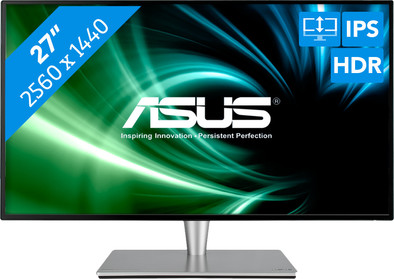
The Asus ProArt PA27AC is a 27-inch monitor for the graphic professional. The monitor supports HDR and has a brightness of 400 nits, so you experience high contrasts and also see the colors on the screen in brightly lit rooms. The 100% support of the sRGB color profile also ensures true-to-life colors. The ProArt PA27AC is pre-calibrated at the factory and has the Asus ProArt calibration technology, which you can use to easily calibrate the monitor yourself. You can save your desired settings on the IC chip of the monitor, so that you do not have to recalibrate if you connect another PC. Adjust the monitor in several ways, for example in height, to adjust it to your working posture.
Sharpness | Quad HD (1440p) | |
|---|---|---|
Curved | ||
Aspect ratio | Standard (16:9) | |
Refresh rate | 60 Hz | |
Response time | 5 ms | |
Panel type | IPS panel | |
Color depth | 17 million colors (8-bit) | |
Built-in speakers |
5 stars
2
4 stars
0
3 stars
0
2 stars
1
1 star
0
Good addition, especially if you have to work with multiple screens.
Peter Denissen
25 March 2020
Automatically translated from Dutch
Great screen for the home workplace
Johan
9 April 2020
Automatically translated from Dutch
Unfortunately one major setback! I have specifically selected a monitor for my Macbook Pro at Coolblue (there is the standard option). I came across this Asus PA27AC for a solid price of €699. The default color settings do not match my Macbook, a solid beige layer over the image (no, there is no protective film on it). Then manually adjust the color settings. You can activate the menu via a kind of joystick on the back of the monitor. You can only use half of the menu. It turns out that you first have to turn off HDR (High Dynamic Range). Via the screen settings of my MacBook I managed to switch off the HDR on the Asus. Quite a relief. The image turns out to be a lot sharper and clearer in one go. And..... the entire menu of the screen itself is visible and usable. With some adjustments, the Scenery Mode (Splendid) setting appears to match the best. But not quite yet. In this mode, the characters in Word, for example, become a bit speckled. Then the resolution falls. And guess what: when you turn the monitor off again (despite the fact that I have registered the correct settings) the monitor is upset again. HDR is on again, colors are off again and you have to set everything again. Tried several times but unfortunately a bad result. Now I've been working with computers of all shapes and sizes all my life. Can I tie something together and set it up. But this monitor is going back CoolBlue.
Arjen de Vries
11 April 2020
Automatically translated from Dutch
Product number | 835433 | |
|---|---|---|
Manufacturer code | 90LM02N0-B01370 | |
Brand | ASUS | |
Warranty | 2 years | |
Processing of your defect | Via Coolblue |
Recommended display resolution | 2560x1440 | |
|---|---|---|
Sharpness | Quad HD (1440p) | |
Aspect ratio | Standard (16:9) | |
Refresh rate | 60 Hz | |
Response time | 5 ms | |
Panel type | IPS panel | |
Brightness | 400 cd/m2 | |
Local dimming | ||
HDR support | ||
Contrast ratio | 1900 | |
Touchscreen | ||
Type of HDR | HDR10 | |
Screen reflection | Anti-glare | |
Blue light filter | ||
Flicker-free technology | ||
Color space | sRGB | |
Color depth | 17 million colors (8-bit) | |
Adaptive Sync | ||
Resolution width | 2560 pixels | |
Resolution height | 1440 pixels | |
Anti-reflection type | Anti glare | |
Horizontal viewing angle | 0 ° |
Height | 35,3 cm | |
|---|---|---|
Width | 61,4 cm | |
Depth | 5,9 cm | |
Weight | 5,9 kg | |
Color | Black | |
Including stand | ||
Material | Metal | |
Cable management | ||
Appearance | Neutral | |
Curved |
Number of HDMI connectors | 2 | |
|---|---|---|
Number of Female HDMI type A 1.4 ports | 2 | |
Number of headphone jacks | 1 | |
Type of headphone connection | 3.5mm (TRRS) | |
Number of USB-C ports | 1 | |
Number of USB 3.0 Female USB-C ports | 1 | |
Number of Female Standard DisplayPort 1.4 ports | 1 | |
Number of female standard USB-A ports | 2 | |
Female standard USB-A port version | 3.0 | |
Number of female 3.5mm TRRS Audio Jack ports | 1 | |
Type of USB port | Standard USB-A, USB-C | |
Number of USB ports | 3 |
Included by default | DisplayPort cable, HDMI cable |
|---|
Adjustable in height | ||
|---|---|---|
Tiltable | ||
Pivotable stand | ||
Pivot function | ||
VESA mount option | ||
VESA mount | 100x100mm |
Energy consumption standby | 0,5 W | |
|---|---|---|
Energy consumption active | 25 W |
Built-in speakers | ||
|---|---|---|
Sound system | Stereo | |
Webcam | ||
Split screen | ||
Kensington lock | ||
Best tested |
Recommended for use | Internet, email, and text processing, Office work |
|---|
