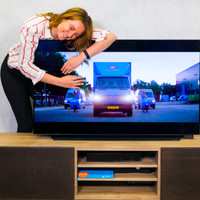
Samsung QLED Frame 55LS03T (2020)

Never available again
View alternatives in the sidebar
View alternatives in the sidebar
Product number | 858680 | |
|---|---|---|
Manufacturer code | QE55LS03TASXXN | |
Brand | Samsung | |
Warranty | 2 years | |
Processing of your defect | At your home |
Image quality | Good | |
|---|---|---|
Screen type | LED-LCD | |
Screen size | 55 inches | |
Sharpness | 4K (UHD) | |
Refresh rate | 100 Hz | |
Color depth | 1 billion colors (10-bit) | |
Recommended for television use | Optimal gaming, Stream series and movies, Watch standard channels |
Quality viewing angle | Standard | |
|---|---|---|
Pixel structure | RGB | |
Local dimming | ||
Type local dimming | Edge lit | |
HDR support | ||
Type of HDR | HDR10, HDR10+, HLG | |
Input lag | 10,3 ms | |
Neo QLED | No | |
Picture Quality Index (Samsung) | 3600 Hz |
Smart TV | ||
|---|---|---|
Smart platform type | Extensive | |
Smart platform | Tizen | |
Guaranteed support with updates | 24 months after release date | |
Not supported popular apps | Ziggo GO | |
Built-in WiFi | ||
Bluetooth | ||
DLNA | ||
AirPlay | ||
AirPlay version | AirPlay 2 | |
Media player |
Built-in soundbar | ||
|---|---|---|
Number of speakers | 2 | |
Continuous/nominal total output capacity (RMS) | 40 W | |
Subwoofer | ||
Q-Symphonyq | ||
Dolby Atmos support |
One Connect Box | ||
|---|---|---|
Ambient Mode | ||
Art Mode | ||
Sleep timer | ||
Light sensor | ||
Best tested | ||
Pivotable stand |
Controls via app | ||
|---|---|---|
Controlled via Android app | ||
Controlled via Apple app | ||
Samsung One Remote | ||
Voice control |
CI/CI+ slot | ||
|---|---|---|
Digital tuner | ||
Digital video signal | Cable (DVB-C), Digitenne (DVB-T), Digitenne (DVB-T2), Satellite (DVB-S), Satellite (DVB-S2) | |
DVB-T Twin tuner | ||
DVB-S Twin tuner |
Antenna connector | ||
|---|---|---|
Female HDMI Type A port version | 2.0 | |
Digital optical connector | ||
Headphone jack | ||
USB port | ||
Component video connector | ||
Composite connector | ||
Network connector | ||
RCA connector | ||
VGA connector |
VESA mount option | ||
|---|---|---|
VESA mount | 200x200mm | |
Including TV mount |
Energy label | G | |
|---|---|---|
Energy consumption per 1000h | 140 kWh | |
Energy consumption HDR per 1000h | 151 kWh |
Color | Black | |
|---|---|---|
Height | 70,63 cm | |
Width | 123,5 cm | |
Depth | 4,58 cm | |
Weight | 19,2 kg | |
Height including stand | 75,34 cm | |
Width including stand | 123,5 cm | |
Depth with stand | 21,39 cm | |
Stand height | 4,7 cm | |
Total weight including stand | 19,4 kg | |
Year introduced | 2020 | |
Product line | The Frame |
anything for a smile
Screen size | 55 inches | |
|---|---|---|
Image quality | Good | |
Smart platform | Tizen | |
Refresh rate | 100 Hz | |
Screen type | LED-LCD | |
Sharpness | 4K (UHD) |
According to our television expert
The QLED screen provides rich, pure colors.
You can connect all your peripherals to the TV with a transparent cable via the One Connect Box.
With the included wall mount, the TV is mounted close to the wall, like a real painting.
The television doesn't have a connector for headphones.
You have to request the removable frame from Samsung when you receive the TV.
The Samsung The Frame 55LS03T is a slim 4K TV that seamlessly blends into your interior. You can easily secure a stylish frame onto the slim design. If you mount the TV close to the wall with the No Gap wall mount, it will hardly stand out from your picture frames or paintings. In the Art Store, you can choose one of the hundreds of available artworks. That way, you'll never have a black screen in the room. Thanks to the One Connect Box, you can use 1 transparent cable to connect the TV to the socket and your devices. The QLED screen produces 100% color volume so that all subtle tones are clearly visible. In combination with Dual LED, you'll enjoy a realistic contrast. This technique adjusts the color temperature to the images you're viewing.
The included One Connect Box is 347 millimeters wide, 137 millimeters deep, and 65 millimeters high. Although it's not very big, you do need a cabinet or something else around your TV to set it up
5 stars
142
4 stars
110
3 stars
7
2 stars
3
1 star
2
Sound quality
Image quality
Design
The Frame has been in use for about a week now. It's a beautiful TV. Our 10-year small (32") LED TV still worked, but needed to be replaced. The Frame has a beautiful and sharp picture and the sound is fine. When you watch TV, it is a pleasure for the eye and ear. With the The supplied No-Gap mounting bracket allows you to hang the TV fairly tightly against the wall, it is not really no-gap, there is a space of about a centimeter between them (see photo).The TV is also completely symmetrical on all sides, if you
Once you have everything connected and hung up, the experience is fine. You can zap fairly quickly and with the remote control you can view the TV guide or open streaming services (or other apps) with 1 click. Navigating through, for example, Netflix works very well with the remote control. I also connected a Chromecast to it for streaming, for example, the Ziggo app from your phone.
Then the art mode, which is very nice. Some paintings and photography are included for free. And with the on/off button on the remote you can put the TV in art mode (long press on/off button for completely off). If the art mode is on, and it has a painting with a passe-partout on it, it looks a bit like a painting, especially if the room itself is bright and the brightness is not set to maximum. But if it's a little darker, you'll see it's a TV. Or at least that it gives light. The real effect is quite hard to see actually in a photo.
You can also put your own photos/images on the TV as an art mode, but Samsung's documentation falls very short there. You can put photos on it via the app, but they all only get 1 kind of passe-partout (a shadow underneath), to get your own photo full screen or with one of the other passe-partouts, your photo must have exactly the resolution away from the screen (with the 43" it is 3840px by 2160px). That is not mentioned anywhere, too bad. Tip: download the app Photo Size / Photo Size, with this you can easily get photos in the right size. You can also take a lot of photos Just legally download classical works of art (public domain), so you can also get your own art collection on TV without purchasing a subscription.
There are interchangeable frames around the TV, but they are not included in the box. Apparently you have to request it separately from Samsung.
Then a few things I don't like:
Conclusion Nice TV to watch, both design and picture quality. The art mode gives an extra dimension, now you have the choice to have a (homemade) photo or painting on the wall. Once installed I am happy with it! Unfortunately, the installation did not go smoothly for me, also pay attention to the privacy settings.
Rutger
11 May 2020
Automatically translated from Nederlands
For the money you pay for this TV - no matter how beautiful the design is - the image quality is unacceptable. When you watch a movie in the evening, and the image is dark, you see an extreme amount of edge bleeding from every angle. While some edge bleeding is unavoidable with LCD panels, even my 10-year-old TV doesn't have it to this extent. The corners of the TV turn towards white, during black scenes.
A replacement model had the exact same problem. I therefore exchanged the TV for another model with OLED. Because although I really like the design of The Frame, a TV in 2020 with this amount of edge bleeding cannot be called normal.
Perhaps if Samsung ever produces this TV with Mini-LED, I would like to consider it again. But now the design really does not outweigh the poor quality of this TV for me. Which by the way LCD can be an excuse, because as I said earlier, my 10-year-old LCD doesn't have this problem. I think this can simply be solved within the current design, whereby some edge bleeding cannot be prevented, but can certainly be limited!
Kevin
19 May 2020
Automatically translated from Nederlands
Have the device for a week now, sharp image and also good sound from the TV as standard. The difference between a full HD LCD and this Qled is very large in a positive sense
Coen Leemans
26 September 2020
Automatically translated from Nederlands