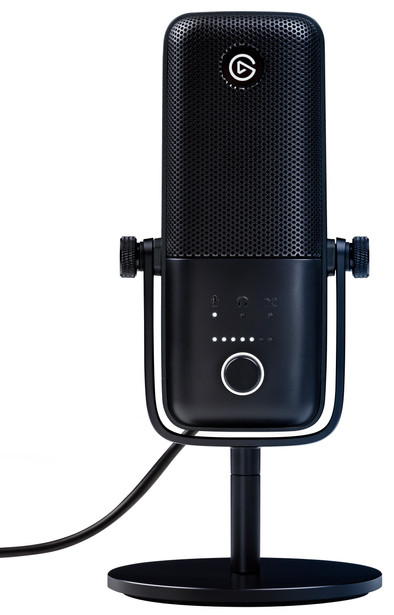
Never available again
View alternatives in the sidebar
View alternatives in the sidebar
Product number | 864541 | |
|---|---|---|
Manufacturer code | 10MAB9901 | |
Brand | Elgato | |
Warranty | 2 years | |
Processing of your defect | Via Coolblue |
Bit rate | 24 Mbit/s | |
|---|---|---|
Frequency response range | 70 - 20000 Hz |
Transducer | Condenser | |
|---|---|---|
Directional characteristic | Cardioid | |
Number of recording modes | 1 | |
Microphone recording type | Stereo | |
Application microphone | Gaming, Streaming | |
Wireless microphone system |
Mute button |
|---|
Size thread adapter microphone clip | 3/8 inches, 5/8 inch | |
|---|---|---|
Tripod included |
Type of microphone connection | USB | |
|---|---|---|
Headphone jack |
Height | 15,3 cm | |
|---|---|---|
Width | 6,6 cm | |
Depth | 4 cm | |
Material | Plastic |
anything for a smile
Application microphone | Gaming, Streaming | |
|---|---|---|
Directional characteristic | Cardioid | |
Microphone recording type | Stereo | |
Type of microphone connection | USB |
According to our studio microphone expert
Thanks to the 24-bit depth and 96kHz sample rate, you record higher quality audio than with the Elgato Wave:1.
The Clipguard technology keeps you from recording sounds too loudly, which would make your recordings unusable.
You connect the device via the USB port on your laptop or computer, so you don't need a sound card.
The microphone doesn't have a pop filter.
With the Elgato Wave:3, you can record your podcast or livestream with a 24-bit/96kHz sample rate. So recordings sound clear and detailed and you're always clearly audible when you listen to your recording. The Clipguard technology ensures that the recording stays on the same level. This way, you don't have to keep checking whether you and your guest are speaking too loudly. To use the microphone, simply connect it to your computer via USB. You don't need a separate sound card to use it.
Elgato delivers excellent microphones with the Wave:1 and Wave:3, with a unique 'clipguard' function that ensures that the microphone never starts to 'clip' when the enthusiasm rises. The recording of the microphone just sounds good, and only with much more expensive variants with (more expensive) external (XLR) connections there is a notable difference. This difference is negated if it is used for VOIP (Teams, Discord, Teamspeak, Skype) or live streaming (Youtube, Twitch) because compression is applied here.
Unfortunately, the built-in headphone output doesn't provide enough power to drive my headphones sufficiently (volume modulation occurs). The microphone can also be configured to play from the headphone output 100% what the microphone is recording (live without delay) but when it is connected to the input of another sound card there is an ugly 'ground loop' around the corner which constant buzz. If the software mixer (Wave Link) is used to monitor the microphone (sidetone or zero latency), then according to the manufacturer a 25ms delay occurs when using the output on the microphone itself, which can still be done without disturbed your thoughts while talking. But if this output then sends to another output (External sound card, for example) then the delay becomes 80ms according to the manufacturer, but in my opinion it is more like 250-500ms or a quarter/half of a second. This is so big that I want to call it 'unusable', it's like someone is constantly talking through you with the exact same words but just a little later.
If you don't need 'zero latency' monitoring (only adjustable via the PC/Mic mix in wavelink), or if you use balanced audio equipment that would filter out the 'ground loop' noise, this is an excellent choice.
Mark
7 September 2020
Automatically translated from Nederlands
This microphone gives a very good quality. I use it at video meetings and videos. Have this micro installed on an arm, so you get the best quality. The Wave Link software ensures that you can stream or record videos with the best settings.
Johan
25 October 2020
Automatically translated from Nederlands
In addition to the good sound quality, the power lies in the possibilities of the Wavelink software. This allows you to send multiple input channels to a monitor and streaming output. In addition, you can use VST2/3 plugins such as an equalizer, voice changer, etc. All very flexible. If it is purely for a Teams/Zoom meeting, there are cheaper alternatives. But if you're looking for a bit more with multiple channels, streaming to OBS, separating and mixing channels, etc. then you'll come a long way with this microphone. Mute button is handy and you can adjust gain and headphone volume on the microphone. It's not that heavy, large parts of the housing are made of plastic, doesn't feel very solid but no problems so far.
Jasper
17 March 2022
Automatically translated from Nederlands