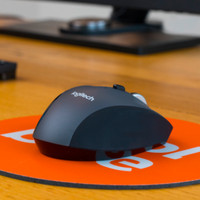
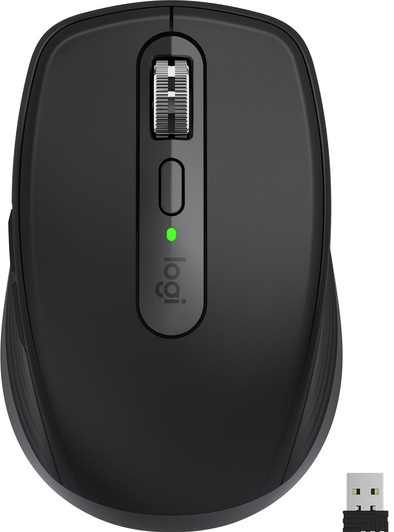
Logitech MX Anywhere 3 Black
Never available again
View alternatives in the sidebar
View alternatives in the sidebar
According to our mouse expert
Take the Logitech MX Anywhere 3 with you wherever you go, so you can work on location. The mouse is compact and lightweight, so you can easily put it in your bag and take it with you. Thanks to the laser sensor, you use the mouse on ever surface. Even on a glass table, for example. The mouse has a MagSpeed scroll wheel for scrolling, which lets you scroll through hundreds of rows in Excel or entire websites in a second. In addition, empty batteries are a thing of the past, because you charge this mouse with the USB-C cable. After several minutes of charging, you can use the mouse for another few hours. The mouse is can also be used on several devices at the same time. Connect the mouse and switch between your PC, laptop, or tablet with the click of a button.
Connection type | Wireless | |
|---|---|---|
Bluetooth | ||
Mouse model | Standard | |
Mouse size | Small | |
Ergonomic design | ||
Left or right-handed | Right-handed | |
Suitable for gaming | ||
Silent mouse |
5 stars
102
4 stars
56
3 stars
6
2 stars
4
1 star
0
Connection options
Ergonomics
Accuracy
Size
Design
The Logitech MX Anywhere 3S Compact Pink mouse is a nice, compact mouse that you can easily take with you. You connect the mouse to a maximum of 3 devices and quickly switch between them. Due to the small design, the mouse is less ergonomic. Still, it feels nice in the hand.
First impression In the black box I find the MX Anywhere mouse, a USB-C to USB-A charging cable and the manual. I carefully take the mouse out of the packaging and immediately notice how nice it feels in the hand. It is compact and made of soft plastic. I am also happy with the unique pink color.
Connect to MacBook Now it's time for pairing. I slide the red button on the bottom upwards. The bottom is now green, which means it's on. A white light is now flashing. I open the bluetooth settings of my MacBook and I immediately see that the MX Anywhere 3S appears. I connect my MX Anywhere 3S with the push of a button. On the bottom of the mouse I see that the left light is on. It is immediately ready for use. Now I also connect my iPad to the mouse. I do this the same way. Now the light next to it also lights up. There is now room for one other device. That's why I also tested it with a Windows PC. This was also easy and fast. When I hold down the button under the 3 lights, I switch between the different devices. I also really like that the mouse connects directly to my devices as soon as I turn it back on. That's how I get started quickly.
Work anywhere I use my Logitech MX in any environment and on any surface. For example, he works on the folding table in the train, a wooden table in the café and even the glass tables in meeting rooms. This is due to the Darkfield sensor. While I work, I am never bothered by noises. The MX is silent as a mouse. Also, I hardly ever charge it. I don't go anywhere without my new Logitech mouse.
Handsome buttons The MX Anywhere 3S has a total of 6 buttons. The button that stands out the most is of course the scroll wheel. This allows me to quickly scroll through the longest web pages or thousands of Excel lines, without any effort. With the button below I adjust the mode of the scroll wheel. In one position I feel a vibration when I scroll. In the other mode I feel nothing and everything I do goes smoothly. This position is my personal preference. What I particularly like are the buttons on the left side of the mouse. With the front button you go one step forward and with the back one one step back. At the bottom are the bluetooth button and the on and off button. With the Logi Options+ app I adjust the buttons and adjust the settings to my liking.
Rowan. Muizen specialist
5 July 2023
Automatically translated from Dutch
I switch daily between a number of computer devices to carry out my work. One day I'm working on my laptop at the office, the next I'm working at home on my laptop via a docking station. And in the evening I sometimes want to switch on my Game PC to play a game. One of the biggest annoyances for me is that my desk is littered with keyboards and especially mice. I like a tidy desk and I started looking for a mouse that you can connect to multiple devices at the same time. Because the mouse also has to be portable, I opted for the MX AnyWhere 3 from Logitech.
The Logitech MX Anywhere 3 is a small, handy mouse and equipped with an internal battery that you can fully charge the included USB-C cable in 3 hours. To be able to last for 70 days without a charge. In the unlikely event that the mouse should run out of power, 1 minute of charging is sufficient to continue working for 3 hours. Previously, I always had an extra set of batteries with me in case my mouse companion was beeping. Now a phone charger is enough to continue working.
Another feature of this mouse is the ability to connect it to three devices. I have connected the mouse to my PC, laptop and work laptop. This can be done via Bluetooth, but Logitech also supplies a Unifying USB receiver. With the selection button at the bottom of the mouse, you can easily select and connect the right device.
Scrolling has never been so smooth. The mouse scrolls slowly by default, about 20 lines per second, but if you turn a little faster, the mouse goes into a kind of freewheel so that you can suddenly scroll at 1000 lines per second. Ideal for large Excel files. Personally, I find the tap, the resistance you feel when scrolling slowly, a bit annoying after a while. It gives a numb feeling in the finger.
The software that Logitech provides is fine. A number of presets are included here for packages such as Word. Excel, PowerPoint and Photoshop. These presets indicate the behavior of the 2 buttons on the (right) thumb in an application. Handy, but can be adjusted later as desired. It is also possible to switch between the devices with Logitech Flow as if you had 2 screens on 1 computer. The effect of this is not yet optimal. Often the mouse got stuck in a corner of the screen and the computer could not be operated with the mouse. But that is software and probably fixable later.
The mouse fits comfortably in the hand, with its soft grip on the side, but is actually a bit too small for my large hands. It is also ideal as a travel companion. He is solidly built. I've already dropped it once without having to look for the parts such as batteries and a battery cover.
So all in all, an ideal mouse companion for the flex worker who also works on multiple devices.
I de Jong
2 November 2020
Automatically translated from Dutch
It is a pleasant mouse, which can be used for precision work as well as for ordinary applications. Scrolling can be done at 2 speeds. Connection can be done with both USB dongle and bluetooth. I personally experience too little support when using the mouse under my hand. The mouse is also very pleasant to hold. The buttons are pleasant to use and customizable. Each button can be configured with the downloadable software. Using the laptop on multiple devices does not cause any problems. I was pleasantly surprised that the mouse can track on our transparent oilcloth, unfortunately it is still very stiff over the oilcloth, so that an empty A4 sheet has to be placed under it again. The battery lasts a long time after charging!
Sylvers
22 November 2020
Automatically translated from Dutch
Product number | 869381 | |
|---|---|---|
Manufacturer code | 910-005988 | |
Brand | Logitech | |
Warranty | 2 years | |
Processing of your defect | Via Coolblue |
Mouse model | Standard | |
|---|---|---|
Input | Laser | |
Number of buttons | 7 | |
Ergonomic design | ||
Left or right-handed | Right-handed | |
Adjustable DPI | ||
Mouse controls | Buttons, Scroll wheel | |
Suitable for gaming | ||
Programmable buttons | ||
Number of programmable buttons | 2 | |
Lighting peripherals | ||
Silent mouse | ||
Horizontal scrolling | ||
Mouse surface | Any surface | |
Product family | MX |
Connection type | Wireless | |
|---|---|---|
Type of USB port | USB-C | |
Nano receiver | ||
Frequency bands | 2.4GHz | |
Bluetooth | ||
Number of devices that can be paired | 3 |
Plug and Play | ||
|---|---|---|
Compatible with operating system | Windows |
Power supply type | Rechargeable battery, USB port PC/laptop | |
|---|---|---|
Battery level indicator | ||
Replaceable battery | ||
Battery included |
Color | Black | |
|---|---|---|
Mouse size | Small | |
Width | 6,6 cm | |
Height | 4,3 cm | |
Depth | 10,5 cm | |
Material | Metal, Plastic | |
Finish | Matte and glossy |