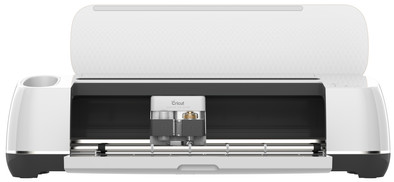
Cricut Maker Cutting Machine Champagne
Never available again
View alternatives in the sidebar
View alternatives in the sidebar
Connection type | Wired, Wireless | |
|---|---|---|
Portable (mobile use) | ||
Cutting length | 61 cm | |
Number of supported materials | 300 | |
Maximum width of material | 30 cm | |
Support for smart materials |
According to our cutting machine expert
Use more than 300 materials for your designs.
There are 11 tools for cutting, writing, folding, engraving, and more, so you have even more options.
The Adaptive Tool technology provides even more precision and performance.
With more than 10 kilograms, you can't easily take this cutting machine with you.
The Cricut Maker Cutting Machine Champagne offers countless possibilities. With this cutting machine, you can cut your designs from more than 300 materials 24 hours a day. The Cricut Maker even cuts into sturdy materials like leather and balsa wood. This way, you increase your creative possibilities. More materials also means more tools. There are 11 additional tools available to give your designs the finishing touch. You can change tools at the touch of a button on the universal attachment. The Maker technology goes one step further. In addition to precise cutting, the blade adjusts the cutting pressure to the material you're using. The cutting capacity is so high that you can easily cut through all suitable materials.
You can create your designs with the free Design Space software. Cricut Design Space is the design program by Cricut. A couple of ready-made projects are available for free. Do you want access to thousands of ready-made projects, images, and fonts? You'll need a payed subscription with Cricut Access. Or, upload a free design from the internet. You can use the canvas and create your own design with various shapes. Cricut Design Space will guide you through your entire project.
5 stars
25
4 stars
16
3 stars
0
2 stars
1
1 star
1
First impression I've had the Cricut Maker since May 1 and I'm thrilled. My first preference was the Cricut Explore Air 2 but thanks to my husband I went a step higher. My feeling now says that I would have really regretted it if I had gone for the Explore Air 2. Simply because the Maker has many more options and I really want to use it. It is the most complete cutting plotter at the moment. It is prominent on my worktop and that is perfectly possible with this pink version. The eye also wants something ;)
I haven't done much with it at the moment. But what I've made has turned out really fantastic. I've cut cardboard and vinyl with it so far. I made cards from this, covered wine glasses with vinyl, made an imprint on a tea towel (just with an iron, you don't necessarily need the Cricut EasyPress) and a nice shadowbox. The installation was very simple, with all the clear information and videos from Cricut itself. Tip: really take the time to watch hours of YouTube videos with tips and tricks. It gives a lot of insight into the use of the Maker. Join some Facebook groups and get inspired and helped by other enthusiasts. Often you are also lucky that a number of free templates/images/projects are shared! Also give yourself time to get to know the Maker and its extensive possibilities and keep in mind that you will probably 'use' quite a bit of material the first time. This includes vinyl and cardstock. I therefore recommend that you first test your new designs on cheaper materials from, for example, AliExpress.
unboxing The Coolblue box contained the following products:
Accessories and tools If you want to buy more accessories such as blades for the Maker, you should currently research where they still have them in stock. Availability fluctuates a lot at the moment, no idea why. At the time of writing this review, the delivery person has just arrived with the package. On the Double Scoring Wheel -despite the fact that I thought I could manage with what was initially delivered - I ordered almost all knives and tools. It's pricey but I think it's well worth it. You can also go for an alternative: counterfeit AliExpress, but I have not read any experiences with it yet. I myself ordered the following extra tools: Single Scoring Wheel, Perforation Blade, Debossing Tip, Engraving Tip, Knife Blade and the Foil Tool kit. I did not order the Double Scoring Wheel and the Wavy Blade because I do not expect to use them.
Software The Design Space software is a fairly easy to understand program. Especially if you are already familiar with graphic design or Photoshop/Illustrator/CorelDraw. I use Design Space on the PC or on the laptop and I also have the Android app installed on my phone. It works exactly like on the PC, but in a smaller version. If you have an iPhone you are also lucky that you can use SnapMat. SnapMat helps you visualize your image and text by taking a photo of your material on the cutting mat. You can view the layout as a virtual representation of the mat. You can reposition images and text on the photo for an ideal position." According to the Cricut.com website. The process from design to finished product is also very clear and simple. Everything is indicated what to do, which cutting mat to use, what size material and which blades/tools. Once you click on 'make it', everything happens almost automatically.
Cricut Access subscription A subscription to Cricut Access costs around 80 euros for the Standard package and 100 euros for the Premium package. Since I make my designs myself, I have chosen not to take out a subscription. If you also decide not to take out a subscription, you can always buy individual designs in the program or use the free designs. There are quite a few of these and there are also really nice beginner designs. Cutting out a card with a nice pattern is also possible with the free version. By the way, if you search well for line images in Google, you will come a long way because the software can convert images to a cutting or drawing file. You can also bypass the fonts that you can purchase via an in-app purchase by downloading and installing a font on, for example, DaFont.com.
The ultimate all-rounder You mainly see cards and vinyl designs, but this Cricut Maker can do much more! So think carefully about your purpose with a cutting plotter. Are you only going to make cards and cut fabric? Then you can go for the Cricut Explore Air 2. The Maker is the ultimate all-rounder and therefore a bit more expensive if you want to buy accessories with it. I have to admit that I was quite hesitant about the money, complete with the accessories. But that pain only lasted a short time. When the device arrived and I made my first project, I had already forgotten the large amount ;)
Elkana Oosterveen
11 May 2021
Automatically translated from Dutch
A nice addition to the craft shed, works easily and I am satisfied with the cutting result. Even if you only find housewives online who make 3D pop-up cards with the Cricut. As a handyman it is also a very suitable addition to: cut templates, make stickers, make templates, cut thin leather and sail, and much more. Thanks to the detailed stickers, you really give products a dot on the i. Only the accompanying software, which also includes purchases such as paying for fonts and a premium account, disappoints me. But someone who is handy with the computer can work around this.
Mats
5 January 2021
Automatically translated from Dutch
The cricut maker is the most complete and precise cutting plotter available today. I bought it to cut patterns out of fabric, but now also make complete party decorations with it. From personalized cards, streamers and a cake topper to personalized glasses and shirts.
V Bandjar-van Wijk
21 November 2020
Automatically translated from Dutch
Product number | 870511 | |
|---|---|---|
Manufacturer code | 2007002 | |
Brand | Cricut | |
Warranty | 2 years | |
Processing of your defect | Via Coolblue |
Color | Yellow | |
|---|---|---|
Height | 15 cm | |
Width | 54 cm | |
Depth | 18 cm | |
Weight | 4,8 kg | |
Portable (mobile use) | ||
Maximum width of material | 30 cm | |
Maximum thickness of material | 2,4 mm | |
Cutting length | 61 cm | |
Connection type | Wired, Wireless | |
Bluetooth | ||
Controls via app | ||
Compatible with operating system | Android, Windows, iOS, iPadOS, macOS |
Workshops possible | ||
|---|---|---|
Works with card mat | ||
Also works without a cutting mat | ||
Support for smart materials | ||
Number of supported materials | 300 | |
Number of tools | 13 | |
Functionality of the tools | Create folding lines, Cutting, Engraving, Foil, Writing |
Receive more coverage in case of damage than with your standard warranty. Coolblue takes care of everything: from taking out the insurance to repairs. Is a repair not possible? You receive the purchase price as CoolblueCredit.
XCover is allowed to arrange and process insurances on behalf of the insurer. The insurances are governed by Belgium law. If you have a complaint, you can contact the or our customer service.
First, add your cutting machine to your shopping cart. On the next page, choose the Protection Plan below. You always have a 30-day return window and pay no deductible in case of damage.
The insurance can be canceled every year, even if you have paid in advance. If you cancel earlier, you will receive a refund for the overpaid amount.