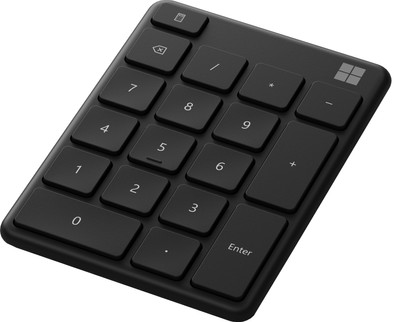
Microsoft Wireless Numeric Keyboard Black

Never available again
View alternatives in the sidebar
View alternatives in the sidebar
Product number | 871605 | |
|---|---|---|
Manufacturer code | 23O-00013 | |
Brand | Microsoft | |
Warranty | 2 years | |
Processing of your defect | Via Coolblue |
Keyboard layout | Numerical | |
|---|---|---|
Backlit keyboard | ||
Spill-resistant | ||
Programmable keys | ||
Multimedia shortcuts | ||
Flat keys | ||
Suitable for gaming | ||
Mechanical keyboard |
Connection type | Wireless | |
|---|---|---|
Nano receiver |
Keyboard composition | Numpad | |
|---|---|---|
Ergonomic design | ||
Wrist rest | ||
Color | Black |
Power supply type | Rechargeable battery |
|---|
Connection type | Wireless | |
|---|---|---|
Backlit keyboard | ||
Keyboard composition | Numpad | |
Ergonomic design | ||
Mechanical keyboard | ||
Suitable for gaming | ||
Spill-resistant |
According to our keyboard expert
With this separate numeric keyboard, you have a small separate keyboard to work with numbers quickly without needing a large keyboard.
You connect this keyboard wirelessly via Bluetooth, so you have enough freedom of movement.
Connect the keyboard to up to 3 devices at the same time.
You can't use the keyboard with devices that don't have Bluetooth.
With the Microsoft Wireless Numeric Keyboard, you can easily work with numbers wherever you are. This separate numeric keyboard ensures that you can always easily work with numbers in programs like Excel. You connect this wireless keyboard to a device of your choice via Bluetooth. In addition, you can connect the keyboard to up to 3 devices of your choice simultaneously. With the press of a key, you can simply switch between the connected devices. Thanks to its compact size, the keyboard is easy to take with you in your bag and bring everywhere.
5 stars
16
4 stars
5
3 stars
0
2 stars
0
1 star
0
On button cell battery, incomprehensible. A USB cable for charging would have been much more convenient. Otherwise a great product, almost direct contact with Windows PC via Bluetooth.
TBK
3 June 2021
Automatically translated from Nederlands
Unpack, turn on, plug in and use in 2 minutes.
roeland renzenbrink
12 March 2021
Automatically translated from Nederlands
fine so far. Exactly what I bought it for.
rene Jansen
25 August 2021
Automatically translated from Nederlands