iiyama Prolite XUB2792QSN-B1
Never available again
View alternatives in the sidebar
View alternatives in the sidebar
According to our monitor expert
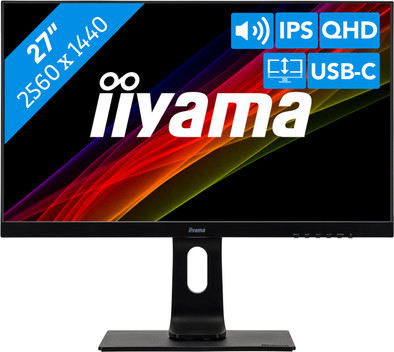
Organize your desk thanks to the USB-C connectivity of the iiyama ProLite XUB2792QSN-B1. With the USB-C dock of this monitor, you can connect and charge (65W) your laptop. The thin bezels make this monitor suitable for a setup of 2 or more screens next to each other. As a result, you can increase your screen space and open several tabs and windows next to each other. This way, you won't have to switch back and forth as much. Naturally, you'll want to get through the working day comfortably. You can create an ergonomic working posture by tilting, turning, or adjusting the monitor in height. This prevents neck and back issues, even when you put the monitor on a different desk.
Sharpness | Quad HD (1440p) | |
Curved | ||
Aspect ratio | Standard (16:9) | |
Refresh rate | 75 Hz | |
Response time | 4 ms | |
Panel type | IPS panel | |
Color depth | 1 billion colors (10-bit) | |
Built-in speakers |
5 stars
16
4 stars
6
3 stars
0
2 stars
0
1 star
0
Installation ease
Image quality
Price-quality ratio
Design
I use the monitor to upgrade my home workplace. By means of the built-in USB-C dock, I can charge my laptop via 1 USB-C cable (USB-Power Delivery), use a wired network and link image and sound. The keyboard and an external webcam are also connected through the display. This means that the two USB ports on the monitor are both occupied. Fortunately, I have a wireless mouse, so a third USB connection is not necessary. If you want to connect more via the monitor, you will unfortunately need an extra USB hub. Because I am now connected to the screen with 1 USB-C cable, I can leave my charger in the laptop bag and I am quickly on and off when I can go back to the office.
The monitor is well adjustable in height. This allows me to use the ream of paper that was under my old monitor for printing. The top edge of the screen comes to about 46 cm from the desk at the highest position.
The built-in speakers give a moderate sound: insufficient to listen to for a long time, but sufficient to hear notification sounds.
Daan
24 August 2021
Automatically translated from Dutch
Perfect screen and with the USB-C neatly 1 cable to the PC. The rest of the peripherals are connected to the screen, so no docking station is required.
Werner Van Ransbeek
15 September 2021
Automatically translated from Dutch
Perfect purchase for my home office desk
Tevreden klant
13 December 2022
Automatically translated from Dutch
Product number | 879490 | |
Manufacturer code | XUB2792QSN-B1 | |
Brand | Iiyama | |
Warranty | 3 years | |
Processing of your defect | At your home |
Recommended display resolution | 2560x1440 | |
Sharpness | Quad HD (1440p) | |
Aspect ratio | Standard (16:9) | |
Refresh rate | 75 Hz | |
Response time | 4 ms | |
Panel type | IPS panel | |
Local dimming | ||
HDR support | ||
Contrast ratio | 1000 | |
Touchscreen | ||
Screen reflection | Anti-glare | |
Blue light filter | ||
Flicker-free technology | ||
Color space | sRGB | |
sRGB color coverage percentage | 99 % | |
Color depth | 1 billion colors (10-bit) | |
Adaptive Sync | ||
Resolution width | 2560 pixels | |
Resolution height | 1440 pixels | |
Anti-reflection type | Matte | |
Viewing distance | 43 - 115 cm | |
Horizontal viewing angle | 178 ° |
Height | 41,3 cm | |
Width | 61,1 cm | |
Depth | 54,3 cm | |
Weight | 7,9 kg | |
Color | Black | |
Including stand | ||
Material | Plastic | |
Cable management | ||
Appearance | Business | |
Curved |
Number of HDMI connectors | 1 | |
Number of Female HDMI type A 1.4 ports | 1 | |
Number of headphone jacks | 1 | |
Type of headphone connection | 3.5mm (TRS) | |
Number of USB-C ports | 1 | |
Number of USB 3.0 Female USB-C ports | 1 | |
Number of Female Standard DisplayPort 1.4 ports | 2 | |
Number of female standard USB-A ports | 2 | |
Female standard USB-A port version | 3.0 | |
Number of female 3.5mm TRS Audio Jack ports | 1 | |
Type of USB port | Standard USB-A, USB-C | |
Number of USB ports | 3 | |
Suitable for daisy chaining | ||
USB-C dock | ||
Maximum USB-C dock power | 65 W |
Included by default | DisplayPort cable, HDMI cable, USB-C cable |
Adjustable in height | ||
Tiltable | ||
Pivotable stand | ||
Pivot function | ||
VESA mount option | ||
VESA mount | 100x100mm |
Energy consumption standby | 0,5 W | |
Energy consumption active | 33 W | |
Energy consumption per 1000h | 24 kWh | |
Annual energy consumption | 35,04 kWh | |
Annual energy costs | 14,02 euros |
Built-in speakers | ||
Sound system | Stereo | |
Webcam | ||
Split screen | ||
Kensington lock |
Recommended for use | Internet, email, and text processing, Office work, Watching movies in Full HD |
