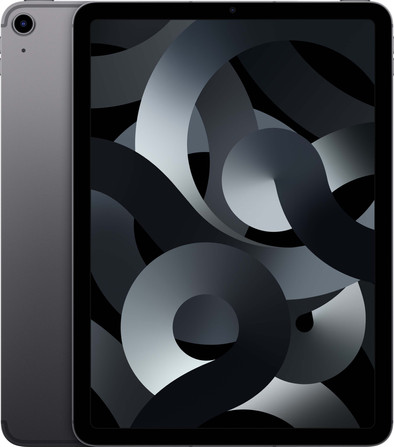
Apple iPad Air (2022) 10.9 inches 64GB WiFi + 5G Space Gray
Never available again
View alternatives in the sidebar
View alternatives in the sidebar
The Apple iPad Air (2022) is the successor of the Apple iPad Air (2020). This 2022 model has an M1 chip, which makes it suitable for the most demanding tasks. The Air (2022) also has the Center Stage function and supports a 5G network connection. Are you curious about the similarities and differences? View our advice article.

Product number | 902874 | |
|---|---|---|
Manufacturer code | MM6R3NF/A | |
Brand | Apple | |
Warranty | 2 years | |
Processing of your defect | Via Coolblue |
Tablet size | Medium-sized | |
|---|---|---|
Depth | 0,61 cm | |
Width | 17,85 cm | |
Height | 24,76 cm | |
Color | Gray | |
Material | Metal |
Child mode available | ||
|---|---|---|
Children's tablet | ||
Recommended for use | Movies, series, and gaming | |
Samsung Enterprise Edition |
Screen quality | Good | |
|---|---|---|
Screen size | 10,9 inches | |
Screen-to-body ratio | 81,3 % | |
Sharpness | Liquid Retina | |
Resolution height | 1640 pixels | |
Resolution width | 2360 pixels | |
Pixel density | 264 ppi | |
Brightness | 500 cd/m2 | |
HDR support | ||
Scratch resistant | ||
Panel type | IPS panel | |
Horizontal aspect ratio | 4 | |
Vertical aspect ratio | 3 | |
Screen technologies | Anti-reflective coating, Apple True Tone, Fingerprint-resistant coating, Laminated screen, Wide Color Display (P3) | |
Refresh rate | 60 Hz |
Built-in WiFi | ||
|---|---|---|
WiFi standards | Wireless A (WiFi 2), Wireless AC (WiFi 5), Wireless AX (WiFi 6), Wireless B (WiFi 1), Wireless G (WiFi 3), Wireless N (WiFi 4) | |
Internet connection options | 5G and WiFi | |
SIM card slot | ||
SIM card slot type | Nano SIM | |
Bluetooth | ||
Bluetooth version | 5.0 | |
Headphone jack | ||
USB port | ||
Type of USB port | USB-C | |
Lightning connector | ||
Suitable for Samsung DeX | ||
Specific Absorption Rate (SAR) category | To be announced |
Year introduced | 2022 | |
|---|---|---|
Introduction month | March | |
Access to Google Play Store | ||
Operating system | iPadOS | |
iPadOS version | iPad OS 15 | |
Expected frequency security updates | Every month | |
Expected date of last security update | March 2027 | |
Assessment remaining security updates | Excellent | |
Review update policy | Excellent |
Total storage capacity | 64 GB | |
|---|---|---|
Memory card reader | ||
Internal RAM | 8 GB |
Speed class | Excellent | |
|---|---|---|
Processor | Apple M1 chip | |
Processor cores | Octa-Core (8) | |
Clock speed | 3,2 GHz | |
Turbo speed | 3,2 GHz |
Autofocus | ||
|---|---|---|
Front Camera | ||
Number of megapixels front camera | 12 MP | |
Second rear camera |
Battery/battery capacity | 2860 mAh | |
|---|---|---|
Suitable for fast charging | ||
Suitable for fast charging type | Power Delivery 3.0 |
Built-in speakers | ||
|---|---|---|
Sound reproduction | Stereo | |
Number of speakers | 4 |
Accelerometer | ||
|---|---|---|
GPS sensor | ||
Light sensor | ||
Fingerprint identity sensor | ||
Facial recognition |
Water-resistant | ||
|---|---|---|
Shockproof |
anything for a smile
Recommended for use | Movies, series, and gaming | |
|---|---|---|
Tablet size | Medium-sized | |
Speed class | Excellent | |
Screen quality | Good | |
Total storage capacity | 64 GB | |
Internet connection options | 5G and WiFi | |
Screen size | 10,9 inches | |
Operating system | iPadOS |
According to our tablet expert
The Apple iPad Air (2022) 10.9 inches is the best iPad for intensive use, such as school or work.
The Apple tablet can effortlessly handle the most demanding tasks, like 3D games and photo editing.
Thanks to 5G, you can stay online in places without a WiFi connection.
You have to regularly clean up apps and files and you can't download many videos, so choose 256GB if you want more storage.
To stay online everywhere via 5G, you need a SIM card or eSIM with a mobile data plan.
With the Apple iPad Air (2022) 10.9 inches 64GB WiFi + 5G Space Gray, you can get started with your documents, games, and series anywhere you want. You can make video calls in high quality while on the go, because the iPad Air supports the fast 5G network. You do need a SIM card with a 5G data plan for this. Thanks to the powerful M1 chip, you can easily use multiple apps at the same time on this iPad Air. Center Stage allows you to stay in the picture during video calls with the 12-megapixel camera. On the 10.9-inch Retina display, you can watch your favorite series in high quality. You can charge the iPad Air (2022) via the USB-C port or connect it to an extra screen, for example. With 64GB storage capacity, you'll have enough room for your favorite apps, files, and photos.
Note: the Apple Pencil (2nd generation) and Magic Keyboard aren't included by default.
Battery life
Speed
Screen quality
Design
Apple iPad Air (2022) is a powerful, stylish iPad with a fast processor that can handle all demanding apps and programs. This model is compatible with Apple Pencil and Magic Keyboard, but you have to purchase them separately.
Stylish, modern design with no home button Like its predecessor from 2020, this model iPad no longer has a home button at the bottom of the screen. That takes some getting used to, because my previous iPad still had that button. I unlock with Touch ID on this model with the lock button on top of the iPad. It also has the same stylish straight edges and a bright screen. The camera on the back sticks out a little bit, so I put the iPad Air (2022) down extra carefully.
Powerful M1 processor Once my iPad is installed, I head to the App Store for all my favorite apps and games. I also get a trial period of Apple Arcade and try out some advanced 3D games. Now I notice the power of the M1 processor of iPad Air (2022). The games don't stutter, the images glide smoothly across the screen and quickly switching between games is no problem either. The M1 chip also shows its strength when I want to edit my photos in Photoshop. This heavy program is no problem for the processor.
Sharp Cameras and Center Stage During video calling with my grandmother I notice a difference in the camera on the front of the iPad. This is now a 12 megapixel selfie camera, so I have a sharper image than with my old iPad. The camera on the back is also a 12 megapixel camera. Another fine specification of this iPad is the Center Stage function. This keeps me in the picture during video calling. The camera follows my face as I move back and forth. For example, I video call my grandmother while I'm cooking, without her losing sight of me.
Works well with Apple Pencil 2 While editing photos, I grab my Apple Pencil 2. It works easily with iPad Air (2022). With the stylus I can easily navigate through my apps, edit my photos and write and sketch in the Notes app on iPad. This model is also compatible with Apple's Smart Keyboard and Magic Keyboard. With that, I comfortably type longer pieces of text on iPad. With the Magic Keyboard, my iPad is even slightly higher, making it even more like a laptop.
Robyn. Apple specialist.
1 June 2022
Automatically translated from Nederlands
Truly an upgrade after years of working with an iPad mini. Battery life. Super fast
peter Harteveld
11 April 2022
Automatically translated from Nederlands
Bought to replace my slowing iPad Air 2, and performs perfectly as expected. At the price, but with the M1 chip you are ready for the future for the time being. Wonderful product, highly recommended.
Piet
5 June 2022
Automatically translated from Nederlands