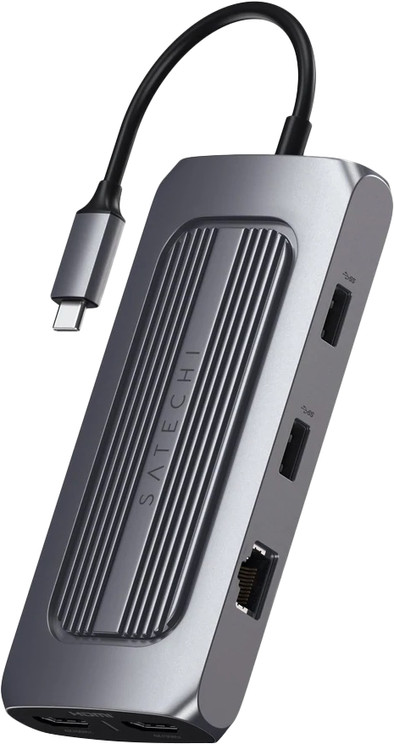
Satechi USB-C Multiport MX Adapter
Never available again
View alternatives in the sidebar
View alternatives in the sidebar
According to our dock for laptops expert
With the Satechi USB-C Multiport MX Adapter, you can connect all your peripherals to your laptop. Before use, you have to install the SiliconMotion software. This is required for the HDMI connectors to work. After that, you can connect up to 2 monitors via the Thunderbolt 4 connectors to create more screen space for all your windows. In addition to that, you can connect your mouse, keyboard, internet cable, and headphones and get started right away. The adapter is useful if you're working at the office or at home. You can also use it to charge your laptop, so you never have to look for a socket when you're working. The Satechi USB-C Adapter works on all Windows laptops, MacBook models, and Chromebook models with a USB-C port that transmits a video signal. This is how you check whether your laptop has a suitable USB-C port.
Extra functionalities docking station | Charge MacBook via own charger, Connect headphones, Connect wired network | |
Type of main connector | USB-C | |
Total available video outputs | 2x HDMI | |
Number of connectable monitors | 2 | |
Type of USB port | Standard USB-A, USB-C | |
Cable length | 0,15 m |
5 stars
0
4 stars
2
3 stars
2
2 stars
1
1 star
0
This Satechi USB-C Multiport MX adapter is highly recommended!
Dual Monitor setup for M1 MacBook According to the technical specifications, it is not possible to connect multiple screens for a MacBook Air M1 (2020). However, with an adapter, this would be possible, according to MacWorld and MacHow2. Several adapters and docking stations are reviewed, but this particular adapter is not mentioned. After installing SiliconMotion's InstantView software, which can be found online but also included on the adapter, my set-up works with a 4K display @60Hz and a QuadHd @60Hz. According to the manual, 1x4K@60Hz and 1x4K@30Hz can be connected.
The adapter is compact and color similar to the Space Gray MacBook. The sleek design fits well in the style.
The connection from the adapter to the laptop is with USB-C, I would have preferred this with Thunderbolt given the limitation of USB-C in data transfer. In addition to data and image, the adapter can also serve as a charger for the laptop if you plug a USB-C charger into the adapter.
If you connect a 2nd monitor to this adapter, you can no longer watch videos.
In short, I am very happy with this simple solution for a reasonable price.
Robbert B.
23 December 2022
Automatically translated from Dutch
Nice docking station, easy to switch between working at the office and at home. Plug in 2 cables and you can work. Even just 1 cable if you buy a 100 W USB-C power supply.
hans Verbeek
5 May 2022
Automatically translated from Dutch
As far as I'm concerned, a product of today should take power consumption into account and this is a USB-C device that should work well with laptops in practice. This device does not do that, power consumption of my laptop immediately went up and the device did not function properly without connecting the laptop to the charger.
Sayf Jawad
1 January 2023
Automatically translated from Dutch
Product number | 905031 | |
Manufacturer code | ST-UCMXAM | |
Brand | Satechi | |
Warranty | 2 years | |
Processing of your defect | Via Coolblue |
Made for laptop models | Apple MacBook, Chromebook, Microsoft Surface, Windows laptop |
Laptop docking station suitable for | Connect 1 monitor, Connect 2 monitors and MacBook, Connect 2 monitors and a Windows laptop | |
Extra functionalities docking station | Charge MacBook via own charger, Connect headphones, Connect wired network | |
Type of main connector | USB-C | |
Supported video technology on Docking Station | DisplayLink | |
Number of USB ports | 4 | |
USB function | Data transfer, Device connection, Play media, Power source, Record audio, Software updates | |
Type of USB port | Standard USB-A, USB-C | |
Number of female standard USB-A ports | 2 | |
Female standard USB-A port version | 3.0 | |
Number of USB-C ports | 2 | |
Protocol Female USB-C port | USB, USB electricity | |
USB version Female USB-C port | 3.0 | |
Number of USB 3.0 Female USB-C ports | 2 | |
Power USB-C port | 100 W | |
Fast charging USB-C port | ||
Fast charging second USB-C port | ||
Total available video outputs | 2x HDMI | |
Number of HDMI connectors | 2 | |
Number of Ethernet ports | 1 | |
Ethernet speed | Gigabit Ethernet (1000Mbps) | |
Number of headphone jacks | 1 | |
Type of headphone connection | 3.5mm (TRS) | |
Memory card reader | ||
Memory card | MicroSD, SD | |
Number of connectable monitors | 2 | |
Maximum image resolution 1 monitor | 4K (3840x2160) | |
Maximum refresh rate 1 monitor | 60 Hz | |
Maximum image resolution 2 monitors | 4K (3840x2160) | |
Maximum refresh rate of 2 monitors | 30 Hz |
Cable length | 0,15 m | |
Color | Gray | |
Height | 1,5 cm | |
Width | 13 cm | |
Depth | 6 cm | |
Weight | 0,18 kg |