BlueBuilt Wireless Bluetooth Keyboard Pro QWERTY
Never available again
View alternatives in the sidebar
View alternatives in the sidebar
BlueBuilt products have the best price-quality ratio because we've put them together ourselves. Based on product data, feedback from customers, and our own product knowledge. In other words, good products. We are so confident, that we'll even give you an extra long warranty. Read everything on BlueBuilt.

Product number | 921904 | |
|---|---|---|
Manufacturer code | BBWLBKPQ23 | |
Brand | BlueBuilt | |
Warranty | 2 years | |
Processing of your defect | Carry-in warranty |
Keyboard layout | QWERTY | |
|---|---|---|
Geographic keyboard layout | US layout | |
Physical keyboard layout | ANSI | |
Typing comfort | Mid-range | |
Backlit keyboard | ||
Spill-resistant | ||
Programmable keys | ||
Multimedia shortcuts | ||
Flat keys | ||
Suitable for gaming | ||
Mechanical keyboard |
Connection type | Wireless | |
|---|---|---|
Type of wireless connection | Bluetooth | |
Bluetooth version | 5.0 | |
Nano receiver |
Keyboard composition | Keyboard, Numpad | |
|---|---|---|
Ergonomic design | ||
Height | 1,3 cm | |
Width | 42,7 cm | |
Depth | 11,3 cm | |
Wrist rest | ||
Color | Black |
Power supply type | Rechargeable battery |
|---|
anything for a smile
Connection type | Wireless | |
|---|---|---|
Backlit keyboard | ||
Keyboard composition | Keyboard, Numpad | |
Ergonomic design | ||
Mechanical keyboard | ||
Physical keyboard layout | ANSI | |
Geographic keyboard layout | US layout | |
Suitable for gaming |
According to our keyboard expert
The flat keys don't make a lot of noise, so your surroundings aren't bothered by your typing.
You can easily connect the keyboard to your laptop or desktop via Bluetooth.
With the multimedia keys, you'll always have the controls for your music and movies within reach while you type.
You can't connect this keyboard via a USB receiver, but via Bluetooth.
The keyboard doesn't have backlit keys, so you might make more typos in the dark than with a backlit keyboard.
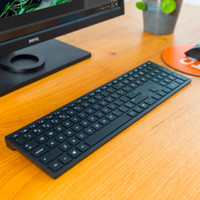
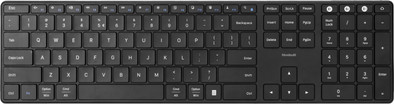
With the BlueBuilt Wireless Bluetooth Keyboard Pro QWERTY, you can type comfortably for hours no matter where you work. The keys are shaped to your fingertips, so they feel comfortable while you type. The keys are also flat and silent, so you don't bother anyone while you type. You can easily connect the keyboard to your laptop via Bluetooth and get started right away. The keyboard has useful multimedia shortcuts that allow you to control your music, open your email, or print a page easily. Work with numbers a lot? You can easily enter them via the numeric keypad. You can fully charge the keyboard in about 2 to 4 hours. You also receive a 5-year warranty for this BlueBuilt keyboard.
Degelijkheid
Installatiegemak
Ergonomie
Gebruiksgemak
Vormgeving
The BlueBuilt Wireless Bluetooth Keyboard Pro QWERTY is a nice keyboard that I can easily take with me everywhere. I can easily connect the keyboard to my MacBook via Bluetooth within seconds. The keys type nicely and make little noise. I do think it's a shame that this keyboard doesn't have feet, so you can't adjust the height. I also miss lighting under the keys. I like to work in the evening and can't see the keys that well.
First impression In the packaging I find the keyboard, a USB C cable and a mini manual. The keyboard has a nice, slim design and is thinner than I expected. I like that the keys are printed with both the Windows and macOS symbols, because I regularly switch between my MacBook and Windows laptop. The manual is a bit small, but has all the information I need. I had to charge the keyboard first with the supplied USB C cable. I connected this to my Bluebuilt docking station, because an adapter is not included.
Getting started After charging, I turned on the keyboard with the small slide button that is hidden at the top right. To pair my MacBook, I held down the Bluetooth button for about 3 seconds. The keyboard quickly appeared in the Bluetooth menu of my MacBook. After entering the verification code and determining the keyboard type, I got started. The keys are flat and feel nice when I type, even with my artificial nails. Moreover, I hear almost no sound when I type. In addition to my MacBook, I also easily and quickly paired the keyboard with my Windows laptop and iPad. I quickly switch between these devices by pressing the toggle keys. These are located above the numeric keypad on the right. I like that my devices remember the keyboard. When I later turned the keyboard back on, I could type immediately and did not have to do anything else.
Rowan. Toetsenbord specialist.
30 September 2024
Automatically translated from Nederlands
Keyboard is not completely straight. Is a little bit warped at the bottom. So there is a millimeter of clearance. Very annoying when typing. I now have two business cards underneath as standard, to stop the wobbling. The only thing keeping me from returning it is the effort.
Gert-Jan
1 May 2024
Automatically translated from Nederlands
If you are looking for a solid, easy-to-connect keyboard, this is a good choice. If you're looking for a comfortable, quiet, and customizable keyboard, I wouldn't recommend this
Iris
21 September 2023
Automatically translated from Nederlands