Written by Evany
Edited on
15 December 2023
·
15:26
Everything on Apple iOS 16
The operating system iOS 16 from Apple has a lot of useful functions. You can customize the lock screen as you like, and you have more control over the messages you send. iOS is installed on the iPhone 14 series by default. This update is available for the iPhone 8 or newer. In this article, you can read more about Apple iOS 16.
iOS 17 now available
The successor to iOS 16 is now available for the Apple iPhone. This new software update has lots of new and improved functions. In the article below, you can read everything on iOS 17.
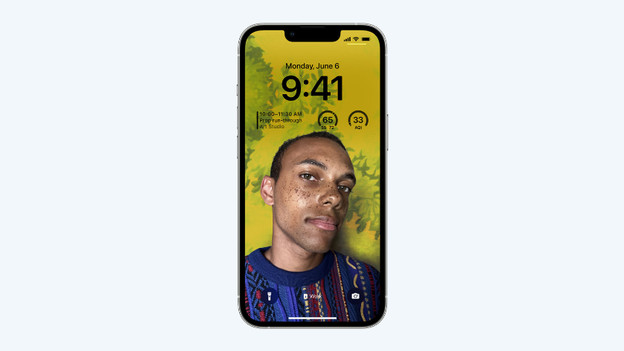
Customizable lock screen
In iOS 16, you can customize the lock screen as you like. You can choose from different styles and colors for the time and dat display. It's also easy to add various widgets. For example, you can quickly check the battery level of your AirPods and if your Activity rings are full. You can see all that without unlocking your iPhone. If you use Focus, you can set a different lock screen per profile. This way, you can stay focused.

Share photos easier via iCloud
Are you going on a nice weekend trip with your family? You'll probably take a lot of photos which you share with each other. You don't have to share photos afterwards anymore. It's now possible to easily share a photo library with family members via iCloud. In the Camera app, you can make sure that photos end up in the shared photo library automatically beforehand. This way, everything is in the right place, and your photos and videos are directly available to everyone who has access.
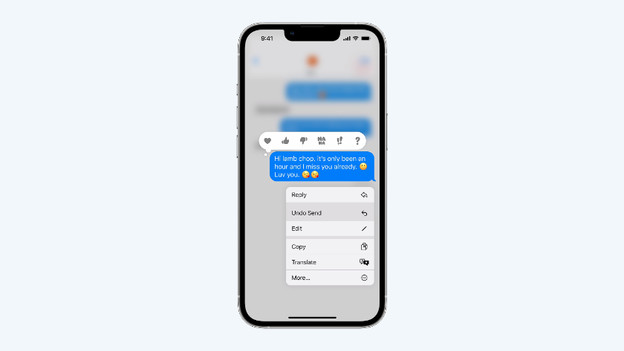
More possibilities in Messages and Mail
Sometimes, you send a message to the wrong person. In iOS 16, you can easily revert that. You can also retrieve sent messages that you deleted. In the Mail app, you can easily plan your mails, so they'll be sent whenever you want. Another useful feature is 'Remind Later'. That way, you get a notification at a later time of an important email that you still need to read and answer. In addition, it's easier to find contacts and attachments.
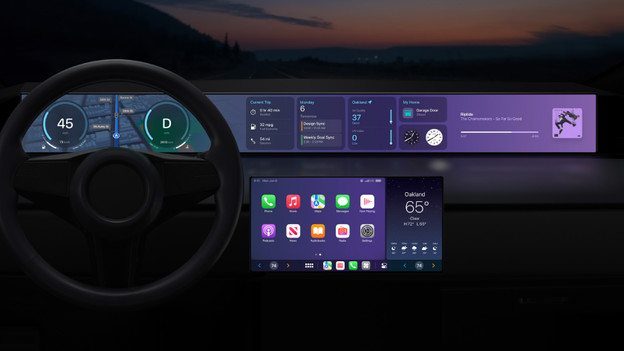
CarPlay fully integrated in cars
Via Apple CarPlay, you have access to your favorite iPhone apps in the car. That will also be the case in the future, but more extensive. In new cars with a digital dashboard, you can now soo the accelerometer and the fuel level in the visual style you're used to from Apple. In addition, you can control your other systems via CarPlay, like the climate control. Apple will announce which cars will support this new system in the end of 2023.
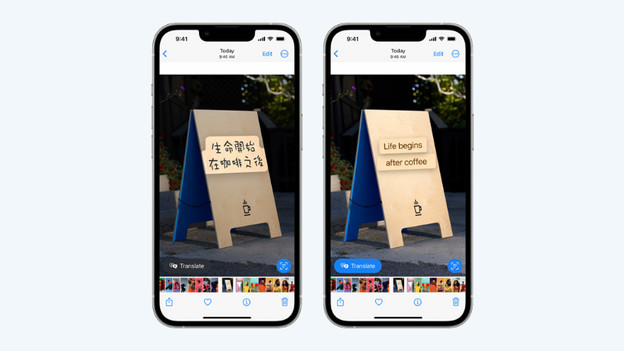
More changes in iOS 16
The iOS 16 operating system also has a few other interesting new and improved functions:
- With the improved 'Live Text', the translation of a text in a photo is more accurate.
- In Safari, you can easily share multiple tabs with your colleagues, for example.
- You can plan up to 15 stops along your route in Maps.
- With Siri, you can add an emoji to messages and end calls.
- With the Health app, you can easily make a useful overview of the medication and vitamins you take, and include reminders.
Article by Evany
Apple Expert.