
Written by Evany
Edited on
25 August 2026
·
09:04
Everything on iOS 17
The iOS 17 is the latest version of the Apple iPhone operating system. This new update has lots of improvements and new functions. You can create personal contact posters, the Messages app has been updated, and you can quickly share your contact details via NameDrop, for example. In this article, we'll tell you more about the most important new features in iOS 17.
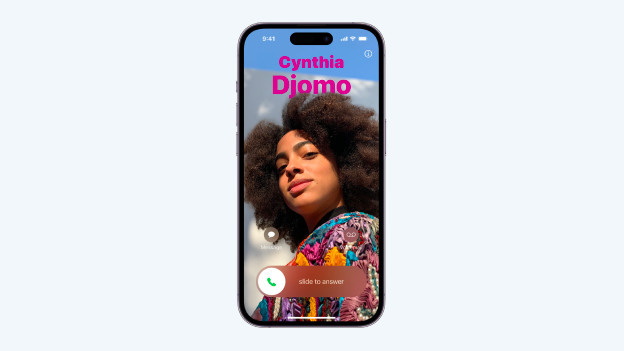
Personal contact posters
With incoming calls, you used to only see the name of the person who was calling on the screen. With iOS 17, you can create special posters for your contacts and yourself. You can design these posters the way you want. Choose the design of the text, the background color, and a photo or memoji. You can also see these contact posters when you tap on a contact in your 'Contacts'.

New functions in Messages
You can now share your location directly from Messages or request it from someone you're talking to. With the new Check-in, you can quickly let us know whether you've arrived safely at your destination. Do you often send audio messages to your friends or family? These are now also converted into text so the recipient can read them right away. In addition, you can find something even faster now. If you search for 'Photo', you'll see a filter, for example. If you tap this filter, you'll see all the photos that have been sent to you.

New AirDrop function and NameDrop
With AirDrop, you can quickly share photos or other files from your iPhone with others who have an iPhone or Mac, for example. You can now do this even faster by holding your iPhone near another iPhone. Do you go to a trade fair or other business event frequently? With NameDrop, you can quickly share your contact details with someone else. Again, all you have to do is hold your iPhone near another iPhone.

Your iPhone as a clock with Standby
You can see the Standby function when you connect your iPhone to a charger and place it on its side. This allows you to see the time, for example. This is useful for your desk or bedside table. Want to see your photos instead of just a clock? In Standby mode, you can easily add other widgets yourself. Standby works best if you attach your iPhone to a wireless charger with a stand. This makes your iPhone look like a clock or digital photo frame.

More new iOS 17 functions
In addition to the these functions, iOS 17 has a number of other new and improved functions:
- During a FaceTime call, you can send hearts, balloons, and more with a simple hand gesture.
- With the new Diary app you have a digital diary on your iPhone.
- You can easily create profiles in Safari, so you can keep work and your private life separate.
- With 'Screen Distance', you'll receive a notification if you hold your iPhone too close to your eyes.
Article by Evany
Apple Expert.

iOS 26 available now
The successor to iOS 17 is now available for the Apple iPhone. This new software update has lots of new and improved functions. In the article below, you can read everything on iOS 17.