
Written by Mark
Edited on
7 May 2024
·
11:44
How do you make a backup of your Nintendo Switch?
You don't want to lose your precious hours of game saves on your Nintendo Switch. Luckily, you can secure your saved data in 2 ways. In this article, we'll tell you exactly how to back up your Nintendo Switch.
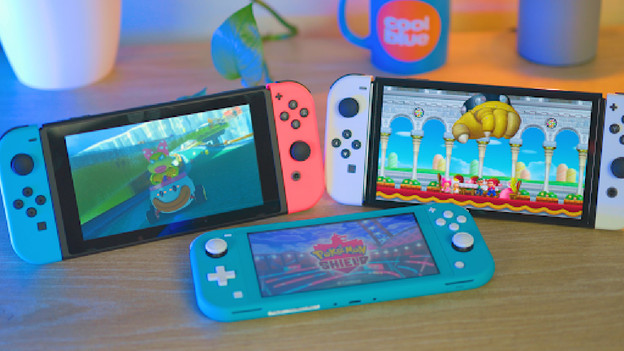
Back up your Switch
If you want to transfer your game saves to a new Nintendo Switch, you have to back them up first. You can back up your game saves in 3 ways.
Tip 1: upload your data to a memory card
Tip 2: upload your data to the cloud
Tip 3: Back up your Nintendo Switch manually
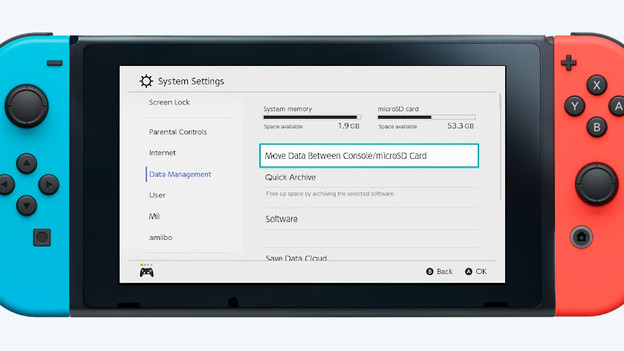
Tip 1: use a memory card
The easiest way to transfer your games to your new Switch is with a memory card. Follow the steps below and transfer your game saves to a memory card.
- Go to 'System settings' via the home screen and then select 'Memory management'.
- Select 'Move data between console and MicroSD card'.
- Check the games you want to transfer to the memory card and then press 'Okay'.
Your game saves are now stored on your memory card.
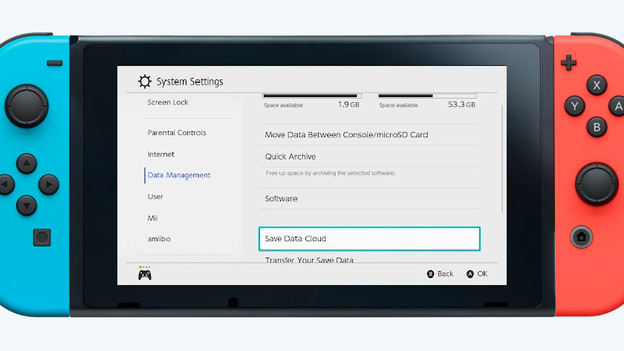
Tip 2: automatically save your data in the cloud
If you have a Nintendo Switch Online subscription, you also automatically save data in the cloud. Follow the next steps and find an overview of all stored data.
- Go to 'System Settings' and select 'Memory Management'.
- Select 'Storage Cloud' and you'll see an overview.
In this overview, you can see exactly which games are stored in the cloud and when this last happened. Don't have a Nintendo Switch Online? Read exactly what the other advantages are in the article below.
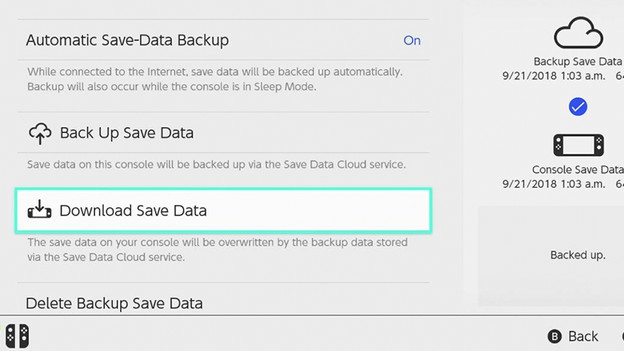
Tip 3: back up your Nintendo Switch manually
Have you purchased a new Nintendo Switch and do you want to be sure that the most recent saved data is in the cloud? Make a backup manually. Follow the steps below and secure all your saved data.
- On the home screen, scroll all the way to the right of your games and select 'All software'.
- Choose the games you want to upload to the cloud and press the plus button on your controller.
- Select 'Back up saved data'.
After this, upload your most recent save to the cloud. You can then transfer your game saves to your new Nintendo Switch.
Article by Mark
Gaming Expert.
