
Written by Robyn
Edited on
3 November 2025
·
14:16
How do you use Siri on Apple TV?
With Siri, it's even easier to control your Apple TV. Use the Apple voice assistant to look for movies and series, or to open apps. Can't you hear an actor properly? Siri can rewind your movie a bit. In this article, we'll tell you more about how your use your Siri smartly on your Apple TV.

Get started with Siri on Apple TV
With Siri, you can find what you're looking for more easily. No matter is it's a movie or your iPhone. In this article, you can learn how to use Siri for the following:
- Find movies, series, apps, and open them
- Find videos on YouTube
- Read the weather forecast
- Find your iPhone
We'll also explain how to set up Siri.
- Set up Siri in Apple TV
Set up Siri on the Apple TV
To enable Siri on your Apple TV, go through a few steps.
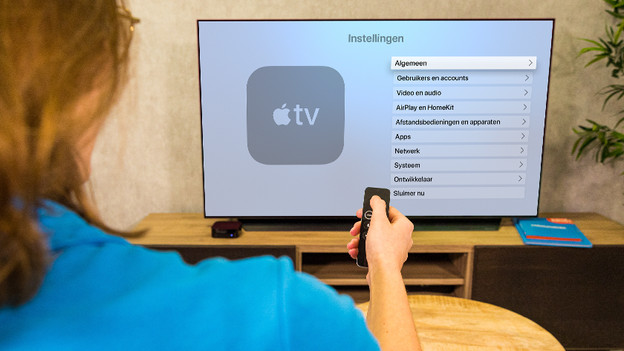
- Open the Settings app on your Apple TV.
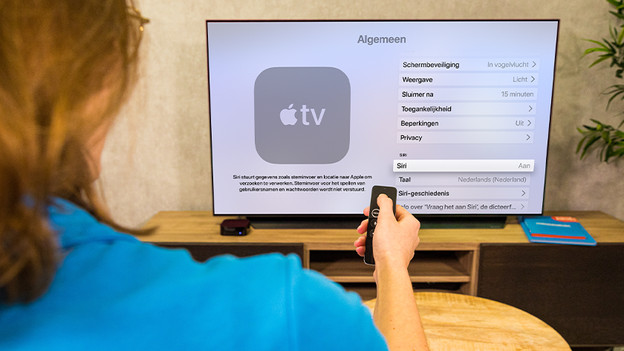
- Click General and scroll to Siri. Click it to enable or disable Siri.
Do you want to ask Siri a question? Press and hold the dictate button on the Siri Remote, ask your questions, and release the button. Siri now searches popular apps, or Siri will display the answer. Siri doesn't talk on the Apple TV, so you won't be distracted while you watch a movie.
Open the settings of the Apple TV and go to 'General'.
Scroll to 'Siri' and click it to enable or disable Siri.

Siri functions
With Siri, you can find apps, movies, and the weather forecast even faster. Tell Siri "I want to watch Gone", and Siri will find the movie for you. Sire looks through all available streaming platforms like Apple TV+, Netflix, Videoland, Prime Video, and Disney+. Ask Siri to enable the subtitles, or to rewind to minutes, and it'll happen. Siri tells you where you phone is when you lost it, how warm is it outside, and what the final score is of the NBA game you missed.
Useful Siri voice commands
| Commands | |
|---|---|
| Search for movies, series, programs, and channels | 'I want to watch Shutter Island.' 'Look for funny horror movies.' 'Find new movies in 4K.' 'Look for children's TV shows.' 'Watch the ABC News live.' |
| During a movie or series | 'Enable the subtitles.' 'Fast forward 90 seconds.' 'What did he say?' 'Who stars in this movie?' 'Pause this.' |
| Search for apps, music, and videos | 'Search for fitness apps.' 'Search for children's apps.' 'Search for Disney apps.' 'Search funny cat videos on YouTube.' 'Search for vegetarian cooking videos on YouTube.' |
| Find your Apple devices | 'Where is my iPhone?' 'Play a sound on my iPhone.' 'Where is my Apple watch?' |
| Get answers to general questions | 'What's the temperature outside?' 'When does the sun go down?' 'What's the NBA shedule?' 'Which soccer matches are on TV?' 'What's the Apple stock today?' |
| Navigate through your Apple TV more easily | 'Open the App Store.' 'Go to Photos.' 'Open Settings.' 'Go to Podcast.' |
| Control HomeKit devices | 'Dim the light in the dining room to 50%.' 'Turn on the coffee machine.' 'Set the temperature to 20°C.' 'Are the lights still on upstairs?' 'Is the front door locked?' |
Article by Robyn
Apple Expert.
