Written by Donato
Edited on
27 January 2025
·
13:10
How do you reset your Samsung television?
If the sound or settings of your television don't work anymore, resetting the television sometimes solves the problem. A reset does delete all your settings and downloaded apps. In this article, I'll explain how to reset your Samsung TV to factory settings.
Reset your Samsung TV in 5 steps
When you reset your Samsung TV, it deletes all your settings and downloaded apps. Keep in mind that you have to reinstall them after the reset.
- Step 1: open the menu
- Step 2: open General
- Step 3: choose Reset
- Step 4: enter your PIN code
- Step 5: confirm the reset
- Extra tip: perform a soft reset


Step 1: open the menu
Press the menu button on the remote. You can recognize this button by the word 'Menu' or an icon that looks like a house.

Step 2: open General and Privacy
Select the menu General and Privacy.
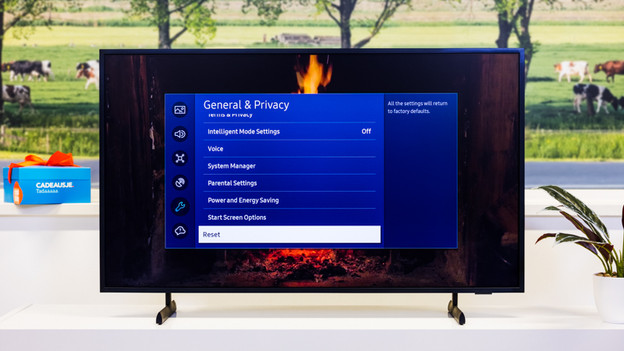
Step 3: choose 'Reset'
Select the option 'Reset' and press the enter button.
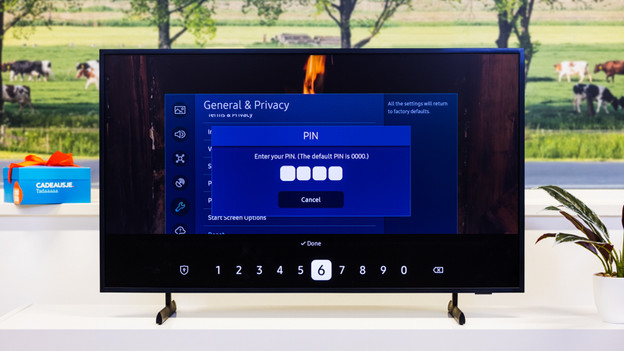
Step 4: enter your PIN code
If you've secured your television, your TV will ask for the PIN code now. Enter the security code and press the enter button.
Didn't create a PIN code yet? Enter '0000'. This is always the default PIN code.

Step 5: confirm the reset
The television now asks if you're sure you want to delete all settings. Choose 'Reset'.
Note: is the 'Reset button on your TV gray and can't you select it? That means an app on your TV is still open and blocking the reset. Press the return button of your remote until you're in the home menu. Go through the steps above again. The reset button should work now.

Extra tip: perform a soft reset
Are you having problems with the image of your Samsung TV and can't see the menu as a result? A soft reset might work. Turn off your television with the remote. Then, unplug the TV from the socket and wait 30 seconds. Plug the connector back into the socket and turn on the TV.
A soft reset doesn't delete all the data on your TV, but it does solve problems sometimes.
Article by Donato
Television Expert.