AVM FRITZ!Box 7360 International
Never available again
View alternatives in the sidebar
View alternatives in the sidebar
Ethernet speed | Gigabit Ethernet (1000Mbps) | |
|---|---|---|
Frequency bands | Single-band (2.4GHz) | |
Number of Ethernet ports | 4 |
According to our router expert
The FRITZ!Box 7360 is more than just a wireless router with an ADSL2+ modem. It's also a base station for DECT phones and supports VDSL and VoIP. The FRITZ!Box 7360 has 1 DSL connection, 1 phone connection, 2 Fast Ethernet ports, 2 gigabit ethernet ports, and 2 USB ports.
The integrated DECT base station of the FRITZ!Box 7360 supports up to 6 wireless phones. Thanks to its VoIP support, you can easily make internet calls. With the Fritz!App, it's even possible to do this with your iPhone or Android smartphone.
A handy feature: with the FRITZ!Box 7360 you can remotely access the router and all USB devices that are connected through MyFRITZ! and FRITZ!NAS, all over the world. Read text files, listen to MP3 files, and watch movies that are stored in your home network.
The FRITZ!Bo 7360 has 2 USB 2.0 ports, which you can use to connect a USB flash drive, external hard drive, or USB printer. 1 USB port is also compatible with 3G dongles. If the incoming ADSL connection fails, you can always surf the web via mobile internet.
5 stars
4
4 stars
6
3 stars
0
2 stars
0
1 star
0
Due to the switch to a new Internet subscription, I could no longer use my FRITZ!Box 7270, because the modem does not support VDSL. The modem that I got on loan from my internet provider does, but does not offer the functionality that I was used to from the 7270. That's why I decided to buy another FRITZ!Box and after some research on the internet, the 7360 model turned out to meet my requirements.
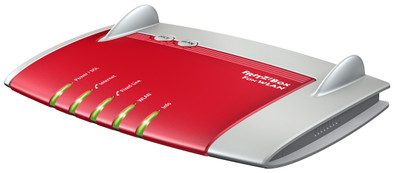
The FRITZ!Box 7360 is supplied with an external power supply, a 4.25 meter long DSL telephone cable, a 1.5 meter long Ethernet cable and an installation manual. The housing looks quite futuristic, partly due to the fully integrated antennas. 5 LED lights are built into the housing: Power/DSL, Internet, Fixed line, WLAN and Info. The function of the latter LED can be set via the user interface. There are also two more buttons on top of the 7360: a DECT button for pairing and calling wireless handsets for telephony and a WLAN button for switching the wireless network on or off. The back of the device contains the following connectivity options: 1 x analog telephone, 1 x DSL/VDSL, 1 x USB 2.0 and 4 x LAN (1 Gbit/s). On the left side is a second USB 2.0 connection.
Connecting the 7360 was a piece of cake in my case: connecting cables, logging into the (non-Dutch) user interface via a PC and going through the installation wizard. In one of the screens I could select my internet provider, with which the FRITZ immediately had the correct settings. The current firmware contains default settings for Scarlet, Telfort and XS4ALL, but it is also possible to configure the modem for other providers. Registering my FRITZ!Fon M2 handset also went smoothly, so that after about 10 minutes I was able to use the internet and make calls again.
The user interface looks fresh and clear. Because it is started within a browser, it does not matter whether you work with Windows or OS X, for example. The main screen provides an immediate overview of useful data, such as current power consumption, the status of connections and interfaces (including current upload and download data). speed), recent phone calls, connected devices, and answering machine messages. The user can choose to make settings via wizards or via the menu. It is recommended to at least browse through the menu, in order to gain insight into the many possibilities of the 7360. Via an option in the menu you can also check whether there are firmware updates and if so, they can be installed directly. The manufacturer offers the upgrades free of charge.
The 7360 is an extremely versatile device. A selection of the many functions: VDSL/ADSL support, WLAN (max. 300 Mbit/s), DECT base station, built-in answering machine, integrated media server, NAS functionality and built-in firewall. Starting up WLAN takes pleasantly little time: about 6 seconds. Activating and deactivating WLAN can be done with the button on the housing, but also from the comfort of your chair with any telephone. If you have a DECT handset from AVM (the manufacturer of FRITZ!Box), it's even easier: it contains a special menu option for this. In addition, in the user settings there is the menu option “Night Service”, which makes it possible to specify a time period for each day of the week in which WLAN should be switched off. The only drawback I find here is that WLAN is always turned on at the end of the time slot, even if it was turned off at the start of the time slot. Connecting various devices (tablet, telephone, game console) went smoothly.
In addition to VDSL and WLAN, I use the 7360 as a telephone exchange in combination with a DECT handset and a landline. The sound quality of telephone calls is without a doubt good. A telephone list can be stored in the FRITZ, and it is also possible to provide telephone numbers with speed dial numbers. Very useful when using an old-fashioned telephone. The 7360 has a built-in answering machine, with ample configuration options. For example, your own welcome and farewell messages can be recorded and the time after which the answering machine should answer can be set. A downside here too: the 7360 has no internal memory for storing messages and voice messages. When using the answering machine, a storage medium will therefore always have to be plugged into one of the USB ports. That in itself is not really a problem, because a memory stick of 128 MB turned out to offer sufficient storage space and there is still a USB port free.
With the FRITZ!Box 7360 you get a kind of Swiss army knife (but Made in Germany ;-)). The device can do just about everything you could wish for and does it very well. The few minuses found are negligible when you look at the many pluses. Therefore, I would advise anyone looking for a stable ADSL/VDSL modem to take a look at the 7360.
BartH
29 September 2013
Automatically translated from Dutch
When my previous modem started to falter, I chose this modem because it met my needs according to the manual. The combination with dect telephones was also interesting because they also need to be replaced at home. The installation was quick and flawless, you definitely don't have to be a "modem expert" to install this. If you want to work deeper into the settings, a manual is necessary, and I think that's a minus. She may not be clear enough, but as always a little Googling and you'll figure it out. It also has an extensive logbook with a lot of info in it and gives much more info than my old Belkin modem. I also chose this modem to easily switch from ADSL2+ to VDSL in the future With this modem you can choose to call via the landline or VOIP if your provider allows this option. This is really a fine piece of technology, I couldn't miss it anymore.
Marc
6 November 2013
Automatically translated from Dutch
easily programmable
Bart Zoons
17 March 2017
Automatically translated from Dutch
Receive more coverage in case of damage than with your standard warranty. Coolblue takes care of everything: from taking out the insurance to repairs. Is a repair not possible? You receive the purchase price as CoolblueCredit.
XCover is allowed to arrange and process insurances on behalf of the insurer. The insurances are governed by Belgium law. If you have a complaint, you can contact the or our customer service.
First, add your router to your shopping cart. On the next page, choose the Protection Plan below. You always have a 30-day return window and pay no deductible in case of damage.
The insurance can be canceled every year, even if you have paid in advance. If you cancel earlier, you will receive a refund for the overpaid amount.
Product number | 294452 | |
|---|---|---|
Manufacturer code | 20002536 | |
Brand | AVM FRITZ! | |
Warranty | 5 years | |
Processing of your defect | Carry-in warranty |
Can be expanded with extra stations |
|---|
Frequency bands | Single-band (2.4GHz) | |
|---|---|---|
2.4GHz band speed | 300 Mbit/s | |
Number of WiFi antennas | 3 | |
Jumbo frame support |
Ethernet speed | Gigabit Ethernet (1000Mbps) | |
|---|---|---|
Network connector | ||
Number of Ethernet ports | 4 | |
PoE support | ||
USB port | ||
Number of USB ports | 2 |
Automatically switches to 3G/4G | ||
|---|---|---|
SIM card slot |
Quality of Service (QoS) | ||
|---|---|---|
MU-MIMMO | ||
Seamless roaming | ||
Beamforming | ||
Port forwarding | ||
LACP Link aggregation |
Parental controls | ||
|---|---|---|
WLAN security | WEP, WPA, WPA2 | |
Firewall | ||
Firewall type | NAT Firewall, SPI Firewall | |
Guest network | ||
VPN server | ||
VPN passthrough |
Mounting possible | ||
|---|---|---|
Width | 15,9 cm | |
Height | 4,7 cm | |
Depth | 22,6 cm | |
Weight | 0,5 kg | |
Color | Gray, Red | |
Material | Plastic |
Power supply type | Power grid | |
|---|---|---|
Battery level indicator |