Never available again
View alternatives in the sidebar
View alternatives in the sidebar
Product number | 315691 | |
|---|---|---|
Manufacturer code | 6992B009 | |
Brand | Canon | |
Warranty | 2 years | |
Processing of your defect | Carry-in warranty |
Width | 49,1 cm | |
|---|---|---|
Depth | 39,6 cm | |
Height | 23,1 cm | |
Color | Black | |
Weight | 11,7 kg |
Printer type | All-in-one | |
|---|---|---|
Photo printer | ||
Portable (mobile use) |
Print technology | Inkjet | |
|---|---|---|
Number of cartridges/toner cartridges | 5 | |
Color printer | ||
Print speed black (ISO) | 12,5 ppm | |
Print speed color (ISO) | 10 ppm | |
First black page ready after | 8,4 seconds | |
Maximum print resolution height | 2400 dpi | |
Maximum print resolution width | 9600 dpi | |
Maximum print size | A4 | |
Automatic duplex printing | ||
Borderless printing | ||
Maximum print size duplex printing | A4 |
Scan functionality | ||
|---|---|---|
Automatic duplex scanning | ||
Maximum optical scan resolution width | 4800 dpi | |
Maximum optical scan resolution height | 2400 dpi | |
Scanner type | File scanner, Flatbed scanner | |
Maximum scan size | A4 (21x29.7cm) | |
Automatic document feeder (ADF) | ||
Maximum paper size ADF | A4 | |
Scan sizes | A4 | |
Scan speed (PPM) | 14 ppm | |
Color depth output | 24 bpp | |
Scan to | USB | |
ADF capacity | 35 |
Copying functionality |
|---|
Fax functionality | ||
|---|---|---|
Color fax |
Built-in screen | ||
|---|---|---|
Color screen | ||
Touchscreen |
Compatible with operating system | Windows, iOS, macOS | |
|---|---|---|
Apple AirPrint | ||
Email print | ||
WPS (Wireless Protected Setup) | ||
Number of Ethernet ports | 1 | |
NFC | ||
Built-in WiFi | ||
WiFi direct | ||
Bluetooth | ||
USB port |
Manual input tray | ||
|---|---|---|
Photo paper drawer | ||
Output capacity output drawer | 250 | |
Input capacity photo paper tray | 20 | |
Maximum print size standard paper tray | A4 | |
Input capacity standard paper tray | 250 | |
Maximum print size photo paper tray | 10x15, 13x18 | |
Number of standard paper trays | 1 |
Memory card reader |
|---|
anything for a smile
Print technology | Inkjet | |
|---|---|---|
Printer type | All-in-one | |
Color printer | ||
Automatic duplex printing | ||
Maximum print size | A4 | |
Automatic document feeder (ADF) | ||
WiFi direct |
According to our printer expert
Print razor-sharp photographs thanks to the extensive 5-cartridge system and a print resolution of 9,600DPI by 2,400DPI.
Share the printer with your home network using a network cable.
Use the photo paper tray to store photo paper separately from standard text paper.
The printer has no memory card slot for printing directly from your SD card.
Because the output tray sticks out, this printer is less compact.
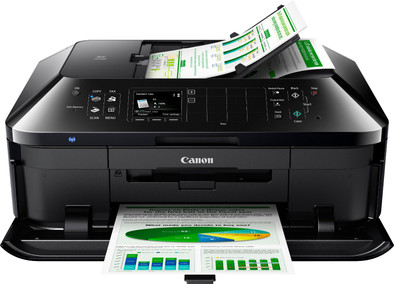
With the Canon PIXMA MX925 you can print, scan, copy, and fax. Print directly from your PC, laptop, tablet, or smartphone using WiFi. The print resolution of 9,600DPI by 2,400DPI makes this all-in-one printer suitable for printing photographs. The MX925 has direct access to the web, allowing you to print photographs from your online albums. With the automatic document feeder, you can scan, copy, or fax up to 35 sheets of paper printed on both sides.
My expectation from an All-In-One printer is that when I need it, it will work perfectly and with quality.
Weekly/monthly I use this to scan a number of administrative documents, occasionally print a photo and of course also on time and print a document. Sometimes I also make a copy, but I don't fax.
° Installation: The installation went smoothly, thanks to the clear manual. The device is connected to my network via WiFi. ° Scanning: The automatic document feeder (ADF) works perfectly. This is one of the reasons I chose this model, so that I can easily and quickly scan my administrative documents. The scan quality is also very good. ° Printing (photo): The print quality of the photos (on Canon GP-501 Glossy Photo Paper 100 sheets 10 x 15 cm) is very nice. Even if I send a photo from my iPhone via Apple Airprint, this is not only super easy, but the result is also beautiful. ° Printing (documents): Nice print quality, as it should be. ° Copy: It is sometimes difficult to tell the difference between the original document and the copy. This also works perfectly.
I am very satisfied with my purchase. The ease of use is enormous thanks to the automatic document feeder and small functionalities such as the Apple Airprint. In addition, the quality is also very satisfying. This All-in-one is well worth its price and highly recommended.
Fabrice Hendrickx
27 March 2015
Automatically translated from Nederlands
Very complete network printer: double-sided printing, printing CDs and DVDs, automatic document feeder, faxing, scanning - just barely brewing coffee. Easy to install and operate, even for the not-so-seasoned. The printer does have an annoying key tone, which fortunately turned out to be switched off. Is also quite noisy when printing, especially when lowering the output cover (clab!). I haven't printed any photos yet, but overall the print quality is excellent.
I only missed one thing: a separate paper tray for stationery, for example. The printer is also quite large - probably because of all those features!
M. Reede
23 September 2014
Automatically translated from Nederlands
Finally a new addition after years and days of using separate canon scanner and printer ip4500 great printer sob.. The box has arrived neatly but where is the promised coolblue box.. because now no fun with that box ;)
But everything is properly packed, always turn the open box upside down and then gently lift the box off, so now there is also a bag with handles around it, so that the contents can easily be removed... but this can only be seen when you've already figured it out. But given the weight and how everything is reasonably locked up in a transport box, I prefer to rely on the proven method.
I do wonder why there is a quick start guide with it because the plug in and everything already indicates the screen from 1st to the last step ... only they could have mentioned on the screen that it is allowed to align, etc. can make coffee in peace. But fair is fair the duration of the steps are given in minutes. Just search for my wifi point with the well-known 2 buttons and found tataa and the printer sets the wifi codes itself.
And when placing the printer at the PC was not yet forgotten that you have something in your hands, this is the heaviest home printer that I personally know. The fingerprints are the same, but that should not spoil the fun. All software can be downloaded via canon but curious how the supplied CD works ... nice and clear and the choice in advance what you do or do not want to install everything done. Click on the icons on the right via the system tray and choose via settings whether you want to start everything with Windows. So time for my 1st print from my pc ... coffee I had quickly knocked back because the expectation is that I will go so fast that my coffee will get cold. Uchum press the document printout and the printer like a Max Verstappen you hear go from left to right and back violently on switching think you should lie down because the paper will fly out in no time. After at least a minute of doing everything, the promised printout finally arrives.
Looks good clear letters and logos with no blurring or unevenness in ink intensity and that on draft or fast print ...impressive... Copy a document through the glass plate and then you feel a heavy lid while folding it up, but close it... hold it well because it goes very easily over a certain point. Selected on the printer keyboard for copy (and 2 options color or black/white) with glass plate and that goes very smoothly. Documents via the ADF then, the printer itself recognizes that documents have been placed and if you press copy, it is almost the same as scanning and printing and the scanned documents are placed via a different upper output. Again perfect if you put the original and copy on top of each other and hold it against the light to see no shifting of text etc. The sound produced is not that bad I'm used to Canon printers, this is now my 5th from 1996. Everyone experiences it in their own way, other things count more for me. Ink can be found cheaply via the well-known offer / sales site all in a row. Later in the day PC was out and still something to copy and thought neuh PC is not available .. but again a max verstappen in the preliminary round once the time round has been driven, the printing goes very smoothly.
Furthermore, what else is there to report that photos and documents roll out insanely .. Display and keyboard are clear and keys light up according to the commands or tasks that you want. Dust-free 2 paper drawers, 250 sheets of A4, above that a drawer with eg envelopes or photo paper. At the bottom of the top drawer is the tray for a CD printer...yup, it's possible too. All media you can put it in.. will be centered and locked in with 1 movement. Print assignment... this all-rounder opens the door himself, but was born in the church because he can't close it, had already spoken to him but still doesn't want to listen. Take a good look at the specs to see how big this all-in-one is and weight if it's important, erase it in advance and it's no problem, it's 1x put down and you're done. Many connection options of various equipment in combination with clear software and yet little software to install, unlike what I am used to with HP, for example with people who wanted an HP. So far a very fine printer, a few minus points that do not outweigh all the positives that it is all about after all.
If you decide to take this into consideration, do it and have fun with it
Seegers
12 July 2017
Automatically translated from Nederlands