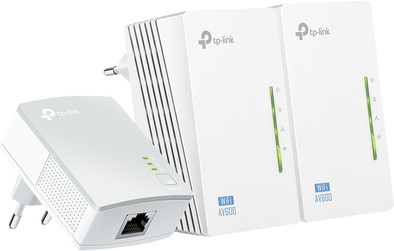
TP-Link TL-WPA4220TKIT WiFi 300Mbps 3 Adapters

Never available again
View alternatives in the sidebar
View alternatives in the sidebar
Product number | 388261 | |
|---|---|---|
Manufacturer code | TL-WPA4220T KIT | |
Brand | TP-Link | |
Warranty | 3 years | |
Processing of your defect | Via Coolblue |
Built-in WiFi | ||
|---|---|---|
WiFi standards | Wireless B, Wireless G, Wireless N | |
Frequency bands | Single-band (2.4GHz) | |
2.4GHz band speed | 300 Mbit/s | |
Ethernet speed | Fast Ethernet (100Mbps) | |
Maximum ethernet speed | 500 Mbit/s |
Automatic phase coupling | ||
|---|---|---|
IGMP Snooping | ||
Seamless roaming | ||
Bridge option |
Number of powerline adapters | 3 | |
|---|---|---|
Number of powerline stations | 2 | |
Socket integrated | ||
Total number of sockets | 0 | |
Integrated switch | ||
Ethernet ports adapter 1 | 1 | |
Ethernet ports adapter 2 | 2 | |
Ethernet ports adapter 3 | 2 | |
Height | 9,4 cm | |
Width | 5,4 cm | |
Depth | 4 cm | |
Color | White |
Ethernet speed | Fast Ethernet (100Mbps) | |
|---|---|---|
Built-in WiFi | ||
Frequency bands | Single-band (2.4GHz) | |
Number of powerline adapters | 3 | |
Number of powerline stations | 2 | |
Socket integrated | ||
Maximum ethernet speed | 500 Mbit/s | |
Automatic phase coupling |
According to our powerline adapter expert
You can create a WiFi hotspot and wirelessly connect devices to your network.
The adapter has 2 network ports to connect devices with a wire.
The maximum speed of powerline adapters depends on the AC power in your home.
Powerline adapters only work when you plug them in a socket, this socket must belong to the same electric circuit as your router.
The TP-Link TL-WPA4220TKIT Network Kit includes 3 powerline adapters. With this Network Kit, you can easily set up a network via the existing power grid in your home. You can plug the adapters into the socket and they're ready for use. Two of the adapters have a built-in switch in addition to a built-in WiFi hotspot. This means you can connect 2 network devices to every adapter at a speed of 100Mbps and use the best WiFi connection. The TP-Link TL-WPA4220TKIT Network Kit is a complete pack of powerline adapters that you can use to create a stable wireless network throughout your house. You don't have to run long network cables.
Note: you need to connect the powerline adapters to the same power phase at home. If you don't do this, the powerline adapter doesn't work or only works partially.
5 stars
311
4 stars
287
3 stars
34
2 stars
10
1 star
5
Installation ease
User friendliness
Speed
Design
At first I had my doubts about the devices before I ordered them. But as always, the order and receipt went smoothly. The manual was clear and actually I didn't even need it. The smallest block hung on the router via utp cable, the other 2 in a socket on the upper floor and the other in the living room and you were done. You can also create 2 more UTP links on both devices.
Nothing simpler , full accessibility and protected by their password .
The packaging also included a CD (mini) to offer you more options if you want, but this was not necessary for me.
The only downside is that the CD cannot be installed on a Mac, but if you find the plug and play way sufficient, they work on Mac without any problems.
If you are looking for an option to expand your WiFi, I can definitely recommend this one. Even the Telenet installer was amazed by the simplicity of installing the devices.
Ronnie Teurfs
10 January 2014
Automatically translated from Nederlands
Upstairs my wifi connection was just bad. So initially looking for a range extender. But that has more disadvantages than advantages. You amplify a bad(er) signal and what is left of it also only has half the speed due to the way such an extender works. Finally found the set of TP-link. This has advantages: you give a good signal from the router via the socket to the access point. And from there it gives a good WiFi signal. As a result, full 4, but usually the full 5 bars of WiFi coverage throughout the house; even with the phone.
The smart thing is that your original WiFi router will simply remain part of your network. So the coverage below will continue to come from your already existing access point.
I only had to do the installation manually. The WPS clone function did not work properly. Finally just set up the two access points via the computer. That also worked fine.
Overall very satisfied. Especially for the fair price
Rolph vd Burgt
9 December 2013
Automatically translated from Nederlands
My IP surveillance cameras are too far away from my WiFi router to register images on PC/iPad. This kit is easy to connect and activate. Also works on different phases of a 3 x 220V installation. Connect the adapters to a multiple plug or - cord sometimes works, but best is a fixed socket. 2 Ethernet ports on each extender allow for e.g. to connect a Skype modem via a LAN cable in a central location in the house to be reachable via Skype with a wireless Philips Skype walking phone anywhere in the house. Since 2 weeks, perfect connection, high speeds, no loss of signal. In our 320 m² house with reinforced concrete, thick walls and doors, we now have a perfect internet connection in every corner, even in the front and back garden. If there is a weak signal in one place, you can simply remove the extender from the existing outlet and plug it into another outlet where a strong signal is desired. The extender retains its settings even after moving. The SSID of the router is kept, but with IP cameras you have to enter the correct MAC address (MAC address can be found by e.g. the App. WiFi-Analyser for Android on a smartphone or tablet). Last but not least: Coolblue does what it promises.
Jean Doumont
18 May 2014
Automatically translated from Nederlands