Never available again
View alternatives in the sidebar
According to our NAS expert
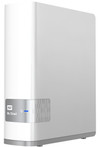
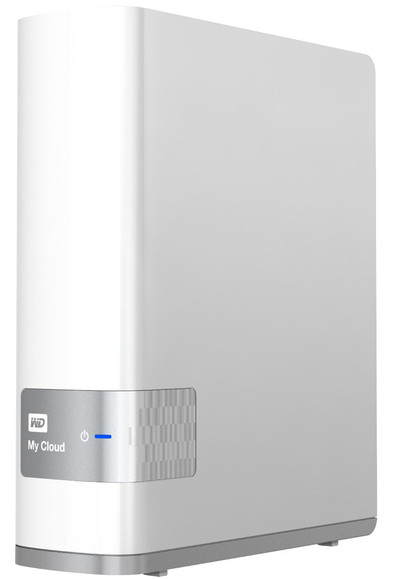
With the WD My Cloud, you get a personal cloud where you can store files in one safe place. Connect the WD My Cloud to the internet and get all the benefits of a public cloud, except your data stays in your house and you don't have to pay for monthly storage. With an internet connection, you can access and save all your photos and videos via any mobile device, anywhere in the world. Do you already have a public cloud account? With the free My Cloud App, you can easily transfer files between your personal cloud, Dropbox, and other public cloud accounts. You can expand the storage capacity of the My Cloud by connecting an external hard drive via USB. The WD My Cloud has a built-in media player that lets you play music, photos, and videos on any DLNA-certified multimedia player, such as a SmartTV, games console, or Blu-ray player.
Number of hard drive slots | 1 | |
|---|---|---|
Suitable for hard drive size | 3.5 inches | |
Internal RAM | 256 MB | |
Processor cores | Dual-Core (2) | |
Built-in hard drive | ||
Total storage capacity | 3000 GB |
5 stars
43
4 stars
62
3 stars
5
2 stars
2
1 star
0
For some time I was looking for an all-in-one solution for storing photos, videos and documents (also via smartphone/tablet). The solution also had to be able to stream movies to my Xbox 360. At the time of searching I was using a portable external USB HDD that moved from iMac to media player quite often which is not convenient of course. The storage capacity was also no longer sufficient. A NAS is of course the solution. But which one in the forest of providers? My budget was limited, 200 euros and a 1-bay NAS was sufficient, RAID is not a requirement. It also does not have to be a super extensive device. As long as it offers central storage, multi-user sharing and streaming to Xbox 360 (DLNA). Soon I came across the WD My Cloud. There were, mostly praising, reviews on the internet and WD has an app available in the various app stores (Windows, Android and iOS). It received 5 stars (at the time of writing) on all three platforms.
After all these positive views, I decided to purchase the 3 TB version. As usual, nascenter.nl delivered the next day and I was able to get started quickly.
Unpacked the box, remove the protective film, power on it and plugged the network cable into my router. The WD My Cloud looks great. It is plastic but it fits well next to my Apple Airport Extreme. According to WD's Quick Installation Guide the installation was done only the WD setup could not find the WD My Cloud :( As I mentioned, the WD My Cloud is connected directly to my router. I have an iMac that is (wirelessly) connected to an Apple Airport Extreme which is connected (wired) to the router. That's probably the problem; the intervention of the Airport Extreme. The WD MyCloud connected directly to the Airport Extreme. Now the WD setup will see the WD My Cloud right away. Installation performed which is very smooth and fast. I called the WD My Cloud Cloud, but it sounds a bit nicer. Immediately an administrator account is created and a 'public' and 'user' folder is created. I immediately created several users who each get their own folder from WD. The rights are easy to arrange. It is immediately possible to copy/drag files to folders on the Cloud via the finder on my iMac. Immediately moved a lot of photos and flms which goes fairly smoothly. It is a bit unclear how best to approach the Cloud. WD installs an application for you, you can make settings via the IP address, WD creates a number of shortcuts on your desktop and you can configure it via the finder (or explorer). I use Safari with the IP address to adjust settings and the finder to configure and it works fine.
Now streaming movies. I had my doubts whether the Xbox could find the Cloud because the Xbox is connected directly to the router and the Cloud to the Airport Extreme. So this can be a hurdle, just like during the installation. Trying to connect to a PC on the Xbox and it worked immediately. Now approach the Cloud and this works immediately. The files can be played neatly via the video player of the Xbox; no disturbances while watching the movie.
The last requirement I had was the presence of well-functioning apps on the different platforms. I tried the app on an iPad and a Windows phone. It works well on both systems. You can upload folders and files and download files. You can also adjust a number of settings. This is very sufficient in my opinion.
In terms of noise level, I can say the following: he is in my meter box and now I hear the meter box hum softly. Not really disturbing, but it is noticeable if you are standing right next to the meter box, but this was to be expected from a NAS.
I have not measured the energy consumption.
Overall, the WD My Cloud is an easy-to-install device and delivers what WD claims. I am very happy with it!
Sjoerd
29 December 2013
Automatically translated from Dutch
Unpack, plug into your router, launch app(s). Create 1 or more users and copy the files you want available everywhere (I did from my PC). Done :-)
Erik Delanghe
10 February 2014
Automatically translated from Dutch
This is absolutely recommended. I am not a hero with computers and have been advised by colleagues to purchase a NAS instead of a regular external hard drive. They were right. I can easily access all the shared files with my Android phone and my wife with her iPhone (and our daughter with the iPad). Our TV (Samsung) also recognizes the NAS directly and plays all files effortlessly. We are very satisfied!
Installing the NAS is really a piece of cake. I didn't need help with it; neither on the PC nor on the telephones, etc. It's a matter of downloading an App from the AppStore or the PlayStore and the rest actually goes without saying. Top!
Laurens
6 January 2014
Automatically translated from Dutch
Product number | 400424 | |
|---|---|---|
Manufacturer code | WDBCTL0030HWT-EESN | |
Brand | Western Digital | |
Warranty | 2 years | |
Processing of your defect | Carry-in warranty |
Built-in hard drive | ||
|---|---|---|
Replaceable hard drive | ||
Number of hard drive slots | 1 | |
Suitable for hard drive size | 3.5 inches | |
Total storage capacity | 3000 GB | |
RAID | JBOD | |
Internal RAM | 256 MB | |
Total number of RAM slots | 1 |
LACP Link aggregation | ||
|---|---|---|
Thunderbolt connector | ||
Bluetooth | ||
Number of Ethernet ports | 1 |
NAS functions | Backup server, FTP server, Media server | |
|---|---|---|
NAS application center | ||
Plex support | ||
Number of IP camera licenses included | None | |
DLNA | ||
UPnP AV support | ||
FTP server | ||
On/off switch | ||
Kensington lock | ||
Apple Time Machine support | ||
Chromecast support | ||
Suitable for IFTTT |
Processor brand | ARM | |
|---|---|---|
Processor family | A9 | |
Processor code name | Cortex | |
Processor cores | Dual-Core (2) | |
Clock speed | 650 GHz |
Depth | 13,93 cm | |
|---|---|---|
Width | 4,9 cm | |
Height | 17,06 cm | |
Type NAS | Upright | |
Color | White | |
Weight | 960 g |