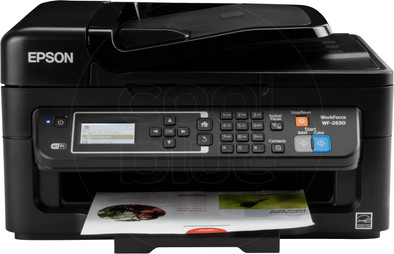
Epson WorkForce WF-2630WF
Never available again
View alternatives in the sidebar
View alternatives in the sidebar
Product number | 518933 | |
|---|---|---|
Manufacturer code | C11CE36402 | |
Brand | Epson | |
Warranty | 2 years | |
Processing of your defect | Carry-in warranty |
Printer size | Medium | |
|---|---|---|
Width | 39,2 cm | |
Depth | 37,7 cm | |
Height | 22,1 cm | |
Color | Black | |
Weight | 5,44 kg |
Printer type | All-in-one | |
|---|---|---|
Photo printer | ||
Portable (mobile use) |
Cartridge line | Epson 16 | |
|---|---|---|
Print technology | Inkjet | |
Number of cartridges/toner cartridges | 4 | |
Color printer | ||
Print speed black (ISO) | 9 ppm | |
Print speed color (ISO) | 4,7 ppm | |
First black page ready after | 10 seconds | |
Maximum print resolution height | 1440 dpi | |
Maximum print resolution width | 5760 dpi | |
Maximum print size | A4 | |
Automatic duplex printing | ||
Borderless printing |
Scan functionality | ||
|---|---|---|
Automatic duplex scanning | ||
Maximum optical scan resolution width | 1200 dpi | |
Maximum optical scan resolution height | 2400 dpi | |
Scanner type | File scanner, Flatbed scanner | |
Maximum scan size | A4 (21x29.7cm) | |
Automatic document feeder (ADF) | ||
Maximum paper size ADF | A4 | |
Scan sizes | A4, A5, [B5], [B6], [Letter] | |
Scan speed (PPM) | 1 ppm | |
Color depth output | 24 bpp | |
Scan to | Cloud, Email address, File, Image, OCR, PC (local) | |
ADF capacity | 30 | |
OCR |
Copying functionality |
|---|
Fax functionality | ||
|---|---|---|
Color fax |
Built-in screen | ||
|---|---|---|
Color screen | ||
Touchscreen |
Compatible with operating system | Android, Windows, iOS, macOS | |
|---|---|---|
Connection type | Wired, Wireless | |
Apple AirPrint | ||
Email print | ||
WPS (Wireless Protected Setup) | ||
Female standard USB-A port version | 2.0 | |
NFC | ||
Built-in WiFi | ||
WiFi direct | ||
Bluetooth | ||
USB port |
Manual input tray | ||
|---|---|---|
Photo paper drawer | ||
Output capacity output drawer | 100 | |
Maximum print size standard paper tray | A4 | |
Input capacity standard paper tray | 100 | |
Number of standard paper trays | 1 |
Memory card reader |
|---|
anything for a smile
Print technology | Inkjet | |
|---|---|---|
Printer type | All-in-one | |
Color printer | ||
Automatic duplex printing | ||
Maximum print size | A4 | |
Automatic document feeder (ADF) | ||
WiFi direct |
According to our printer expert
Thanks to the high print resolution of 5,760DPI by 1,440DPI, you can print detailed photographs.
Thanks to the automatic document feeder (ADF), you can scan and copy multiple documents simultaneously without having to feed them individually.
Send and receive documents via the phone line thanks to the fax feature.
For duplex printing, you must turn the paper sheets manually.
Because the output tray sticks out, this printer is less compact.
The Epson WorkForce WF-2630WF is a compact all-in-one printer. The Epson Connect app allows you to easily send jobs to the printer from your smartphone, tablet, or PC. This is especially useful if the printer has multiple users. Because the WF-2630WF has an automatic document feeder for 30 sheets (ADF), you can quickly scan and copy documents. This WorkForce is recommended for home users who print fewer than 10 sheets per day, but nevertheless want a printer with many features.
Installation ease
Options
Print quality
Introduction and Brand Choice * To start with, I chose a printer from the Epson brand because it offers a relatively large amount of functionality for a low price. For example, I wasn't concerned about speed, but mainly about the quality of the scans, so I tested them extensively. So for me, Epson came out on top in this area. Besides the fact that Epson products are used with great pleasure in my immediate environment, it is also a brand that, together with Canon and Brother, is at the forefront of the Japanese make printer and scanner industry. The technically progressive Japan and the fame of these brands have therefore also led me in this direction.
Entry * The package has been received in good order. Of course it arrived in a nice, large box from Coolblue and it was immediately recognizable. Once the box was opened, surrounded by air cushions, there was the one and only Epson box containing, of course, the printer and some accessories.
Unpacking The printer was packed in the Epson box. This was safely stored and provided with a protection against damage which consists of polystyrene foam. For people who are slightly more sensitive to this, it is advisable to have someone else unpack the printer. Once unpacked, you will see neatly packed booklets and the CD for driver installation at the bottom. Furthermore, there is of course a power cord that is needed to power the printer. A printer cable that is required for data transfer by cable to the computer is not included, but if you have ever owned a printer, you most likely already own it. If that is not the case, it is available for only a few euros. However, it is of course also possible to do this completely wirelessly and via Wi-Fi, which also works surprisingly well. I will come back to this later.
First impression * The printer is fairly large, but given the wide range of functionality it is understandable that the printer has the size it appears to have. Compared to many printers that I have encountered, this format is in principle doable. The 'real office jets' of tens of euros more are not smaller than this beautiful 'budget office jet'. What really struck me was the great care with which the printer was packed. It was fitted with many large pieces of adhesive plastic covering the material so that dirt could not reach it. The printer is dark colored, which suited my interior very well and gave it a sleek, businesslike and glossy impression.
First Use / Installation * However, the so-called 'sticky plastic' that has just been mentioned also turned out to be a minor obstacle. It even reached inside the printer causing me, ignorantly, to start the printer while its functioning was still blocked by a piece of this material. It is therefore important to double check before starting up whether all the protective foil, so to speak, has been removed. This also applies to the inside of the printer in the compartment where the ink cartridges are to be placed. Opening this enclosed space can be done simply by moving the hand to the side cove and separating the top from the bottom with a small upward thrust, or pull. The printer will calibrate itself automatically on the first power up. This process takes an average of ten minutes. After that you can go through the installation procedure. If you want to connect the printer to a wireless network, you will also be given the opportunity to do so, otherwise you will be asked to use a cable. In order to make optimal use of the printer and especially during the installation procedure, it is recommended to use the supplied CD, because it simply brings extra handy 'tools' and programs that make scanning easier, among other things. In addition, it will allow you to update the printer to the latest 'firmware', or to provide the latest version of the system that controls the printer (factory system) if you use the CD during the installation procedure. Of course it is also possible to simply plug the printer into the computer to make it work via standard Windows software, but this is not recommended as the use of Windows software (drivers / drivers) in my IT experience often causes unexpected problems , incomplete compatibility and/or lack of functionality that may affect the functioning of the product (such as the aforementioned firmware updates). To set up wireless internet on the printer: I am a little less pleased with this. If you want to set up the printer for use with a wireless network, you must, of course, enter the password. However, the printer only has a numeric keypad which is actually intended for the fax functionality, but in this case is also used for entering the password for wireless internet. Entering in this way, on the other hand, is quite difficult and it certainly takes some practice to be able to use characters or to switch between upper and lower case letters. But in the end, this is just a one-time thing, so you'll never be bothered by this again after you've done this.
Usage * The printer is on my desk and therefore on a flat surface. It is directly connected to a wall socket and is addressed via the internet (wireless / Wi-Fi) for print jobs and scans. Since this is done from the attic, the distance to the router (which provides me with the wireless connection) is fairly large, but the printer still has a reasonably good range with about 2-3 out of 5 bars. Printing is therefore not more difficult here and data transfer is considerably easy to do.
Automatic Document Feeder * I selected this printer for the brand and for its price-functionality ratio. For me, scanning functionality was a requirement and the automatic document feeder was definitely a plus. Compared to other printers in this price range, it's rare to see a printer with an automatic document feeder, so I'm quite pleased that this printer does.
Ink Prices * What is important with a printer are mainly the ink prices. This will eventually become the largest cost item when it comes to printing and printer use. I have therefore come to the conclusion that this printer is in principle a good choice in terms of ink consumption. The only downside is, Epson's branded ink comes at a significantly high price, as is usual with quality products. People often switch directly to cheaper ink, fortunately with this printer there is a very wide choice and therefore the ink price in that area is really no problem. For high-quality prints you can go for the brand ink and for the large consumer who just wants something to be printed on paper, it is more than enough 'regular ink'. However, keep in mind that it meets all (Epson's) requirements! Otherwise, it may adversely affect the operation of your printer.
Conclusion * This printer is an extremely good choice for both the novice entrepreneur and many families. It includes all the functionality you will ever need and expect from a good quality printer at a low price. Scanning, automatic scanning, copying, faxing and of course printing can all be done 'over the air' without any need for extra wires, outside of the power supply of course. It prints smoothly and neatly and I am certainly pleased with this printer. It has been a successful purchase for me and certainly an investment for now and the future. I hope I can enjoy this device for a long time to come and would like to take this opportunity to thank Coolblue and/or Printershop.nl for the service and quality provided.
Grade (on a scale of 10): 9
Josha E. v. d. H.
1 February 2016
Automatically translated from Nederlands
Printer works fine prints quickly and easily via wifi, easy to find with windows
Hein rijkers
16 December 2015
Automatically translated from Nederlands
Had doubts about buying these printers, read things that the ink would be difficult to install and the scanner would jam.
Fortunately it all turns out not to be right because it works perfectly! Am very happy with it.
The graphical interface is very handy, and when WiFi is set up, the printer can be further configured via your browser (IP of the printer can be read on the screen). This printer also supports Google Cloud Print, you have yet to find out what useful situations are for this, but a welcome functionality nonetheless!
My computer (Windows 10) was also able to automatically detect the printer via the network and print directly to it without having to look up and install drivers or use CDs, nice and simple. I love that.
The printer also boots up very quickly and is immediately ready for use (about 15 seconds).
All in all, very satisfied with this printer and would certainly recommend it to others who are looking for a new good printer.
Jorin Vermeulen
10 February 2016
Automatically translated from Nederlands