Never available again
View alternatives in the sidebar
View alternatives in the sidebar
Product number | 575544 | |
|---|---|---|
Manufacturer code | C11CE21301 | |
Brand | Epson | |
Warranty | 2 years | |
Processing of your defect | Carry-in warranty |
Printer size | Large | |
|---|---|---|
Width | 61,6 cm | |
Depth | 36,9 cm | |
Height | 22,8 cm | |
Color | Black | |
Weight | 15 kg |
Printer type | Printing only | |
|---|---|---|
Photo printer | ||
Portable (mobile use) |
Cartridge line | Epson T760x | |
|---|---|---|
Print technology | Inkjet | |
Number of cartridges/toner cartridges | 9 | |
Color printer | ||
Print speed black (ISO) | 6 ppm | |
Print speed color (ISO) | 6 ppm | |
First black page ready after | 10 seconds | |
Maximum print resolution height | 1440 dpi | |
Maximum print resolution width | 5760 dpi | |
Maximum print size | A3+ | |
Automatic duplex printing | ||
Borderless printing |
Scan functionality | ||
|---|---|---|
OCR |
Copying functionality |
|---|
Fax functionality |
|---|
Built-in screen | ||
|---|---|---|
Color screen | ||
Touchscreen |
Compatible with operating system | Android, Windows, iOS, macOS | |
|---|---|---|
Connection type | Wired, Wireless | |
Apple AirPrint | ||
Email print | ||
WPS (Wireless Protected Setup) | ||
Female standard USB-A port version | 2.0 | |
Number of Ethernet ports | 1 | |
NFC | ||
Built-in WiFi | ||
WiFi direct | ||
Bluetooth | ||
USB port |
Manual input tray | ||
|---|---|---|
Photo paper drawer | ||
Output capacity output drawer | 100 | |
Maximum print size standard paper tray | A3+ | |
Input capacity standard paper tray | 100 | |
Number of standard paper trays | 1 |
Memory card reader |
|---|
Print technology | Inkjet | |
|---|---|---|
Printer type | Printing only | |
Color printer | ||
Automatic duplex printing | ||
Maximum print size | A3+ | |
WiFi direct |
According to our printer expert
Print razor-sharp photos thanks to the extensive cartridge system.
Print large posters and brochures in A3 size.
Send your print jobs wirelessly via WiFi.
Paper drawer sticks out, so you have to remove the paper after use.
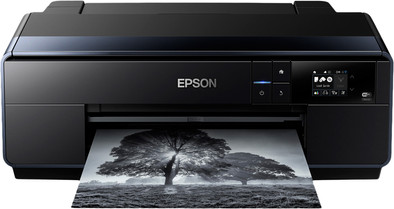
Print images that match the quality of photos printed by a professional printing service with the SC-P600. Print from a paper roll, or load paper up to A3+ size in the multifunctional paper tray. Your prints will have vibrant colors and deep black levels thanks to the 9 separate cartridges. Thanks to the touchscreen, you can operate this printer very easily.
Note: do you want to print a photo on photo paper? Place the back (with the logo) up in the printer.
5 stars
8
4 stars
4
3 stars
2
2 stars
0
1 star
0
I doubted for a long time whether I should start making my prints myself. A trade fair convinced me of the quality of the prints. Ink usage is fine in my opinion. The seller said that the ink cartridges were not completely filled but I have already printed 50 photos on A4 with them, including a lot of B/W and low key portraits. None of the ink cartridges are empty yet. The colors and b/w tones correspond to colors on my screen. (Mac) I print after editing via the lightroom module "printing" Print quality should certainly not be inferior to print centers. I like them even better. I use this printer together with the epson glossy paper. Suitable for both the amateur photographer and the professional photographer.
Frank Van der Voorde
16 June 2017
Automatically translated from Nederlands
Fast delivery by Coolblue and perfect support by Epson.nl. Installing OSX drivers (for B/W) first requires a manual update via Epson. Print quality is second to none . Print both in color and "true" black and white. Low noise during printing and speed is acceptable.
Harry Smeets
19 August 2015
Automatically translated from Nederlands
For a Mac, it takes a while to find the right printer driver, it must be downloaded from Apple, not from the Epson site.
Maarten van den Berg
29 March 2017
Automatically translated from Nederlands