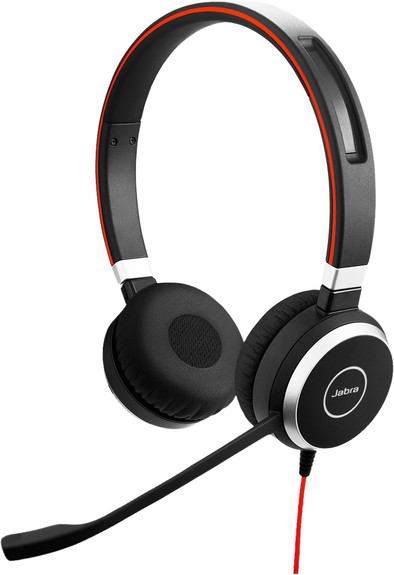
Jabra Evolve 40 UC Stereo Wired Office Headset
Never available again
View alternatives in the sidebar
Choose the better headset that provides more freedom of movement
Jabra Evolve 2 65
Better model
View alternatives in the sidebar
Better model
Are you a business customer? We're happy to offer you extra services such as:
Read more about Coolblue Business here or create a business account right away.
Product number | 683944 | |
|---|---|---|
Manufacturer code | 6399-829-209 | |
Brand | Jabra | |
Warranty | 2 years | |
Processing of your defect | Via Coolblue |
Noise cancellation type | Passive | |
|---|---|---|
Office headset suitable for device | PC, Smartphone | |
Suitable for type of communication software | Universal Communication | |
Supported communication software | Unified Communications | |
Pick up/hang up phone call | ||
Spoken notifications |
Headphones wearing method | On the ear | |
|---|---|---|
Ear cushion material | Foam, Imitation leather | |
Number of ear cups | 2 | |
Rotatable ear cups | ||
Foldable |
Connection type | Wired | |
|---|---|---|
USB port | ||
Type of USB port | Standard USB-A | |
Bluetooth | ||
Software compatibility |
Built-in microphone | ||
|---|---|---|
Microphone recording type | Mono | |
Microphone mute function | ||
How to mute | Close the microphone boom | |
Collapsible microphone |
Power source | ||
|---|---|---|
Power supply type | USB port PC/laptop | |
Cable length | 1,2 m | |
Base station |
Weight | 0,79 kg | |
|---|---|---|
Material | Plastic | |
Finish | Matte and glossy | |
Color | Black |
anything for a smile
Headphones wearing method | On the ear | |
|---|---|---|
Connection type | Wired | |
Office headset suitable for device | PC, Smartphone | |
Suitable for type of communication software | Universal Communication | |
Type of USB port | Standard USB-A |
According to our office headset expert
The leather ear cushions last longer and are more comfortable than foam ear cushions.
Thanks to the noise suppression in the microphone, your conversation partner can always clearly understand you.
With a wired office headset, you'll have less freedom of movement than with a wireless office headset.
Call your colleagues or maintain customer contact with the Jabra Evolve 40 UC Stereo Wired Office Headset. You can connect the office headset via the USB-A port or 3.5mm jack of your laptop, PC, or mobile devices. The buttons on the control panel let you easily control the sound of your office headset. With this control panel, you can also easily answer and end calls. Are you in a call? The lighting on the ear cup will indicate to your colleagues that you're occupied. That way, you won't be distracted during important phone calls.
Sound quality
User friendliness
Wearing comfort
Design
Options
I was looking for an alternative to the Logitech USB headset that I had been using until now. A cheap thing. Most importantly, I made phone calls through both my computer and my cellphone. The Jabra Evolve 40 is the perfect solution for this. The USB cable has a block with mute and volume controls where the headset with the 3.5 mm plug is plugged in. It makes switching between computer and phone incredibly easy. You can also download software from the manufacturer that allows you to set some extra things, such as a regular soft beep when you are on mute. Saves a long speech that no one hears.
Ruud H.
22 January 2016
Automatically translated from Nederlands
I bought the Evolve 40 for online meetings and longer phone calls etc. The sound quality is superb. It seems as if the person you are communicating with is standing right next to you: you can hear them perfectly and recordings show that this is also the case with the interlocutor. Noise cancellation works perfectly. I also deliberately did not order a wireless set, because I expect such a set to always work. On the other hand, you lose freedom of movement behind the PC, but that is not an issue for telephone conversations, for example. I am very satisfied with it.
Maarten Kempeneers
13 May 2019
Automatically translated from Nederlands
Connecting the headset to a Windows PC is hassle-free and with Jabra direct you can easily adjust the volume and sensitivity of the microphone. Works flawlessly with Skype, Webex and Zoom, among others. The keypad is very nice.
Thanks to the 3.5mm connection, the headset can also be used with a smartphone without any problems.
The sound quality and wearing comfort is many times better than the earphones that come with a smartphone.
Mihiel M.
18 January 2018
Automatically translated from Nederlands