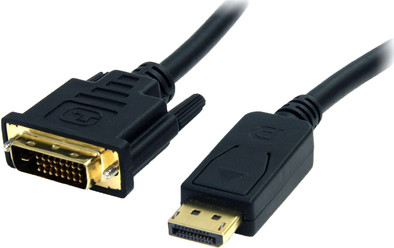
StarTech DisplayPort to DVI-D Cable 1.8 meters

Never available again
View alternatives in the sidebar
View alternatives in the sidebar
Product number | 702340 | |
|---|---|---|
Manufacturer code | DP2DVI2MM6 | |
Brand | Startech | |
Warranty | 3 years | |
Processing of your defect | Carry-in warranty |
Compatible with product type | Desktop, Laptop, Monitor, Smartphone, Television | |
|---|---|---|
USB port | ||
Lightning connector | ||
HDMI connector | ||
DisplayPort connector | ||
Type of DisplayPort connector | standard DisplayPort | |
Type of standard DisplayPort connector | Connector/male | |
DVI connector | ||
Type of DVI connector | DVI-D Dual Link (digital only) | |
Type of DVI-D Dual Link connector | Connector/male | |
VGA connector | ||
Headphone jack | ||
Network connector |
Color | Black | |
|---|---|---|
Cable length | 1,8 m |
anything for a smile
Cable length | 1,8 m | |
|---|---|---|
Color | Black | |
Compatible with product type | Desktop, Laptop, Monitor, Smartphone, Television | |
HDMI connector | ||
Lightning connector | ||
USB port | ||
Network connector | ||
DisplayPort connector |
With the StarTech DisplayPort to DVI-D cable you can easily change a DisplayPort input into a DVI-D input. This allows you to connect all your DVI-D devices without any need to upgrade to the DisplayPort standard. This all works through plug and play, so you won't have to install anything on your computer. The cable supports resolutions up to 1920x1200 (WUXGA) and HDTV resolutions up to 1080p.
This cable does not work with a 144hz display. For this you need to buy a display to dvi active convert.
wouter janssen
18 April 2019
Automatically translated from Nederlands
Looks good, good lock system. When I set the monitor to 144hz I get a black screen.
Kelvin
20 November 2017
Automatically translated from Nederlands
Worked right up to my new video card and old monitor as advertised.
Jelle Suiker
29 October 2020
Automatically translated from Nederlands


