Never available again
View alternatives in the sidebar
View alternatives in the sidebar
According to our monitor expert
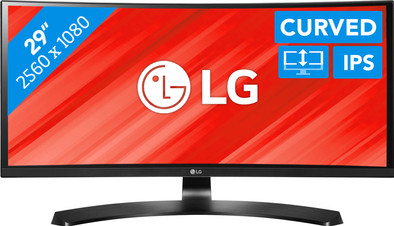
Whether you're editing photos or videos or want to play games, the LG 29UC88 does it all. This monitor is curved, so it has a slight bend. This creates a panoramic effect. The screen is also quite wide, so you can easily open 2 or 3 programs side by side to work more efficiently. If you're working with footage, you benefit from the fact that this LG monitor covers 99% of the sRGB color space. In other words: colors are displayed more realistically than on a 'normal' screen. Job done? Time to play games. Thanks to AMD FreeSync technology you won't experience any stutter or tearing, just smooth gameplay.
Curved | ||
|---|---|---|
Refresh rate | 75 Hz | |
Response time | 5 ms | |
Panel type | IPS panel | |
Built-in speakers | ||
Adjustable in height |
5 stars
10
4 stars
3
3 stars
0
2 stars
0
1 star
0
Colors are fine. Works well with rx 480. Aspect ratio takes some getting used to and requires some windows adjustments to the width.
Works smoothly for photo editing and you are more 'in' the game. If you don't do either, then there might be another reason to go ultra. Assume that applications will increasingly support this image format in the future.
Don't forget that with higher resolutions comes better GPUs.... That's why we didn't make the step to 4K. This resolution from LG fits perfectly on a 29 inch. For 34 inches, this is really too little.
Negative advice regarding image calibration. Takes some fiddling in the display settings and that always forces a selected mode. I would rather have had the option to turn this off completely and apply my calibration alone. This can be done via 'personal', but it is cumbersome. Keep in mind that switching modes does not immediately jump the sliders.... this does happen when you click another tab and come back to your first tab..... software update please! It's something silly, but you'll keep looking for it if you don't know.
Definitely recommended for those who don't want 4K. Prints are closer to screenshot now. Games are beautiful. (Native support for eg the division, elite dangerous....)
glenn van daele
18 November 2016
Automatically translated from Dutch
easy to place 2 windows side by side about the same as working with 2 screens but takes up less space :)
Mariens Tommy
12 November 2016
Automatically translated from Dutch
Ideally large, multiple documents open at once. Sharp image
Dirk HAUWAERTS
12 November 2016
Automatically translated from Dutch
Product number | 711479 | |
|---|---|---|
Manufacturer code | 29UC88-B | |
Brand | LG | |
Warranty | 3 years | |
Processing of your defect | Carry-in warranty |
Refresh rate | 75 Hz | |
|---|---|---|
Response time | 5 ms | |
Panel type | IPS panel | |
Local dimming | ||
Contrast ratio | 1000 | |
Touchscreen | ||
Screen reflection | Glossy | |
Blue light filter | ||
G-sync | ||
Adaptive Sync | ||
Resolution width | 2560 pixels | |
Resolution height | 1080 pixels | |
Anti-reflection type | Anti glare | |
Horizontal viewing angle | 178 ° | |
Vertical viewing angle | 178 ° |
Height | 39,6 cm | |
|---|---|---|
Width | 70,1 cm | |
Depth | 25,2 cm | |
Weight | 7 kg | |
Color | Black | |
Including stand | ||
Material | Plastic | |
Cable management | ||
Curved |
Adjustable in height | ||
|---|---|---|
Tiltable | ||
Pivotable stand | ||
Pivot function | ||
VESA mount option | ||
VESA mount | 75x75mm |
Energy consumption standby | 0,5 W | |
|---|---|---|
Energy consumption active | 28 W |
Built-in speakers | ||
|---|---|---|
Sound system | Stereo | |
Split screen | ||
Kensington lock |
