Never available again
View alternatives in the sidebar
Choose your monitor:
ASUS MB169B+
Choose your monitor
View alternatives in the sidebar
Choose your monitor:
ASUS MB169B+
Choose your monitor
According to our monitor expert
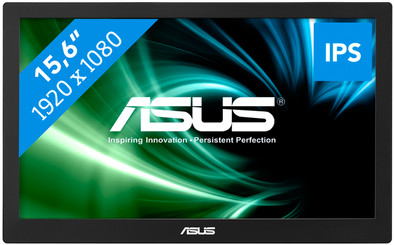
Take the Asus MB169B+ everywhere with you, to use as a second screen next to your laptop or PC. This 15-inch monitor weighs only 800 grams and is just 8.5 millimeters thick, so you can easily take it with you. The Full HD screen will not get damaged on the go, thanks to the included protective cover. When you get started, the cover can be used as an adjustable stand. Set up this screen in your hotel room or when you're with a customer, and use it next to your laptop to create extra space for using multiple programs side by side. Both the power and the video signal run through the USB 3.0 port, so you only need 1 cable to connect it.
Sharpness | Full HD (1080p) | |
|---|---|---|
Curved | ||
Aspect ratio | Standard (16:9) | |
Refresh rate | 60 Hz | |
Response time | 14 ms | |
Panel type | IPS panel | |
Color depth | 17 million colors (8-bit) | |
Built-in speakers |
5 stars
18
4 stars
27
3 stars
4
2 stars
1
1 star
0
This is a review of the MSB169B+. So not from the 168 series or from the MSB169C+.
An extra full HD screen, very lightweight and simply connect with a USB cable! Searched for a long time as the ideal solution to set up a productive work session with my notebook in a place other than my regular workplace. Beautiful and handy cover/stand. Beautiful image. Viewing angle could be a little better. Brightness is good, but only adequate for indoors. This screen draws its power from the USB connection. Also probably explains why they've muted the maximum brightness a bit. I have only tested this screen under Windows.
The connection cable has a normal USB connector. To connect to a notebook or tablet with a microUSB connector, you therefore need the well-known microUSB-OTG cable (microUSB On-The-Go). Please note: on all devices I tested, the microUSB port did not provide enough power to drive this screen. However, this can easily be solved by connecting a powered USB hub (USB2.0 hub works fine). If you still want to work in the park with this screen and your microUSB notebook, sit in the shade and plug a power bank into your USB hub. Works fine!
Be careful with the drivers. This screen works with DisplayLink technology. It is highly recommended that you download and install the latest DisplayLink drivers from the Asus website, not the supplied Asus CD-ROM. The disadvantage of all Asus drivers is that under Windows 10 Anniversary the physical buttons on the screen (on/off and brightness) do not work and the brightness cannot be set via software (reference date March 30, 2017). A possible explanation is that Microsoft is supporting DisplayLink itself from this most recent Windows version and that that support is getting in the way of the Asus drivers. Asus is working to fix the "problem". An alternative on a Windows 10 Anniversary machine is to not install the DisplayLink drivers from Asus when connecting this display for the first time, but just wait until the display is recognized by Windows and the internal Microsoft drivers are installed. Physical buttons will work, but the driver is unstable and the screen will go blank every now and then. So no problems, but just pay attention to what you want and do.
A few more advantages of this screen:
Marcel
31 March 2017
Automatically translated from Dutch
I'm on the road a lot and as a developer you immediately notice the drop in productivity when you don't have a multi-monitor setup.
The Asus does exactly what is needed for the traveler. In addition, the monitor can also be perfectly used in (informal) meetings where no beamer is available. The screen has an excellent viewing angle.
The monitor has a good resolution (1920x1080), good brightness (also for outdoor use), easy to transport (light weight, the protective cover is also monitor standard) and uses little energy. Notice hardly any difference with or without a screen in energy consumption on the laptop battery.
The only downside (and in my case not a problem at all) is the color fastness. This is not a screen for doing graphic work where color fidelity is important.
I'm using the monitor on OS X Sierra and at the time of writing (March 2017) it makes sense to use the latest driver from the displaylink site instead of the Asus drivers (Asus drivers "stutter" as if there was not enough bandwidth on the USB link is). In addition, there are some minor transparency issues in OS X that can be easily resolved by reducing the display's transparency setting (see the accessibility settings in system preferences)
With these two tweaks, it's a great product and I recommend it to anyone missing a second screen on the go.
bas303
31 March 2017
Automatically translated from Dutch
I bought this to create more workspace on my laptop. It actually works fine, but what really annoys me is that the color temperature is much too low and cannot be adjusted as far as I know. Despite this, it's damn handy not to have to switch windows every time. If the color temperature could be adjusted, it is an ideal extension.
Rini Hoenderop
15 March 2018
Automatically translated from Dutch
Product number | 727734 | |
|---|---|---|
Manufacturer code | 90LM0183-B01170 | |
Brand | ASUS | |
Warranty | 2 years | |
Processing of your defect | Via Coolblue |
Recommended display resolution | 1920x1080 | |
|---|---|---|
Sharpness | Full HD (1080p) | |
Aspect ratio | Standard (16:9) | |
Refresh rate | 60 Hz | |
Response time | 14 ms | |
Panel type | IPS panel | |
Local dimming | ||
HDR support | ||
Contrast ratio | 600 | |
Touchscreen | ||
Screen reflection | Anti-glare | |
Blue light filter | ||
Flicker-free technology | ||
Color space | sRGB | |
Color depth | 17 million colors (8-bit) | |
G-sync | ||
G-sync Ultimate | ||
Adaptive Sync | ||
Resolution width | 1920 pixels | |
Resolution height | 1080 pixels | |
Anti-reflection type | Anti glare | |
Viewing distance | 25 - 68 m | |
Horizontal viewing angle | 160 ° | |
Vertical viewing angle | 160 ° |
Height | 23,6 cm | |
|---|---|---|
Width | 37,9 cm | |
Depth | 0,85 cm | |
Weight | 0,8 kg | |
Color | Black | |
Including stand | ||
Material | Plastic | |
Cable management | ||
Appearance | Neutral | |
Curved |
Number of female micro USB-A ports | 1 | |
|---|---|---|
Female micro USB-A port version | 3.0 | |
Number of USB ports | 1 | |
Type of USB port | Micro USB-A | |
Number of USB ports | 1 |
Adjustable in height | ||
|---|---|---|
Tiltable | ||
Pivotable stand | ||
Pivot function | ||
VESA mount option |
Energy label | F | |
|---|---|---|
Energy consumption standby | 0 W | |
Energy consumption active | 7 W | |
Energy consumption per 1000h | 13 kWh | |
Annual energy consumption | 18,98 kWh | |
Annual energy costs | 4,18 euros |
Built-in speakers | ||
|---|---|---|
Webcam | ||
Split screen | ||
Kensington lock | ||
Best tested |
Image quality according to customers | Standard | |
|---|---|---|
Design according to customers | Nice | |
Recommended for use | Internet, email, and text processing, Office work, On the go, Watching movies in Full HD |
