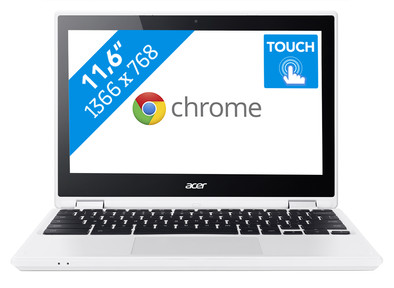
Acer Chromebook 11 CB5-132T-C6DR AZERTY
Never available again
View alternatives in the sidebar
View alternatives in the sidebar
Product number | 741281 | |
|---|---|---|
Manufacturer code | NX.G54EH.011 | |
Brand | Acer | |
Warranty | 2 years | |
Processing of your defect | Carry-in warranty |
Screen size | 11,6 inches | |
|---|---|---|
Touchscreen | ||
Panel type | TN panel | |
Sharpness | WXGA | |
Resolution width | 1366 pixels | |
Resolution height | 768 pixels | |
Screen reflection | Glossy | |
Adaptive Sync |
Processor | Intel Celeron | |
|---|---|---|
Processor code name | Braswell | |
Processor cores | Dual-Core (2) | |
Clock speed | 1,6 GHz | |
Turbo speed | 2,48 GHz | |
Cache memory | 2 MB |
Internal RAM | 4 GB | |
|---|---|---|
Memory composition | 1x 4GB | |
Memory slot 1 | 4 GB | |
Total number of RAM slots | 1 |
Total storage capacity | 64 GB | |
|---|---|---|
Storage type | Flash | |
Hard drive type | M.2 |
Video card | Intel HD Graphics | |
|---|---|---|
Type of video card | Shared |
Operating system | Google ChromeOS | |
|---|---|---|
Operating system language | Multiple languages can be configured |
Laptop model | Chromebook | |
|---|---|---|
Color | Black, White | |
Material | Plastic | |
Height | 1,92 cm | |
Width | 29,4 cm | |
Depth | 20,4 cm | |
Weight | 1,2 kg |
Mobile data connection | No | |
|---|---|---|
Bluetooth | ||
Bluetooth version | 4.0 |
USB port | ||
|---|---|---|
Number of USB ports | 2 | |
Number of female standard USB-A ports | 2 | |
Female standard USB-A port version | 3.0 | |
HDMI connector | ||
DisplayPort connector | ||
VGA connector | ||
Network connector | ||
Thunderbolt connector | ||
Headphone jack | ||
Memory card reader |
Keyboard layout | AZERTY | |
|---|---|---|
Numeric keypad | ||
Spill-resistant | ||
Backlit keyboard | ||
Mechanical keyboard | ||
Programmable keys |
Built-in microphone | ||
|---|---|---|
Number of speakers | 2 | |
Sound reproduction | Stereo | |
Integrated computer speakers brand | Standard speakers |
Built-in camera | ||
|---|---|---|
Image definition webcams | HD Ready (720p) |
Battery technology | Lithium-ion | |
|---|---|---|
Power connector input type (female) | Other brand/product specific |
Manufacturer's warranty |
|---|
TPM (Trusted platform module) | ||
|---|---|---|
Kensington lock | ||
Windows Hello | ||
Fingerprint identity sensor |
Extra installed software |
|---|
anything for a smile
Screen size | 11,6 inches | |
|---|---|---|
Processor | Intel Celeron | |
Internal RAM | 4 GB | |
Total storage capacity | 64 GB | |
Video card | Intel HD Graphics | |
Panel type | TN panel | |
Touchscreen |
According to our laptop expert
Boot your laptop in about 15 seconds, thanks to the flash storage.
This model can be controlled with your fingers, thanks to the touchscreen.
The screen folds back around the keyboard 360 degrees, so you can use the laptop in various positions.
A Chromebook is only suitable for simple tasks like internet browsing, email, and text processing.
Windows programs don't work on a Chromebook.
You can use the Acer Chromebook 11 CB5-132T-C6DR AZERTY as both a tablet and a laptop. That's useful for when you're on the go for school or work. Use the Chromebook as a tablet by folding the keyboard back 360 degrees behind the screen, and swipe easily through all your files and apps on the touchscreen. Thanks to the Chrome OS operating system, your laptop boots within a few seconds. By logging in to your Google account, you'll gain instant access to your files in the cloud. Here, you can also store new files you've been working on. With the integrated virus protection and online backup for all your files, you'll always work safely with a Chromebook.
Note: Windows programs don't run on a Chromebook. Do you want to use Microsoft Office? If so, simply buy Office 365 or download the Office app from the Google Play Store.
I've had my Chromebook for a few days now.
My first impression was that it looks like a toy. And I don't mean that it's bad quality but that it looks like it's not real. Two thin slices of plastic. Looks like a fake computer that's so thin and light. The device is only 2 cm thick.
So it's a very nice computer. Feels very solid even though it is pure plastic. Good weight, not too much, not too little.
Chrome OS is extremely fast. By opening the screen, it starts up and you are literally directly on the login screen.
Takes some getting used to but it's all very slick. The keyboard is good but has no delete button. Alt + backspace does that.
Knowing the correct key combinations is very helpful for switching quickly. You can use a trackpad or touch screen, but a keyboard remains the fastest.
On the keyboard there is a special search button in the place of the "caps-lock". Via the search function you can directly google or start apps.
The screen is much better than I expected. Although this device has the same specs as my old computer, it is much better.
According to the description, this device has a matte screen. This is the most shiny matte screen I've ever seen.
I can't say the trackpad is bad, but that's the part I'm least excited about.
The Android Play Store works. Chrome OS is for the Play Store Android 6.
The Android apps work well on the computer, although some are not very usable due to their design.
Restarting in "developer mode" gives you access to a root shell within Chrome OS.
Through Crouton I was able to install a Linux desktop that works.
So anyone who wants to can easily make it "a real computer" while still retaining all the benefits and convenience of Chrome OS.
In normal mode you can also just ssh via a Chrome app if that is sufficient.
I have over 43GB left of the 64GB as I installed loads of Chrome apps, two different Linux desktop environments, and additional Linux software.
No surprise but as a Google product this thing works perfectly with Google Chromecast. So Youtube, Netflix or casting the entire screen of the computer works perfectly.
Walter Vermeir
5 January 2017
Automatically translated from Nederlands
Very nice device that fits comfortably in the hand and does everything I expected it to do. Much more pleasant to work with than a regular tablet.
Sofie
16 February 2017
Automatically translated from Nederlands
Handy little solid basic Chromebook laptop! It was delivered super fast by cool blue.
DIRK
3 October 2018
Automatically translated from Nederlands