iEAST SoundStream Pro M30
Never available again
View alternatives in the sidebar
View alternatives in the sidebar
Product number | 772029 | |
|---|---|---|
Manufacturer code | 6970504260030 | |
Brand | iEAST | |
Warranty | 2 years | |
Processing of your defect | Carry-in warranty |
Speaker type | Receiver | |
|---|---|---|
Year introduced | 2017 | |
Alarm function | ||
Audio streaming quality | HD quality (24-bit) |
Bluetooth | ||
|---|---|---|
Built-in WiFi | ||
Multi-room audio | ||
AirPlay |
Height | 2 cm | |
|---|---|---|
Depth | 10 mm | |
Width | 7,9 mm | |
Color | Black | |
Material | Metal | |
Weight | 460 g | |
Power supply type | Power grid |
Radio | ||
|---|---|---|
Multi-room audio | ||
Plays from network | ||
Plays from USB memory | ||
Number of zones (audio) | 5 | |
Multi-room functions | Make a stereo pair, Zones separately, Zones simultaneously | |
DLNA | ||
SonosNet | ||
Google Cast | ||
Spotify Connect | ||
UPnP AV support | ||
AirPlay | ||
Internet radio | ||
Streaming services | Napster, Qobuz, Spotify, Tidal, iTunes | |
Streaming services support | ||
Fireconnect |
RCA connector | ||
|---|---|---|
3.5mm mini jack connector | ||
USB port | ||
Headphone jack | ||
Network connector | ||
Number of USB ports | 1 |
Best tested |
|---|
anything for a smile
Built-in WiFi | ||
|---|---|---|
Bluetooth | ||
Multi-room audio | ||
Streaming services | Napster, Qobuz, Spotify, Tidal, iTunes | |
Audio streaming quality | HD quality (24-bit) | |
Power supply type | Power grid | |
Plays from network | ||
AirPlay |
According to our audio streamer expert
With the Soundstream M30, you can wirelessly stream music to each speaker set.
Connect multiple receivers to different speakers and create a multi-room system.
The receiver plays music from USB flash drives or hard drives.
With the M30, you don't stream music from a mobile device to your speakers via Bluetooth.
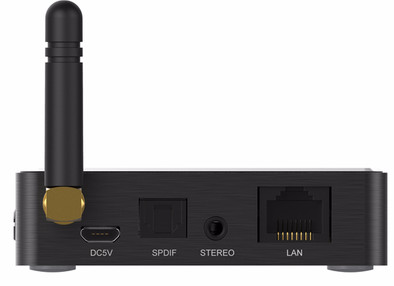
With the iEAST Soundstream Pro M30, you can stream music to every receiver or active speaker set via WiFi. Connect this receiver to your audio system and download the Play app to your smartphone, tablet, or computer. This way, you can stream music from your device to the speakers. You get access to your stored music, songs from connected audio sources or USB flash drives, and playlists from streaming services. If you prefer to listen to the radio, you can get access to thousands of online stations via internet radio. With the included remote, you can pause a song, adjust the volume, or turn the receiver on or off. This is useful for when you don't want to open the app all the time.
I use it to stream Qobuz. That is fully integrated in the app. I use the otic output and the network cable: stable operation and very good sound!
Herman Schartman
29 October 2017
Automatically translated from Nederlands
the easy way to install everything by a layman
Walter Van den Bergh
14 November 2017
Automatically translated from Nederlands
Super easy to connect, works well with spotify. The accompanying app is also great.
Nice that a remote control is included, although it is not always clear whether the device is on or not.
Now I don't have to buy expensive network components for my amplifier.
John de Kroon
7 February 2018
Automatically translated from Nederlands