Good day,
Before I start explaining why the Minix is value for money, let me start at the beginning, why I was looking for a TV box, what I wanted to get out of it and what I started to pay attention to during my research for this.
BACKGROUND
In my house I have an older Panasonic plasma TV, about 4 years old, 1080P. This receives its image signal from various devices via a Marantz NR1501 amplifier. This amplifier is connected to speakers so that it forms a 5.1 set. So from the source the signal goes through the amplifier, which decodes the sound (different DTS formats) and sends the picture to the TV.
There is also a PC in another room, which provides content to watch, but it is so energy-guzzling and loud that I don't want to put it in the living room, or have it on at all while watching. This means that the movies and the like on an external hard drive have to be hung on the media player, or that I have to put everything on a NAS. Given the price of a NAS, rather not. All devices in this chain are connected by means of Cat7 Ethernet cables, a Gigabit switch and the Experiabox V10.
So requirement 1: An external hard disk that can be filled from a Windows PC must be connected to the media player.
I have been using XBMC (Kodi) or a derivative thereof as a media player for ages. This software covers a lot of media extensions, retrieves movie data, subtitles and trailers for you, keeps track of where you left off in your movie or episode and even which movies or episodes you've already seen. However, with the release of newer extensions like H.265, my trusty first-generation Raspberry pi B+ couldn't produce enough computing power. The writing speed of the RaspPi is a limitation, even less than 1 MB/s over the network. So already 2 reasons for a new one.
Requirement 2: HVEC and H.265 support. plus a reasonable write speed over the network.
The third and final requirement stems from the development of Kodi. The newer versions Kodi 17 and later only support DTS-HD passthrough* if the TV box uses the right standards. This is NOT the case with much cheaper cabinets. This in itself can be solved by installing LibreELEC as a driver instead of Android, but I didn't want that.
*(passthrough means that the TV box does not decode the sound to AC3. Passthrough should therefore always be turned on if you have a slightly better amplifier that can decode DTS and if you have 5.1 surround)
Requirement 3: DTS HD support
With all these requirements in a row, I came up with MINIX; the NEO-U9-H or the NEO-U1. The NEO-U9 is the replacement for the NEO U1 and is built with the correct standard (APIs) and as one of the few DTS HD supports in Kodi 17 and newer, the NEO-U1 does not. But Minix works well with the developers of Kodi and so Minix has its own Kodi; “XBMC for Minix” this is already installed by default. This version of XBMC is based on Kodi 16 (if I'm not mistaken) but further developed in consultation for Minix (in fact newer than Kodi 16). As a result, you simply have 5.1 support in Kodi on your box. Small disadvantage, you can't go to a newer Kodi version without switching to LibreELEC. The Minix Neo U9-H does support DTS in the latest Kodi, but it doesn't have a processor that is currently supported by LibreELEC (if you want to keep that option open), it's also not sure if they will have that support working to get. In addition, LibreELEC does not support Refresh Switching (a function that makes all kinds of exotic playback rates (hz) playable without stuttering).
Given the price difference and the minimal improvements from the NEO-U1 to the NEO-U9-H, I eventually chose the NEO-U1.
LOOKS & FEEL
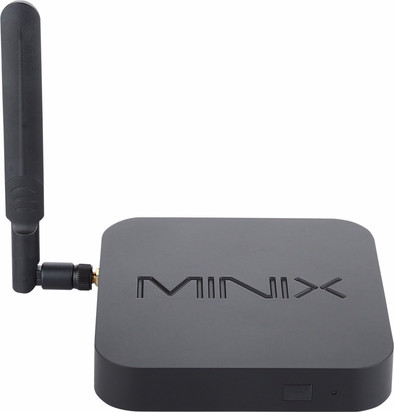
The Minix is a neutrally designed cabinet, it disappears in your TV setup. If you place the Minix neatly between the TV and its foot, like I did, it hardly feels at all until you switch on the box and a blue light comes on. This light is also the remote control receiver. If the light is looking straight at you, the USB ports are on the right. Ether, power and HMDI 2.0 on the back and the antenna connection on the left. If an external hard drive has to be connected, it is therefore least noticeable if the box is located to the left of the TV, because then the external drive is right behind the TV.
The case feels very solid and seems to be of good build quality. The plastic is sturdy and feels thick. When plugging in the cables, the ports also feel sturdy.
The same applies to the remote control; simple, effective and solid.
PERFORMANCE
The Minix plays H.265, HVEC, MKV, H264 etc. fine. I can't test 4k and 3D. If you do a search you will find messages about playback problems with those formats, but these messages are from early 2016 and those problems have been fixed. After setting some settings correctly, DTS-HD was no problem at all. Please note that Kodi 17 and newer does not support the Minix Neo U1 with DTS-HD passthrough (see introduction).
The network performance is really great. As mentioned in the introduction, I don't use the Wifi antenna but decent Cat7 ethernet cables and a 2.5” 2TB hard disk (NTFS) is connected to the Minix (no extra power is needed for this!). Via ES file Explorer (installed by default on the Minix) you can manage the files on the external hard drive from a Windows computer. Files can also be copied into it. Copying is fast enough as far as I'm concerned, about 30 MB/s (240 mbit/s). This looks like a limitation on the write speed of the external drive or the USB 2.0 ports. Setting up this “ftp” is a bit of a puzzle at first, but anyone with access to google should be able to do it.
EXPERIENCE
The first steps of getting the Minix up and running is of course configuring everything and installing the right apps from Google Play. Navigating the main menu of Minix is easy and intuitive. Most buttons on the dashboard open a kind of mini tray of apps. For example, if you sound on file management, you do not go directly to that app, but first open a small screen with a series of apps. You can choose these apps yourself, so if you only use 1 app, you throw the rest away. But if you want to do 1 task with program 1 and the other with program 2, you put them both in it. This may be cumbersome for some, but I think it's a great way to keep your desktop tidy and organized.
Installing new apps, however, is a drama with the default remote. The navigation buttons are not sufficient to operate a screen made on touch screens. The four-point push button always highlights the next button or link or function but does not always do what you expect. It's tedious, but eventually it works. Fortunately it is only for 1 time and therefore I don't count it too heavy, for normal use the remote control can be used in “XBMC for Minix”.
After installing everything I actually only use 2 apps. ES File Explorer to transfer files. And “XBMC for Minix” for all playback work. And this works great; the interface responds quickly and smoothly and standard remote works fine. Starting up the box and then XBMC will not break any records, but within 1 minute you are watching a movie.
CONCLUSION
I was looking for a TV box that could run Kodi, with DTS HD, H.265, H.264, HVEC etc. support and that would provide a good network performance so that an external hard drive can be connected to it. For me, the Kodi delivers exactly this. Yes, it may be more expensive than other cheaper TV boxes. But the build quality, DTS support with Android, Refresh switching and options to install LibreELEC later make me a very happy owner. For some it may be worth ordering the separate Minix remote control, but for me – a Kodi user – that is not necessary. Keep in mind that the Minix NEO-U1 is the older model (replaced by the NEO-U9-H), so there will be no more updates for it. I myself have no problem with this, all bugs and problems have now been solved and you get a box in 1 go that already works optimally.
So in one sentence, are you looking for a box that subtly fits into your interior, to which a hard disk can be connected, which can play all kinds of films, series and music via Kodi and also supports DTS? Then this Minix is definitely recommended.