Never available again
View alternatives in the sidebar
According to our NAS expert
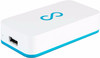
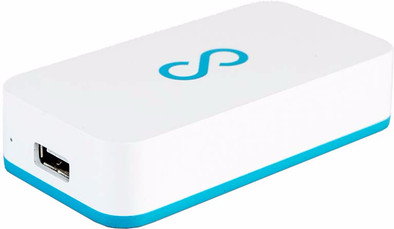
Create a personal cloud at home with the Lima Ultra. Connect the device to your router, connect an external hard drive or USB flash drive, and the Lima Ultra will automatically connect it to the Internet. Transfer office documents, holiday pictures, and videos from your laptop or desktop to the Lima via your network. This way, you can access the files on the hard drive you already have at home remotely. Stream movies and series to your smartphone or enjoy your media on the big screen of your TV with Chromecast support.
Number of hard drive slots | 1 | |
|---|---|---|
Suitable for hard drive size | 2.5 inches | |
Internal RAM | 512 MB | |
Processor cores | Quad-Core (4) | |
Built-in hard drive | ||
Total storage capacity | 0 GB |
5 stars
6
4 stars
1
3 stars
0
2 stars
1
1 star
0
The product is easy to set up, even by a person who is not at all tech savvy. It's a matter of connecting cables, installing the program and creating an account. Child can do the laundry principle.
The Lima works like a charm. The program ensures that you work on your PC as if it were a hard disk. That is very pleasant. This allows you to automatically save programs on that 'hard drive', so that you work in your own cloud by default, and do not run the risk of losing your data if your device crashes. That automatic saving on Lima also works on the phone and tablet.
The transfer of the data is fast, although it could be a little better. But with normal use and with not too large files, you will find that your files are readily available on other devices.
The Lima program that you need on your PC is a light program that has little effect on the performance of your PC. You can also see which devices have access to your cloud and you can deny devices access.
The app for the phone and tablet also works well. It is even suitable for Chromecast, which is handy as a Chromecast user. The disadvantage of the app is that it is not seen as a cloud by Android. That is, you will not see the Lima in the normal file manager app. So you really need Lima's app. In addition, I do miss the option in the app to renew itself because the availability of files on the phone sometimes has a small delay. Probably because it isn't synced yet, but you should be able to do that manually.
A disadvantage is that you do not just pull the disk out of your Lima device to quickly throw some files on it via your PC. This is because the files are encrypted, but if you want to put a large amount of data on it during installation, it will take some time over the WIFI.
Switching to another or larger drive once you have connected a drive, on the other hand, is child's play. Just connect both disks to your PC, put the Lima folder on the new disk and you're done.
The price seems quite expensive at first glance. But for the same money you pay an annual subscription with a Cloud service. With this device you pay once and then you are ready for years to come. You determine the (size of the) disk that you connect yourself and you also manage it yourself. Data is simply stored at home and not on an unknown server of a foreign company. Taking the cloud offline is done with a single plug, if necessary. But the files are encrypted, so the security is fine.
Rudolph
15 June 2017
Automatically translated from Dutch
Lima Ultra the right choice for me! Bought two. You decide how big the hard drives are (have 2 of 5 TB). Had a bit of trouble installing but at Lima they have a fantastic help desk. (Even on Sundays!) Such ease of use. You can view and manage everything via Mac, iPhone, iPad, PC. Photos are transferred automatically. So keep your memory free on your iPhone. Listening to music? 130 GB is on it. I used to have a NAS from WD and way too hard to set up and slow. Now a piece of cake. Watching movies is no problem either. Works flawlessly with Chromecast (is baked into the Lima app. In addition, you can also save anything locally on your device so you don't need an internet connection. In one word "Blissful".
Jean Maurau
26 June 2017
Automatically translated from Dutch
Easy to install and useful as a personal cloud between Mac and iPhone
Wouter Konings
19 July 2017
Automatically translated from Dutch
Product number | 777381 | |
|---|---|---|
Manufacturer code | P2-BLUE-NL | |
Brand | Lima | |
Warranty | 2 years | |
Processing of your defect | Carry-in warranty |
Built-in hard drive | ||
|---|---|---|
Number of hard drive slots | 1 | |
Suitable for hard drive size | 2.5 inches | |
Total storage capacity | 0 GB | |
RAID | JBOD | |
Internal RAM | 512 MB | |
Total number of RAM slots | 0 |
LACP Link aggregation | ||
|---|---|---|
Thunderbolt connector | ||
Bluetooth | ||
Number of Ethernet ports | 1 |
NAS functions | Photo server | |
|---|---|---|
NAS application center | ||
Plex support | ||
Number of IP camera licenses included | None | |
DLNA | ||
UPnP AV support | ||
FTP server | ||
On/off switch | ||
Kensington lock | ||
Apple Time Machine support | ||
Chromecast support |
Processor brand | ARM | |
|---|---|---|
Processor family | Cortex A9 | |
Processor code name | Cortex | |
Processor cores | Quad-Core (4) | |
Clock speed | 1,5 GHz |
Depth | 3,7 cm | |
|---|---|---|
Width | 6,9 cm | |
Height | 2,7 cm | |
Type NAS | Upright | |
Color | Blue, White | |
Weight | 30 g |