Samsung LS24H850QFUXEN
Never available again
View alternatives in the sidebar
View alternatives in the sidebar
According to our monitor expert
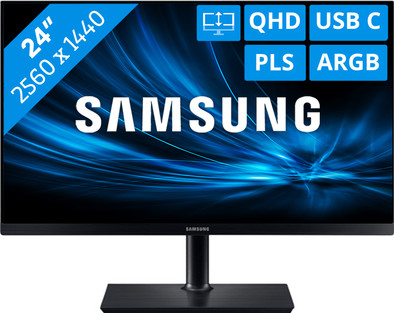
On the Samsung LS24H850QFUXEN, you can edit your vacation photos and watch movies. The 24-inch screen has a resolution of 2560x1440, so you can see everything in detail. Adjust the monitor to your posture by adjusting its height to prevent pain in your neck and shoulders. Create an ergonomic workplace so you can comfortably spend a long day at your monitor. If you tilt the screen, you can still see the image well thanks to the PLS panel. This ensures realistic color representation from every viewing angle. FreeSync technology prevents stutter and tearing in images while watching movies or gaming.
Sharpness | Quad HD (1440p) | |
|---|---|---|
Curved | ||
Aspect ratio | Standard (16:9) | |
Refresh rate | 60 Hz | |
Response time | 4 ms | |
Panel type | IPS panel | |
Color depth | 17 million colors (8-bit) | |
Built-in speakers |
5 stars
34
4 stars
34
3 stars
7
2 stars
0
1 star
1
Installation ease
User friendliness
Image quality
Price-quality ratio
Design
ATTENTION
I connected this monitor to my MacBook Pro 16” 2019 via USB-C. In the beginning a lot of trouble connecting, and spontaneous reboots of my laptop. After 2 calls with Apple Support, the problem turned out to be the USB-C connection of the monitor, which only supplies 45W. However, a MacBook Pro 16” has a power consumption of 96W. This difference caused the reboots and faltering connections. However, Samsung states that you can connect PowerBooks to this monitor. So now I use the official Apple charger. Works flawlessly now, but without the USB-C power supply function.
Stephan Moons
16 January 2020
Automatically translated from Dutch
I chose this monitor in the first place because I wanted a monitor that worked more pleasantly on the eyes and I was particularly curious about the so-called Eye Saver mode that is on this monitor. I regularly wear lenses, which quickly leads to irritation when looking at a screen for a long time. Previously I used a program to filter out the bright blue lights and I think this monitor works in a similar way. In any case, the filter works well because it bothers me a lot less than before! Working at night has become a lot more pleasant. The monitor is easy to install; it was connected within 5 minutes. Finally, the image is very sharp and even with the anti-reflection on it, you can see the image well from a wide viewing angle. In short, a very nice screen!
Lie
14 August 2017
Automatically translated from Dutch
An absolutely fantastic display with a high resolution and a very nice design. However, the main reason for purchase was the availability of USB type C for connection with MacBook Pro. The downside here is that the screen can only be connected via USB type C when the MacBook is directly connected to the mains voltage. The monitor does not supply enough power to simultaneously transmit the image from the MacBook and charge the MacBook. If the MacBook itself is not powered from the mains, it also does not transmit an image to the monitor.
Bjorn
27 November 2017
Automatically translated from Dutch
Product number | 779543 | |
|---|---|---|
Manufacturer code | LS24H850QFUXEN | |
Brand | Samsung | |
Warranty | 2 years | |
Processing of your defect | Carry-in warranty |
Recommended display resolution | 2560x1440 | |
|---|---|---|
Sharpness | Quad HD (1440p) | |
Brand-specific image technology | Samsung QLED | |
Aspect ratio | Standard (16:9) | |
Refresh rate | 60 Hz | |
Response time | 4 ms | |
Panel type | IPS panel | |
Local dimming | ||
HDR support | ||
Contrast ratio | 1000 | |
Touchscreen | ||
Screen reflection | Anti-glare | |
Blue light filter | ||
Flicker-free technology | ||
Color space | Adobe RGB | |
Adobe RGB color coverage percentage | 70 % | |
Color depth | 17 million colors (8-bit) | |
G-sync | ||
G-sync Ultimate | ||
Adaptive Sync | ||
Type of adaptive sync | FreeSync | |
Resolution width | 2560 pixels | |
Resolution height | 1440 pixels | |
Anti-reflection type | Matte | |
Horizontal viewing angle | 178 ° | |
Vertical viewing angle | 178 ° |
Height | 52,3 cm | |
|---|---|---|
Width | 54 cm | |
Depth | 23,6 cm | |
Weight | 6,4 kg | |
Color | Black | |
Including stand | ||
Material | Plastic | |
Cable management | ||
Appearance | Neutral | |
Curved |
Number of HDMI connectors | 1 | |
|---|---|---|
Number of Female HDMI type A 1.4 ports | 1 | |
Number of headphone jacks | 1 | |
Type of headphone connection | 3.5mm (TRRS) | |
Number of Female Standard DisplayPort 1.2 ports | 2 | |
Number of female 3.5mm TS Audio Jack ports | 1 | |
Number of female 3.5mm TRRS Audio Jack ports | 1 | |
Number of USB ports | 4 | |
Type of USB port | USB-C | |
Number of USB ports | 4 | |
Suitable for daisy chaining |
Included by default | DisplayPort cable, HDMI cable |
|---|
Adjustable in height | ||
|---|---|---|
Tiltable | ||
Pivotable stand | ||
Pivot function | ||
VESA mount option | ||
VESA mount | 75x75mm |
Energy label | F | |
|---|---|---|
Energy consumption standby | 0,3 W | |
Energy consumption active | 38 W | |
Energy consumption per 1000h | 38 kWh | |
Annual energy consumption | 55,48 kWh | |
Annual energy costs | 12,21 euros |
Built-in speakers | ||
|---|---|---|
Webcam | ||
Split screen | ||
Kensington lock | ||
Best tested |
Image quality according to customers | Very good | |
|---|---|---|
Design according to customers | Nice | |
Recommended for use | Internet, email, and text processing, Photo editing, Video editing, Watching movies in Full HD |
