Logitech BRIO 4K Stream Edition

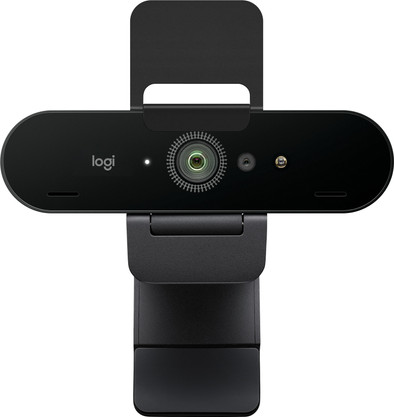
Never available again
View alternatives in the sidebar
View alternatives in the sidebar
Product number | 791690 | |
|---|---|---|
Manufacturer code | 960-001194 | |
Brand | Logitech | |
Warranty | 2 years | |
Processing of your defect | Via Coolblue |
Plug and Play | ||
|---|---|---|
Sharpness | 4K Cinema | |
Autofocus | ||
Wide-angle | ||
Automatic brightness adjustment | ||
Coverable lens |
Built-in microphone | ||
|---|---|---|
Microphone recording type | Mono | |
Microphone noise suppression | ||
Infrared (IrDA) | ||
Tiltable | ||
Type of webcam holder | Universal clip |
Width | 10,2 cm | |
|---|---|---|
Depth | 2,7 cm | |
Height | 14 cm | |
Weight | 63 g | |
Color | Black | |
Material | Plastic | |
Finish | Matte and glossy |
Type of USB port | Standard USB-A | |
|---|---|---|
Connection type | Wired | |
Compatible with operating system | ChromeOS, Windows, macOS | |
Cable length | 1,5 m |
Plug and Play | ||
|---|---|---|
Compatible with operating system | ChromeOS, Windows, macOS | |
Autofocus | ||
Sharpness | 4K Cinema | |
Built-in microphone |
According to our webcam expert
You can adjust the field of view to your usage, for example a wide 90 degrees with more background or a narrow 78 degrees that keeps the attention on you.
Self-learning software cleans up a messy background.
The webcam is fully integrated with XSplit and has a 12-month XSplit premium license.
You need to place a wired webcam near your computer.
With the Logitech Brio 4K Stream Edition webcam, you can stream on Twitch, record videos for your YouTube channel, or make a video call on Skype. The Ultra HD 4K video resolution lets you capture the smallest details of your face and facial expressions. Thanks to the high frame rate, you can live stream with 1080p at 60fps, so your audience sees your stream as smoothly as you do on your monitor. The Field of View of the webcam can be adjusted between 78 and 90 degrees. This allows you to focus the image on your game face or to show off your gaming collectibles in the background.
5 stars
55
4 stars
22
3 stars
6
2 stars
1
1 star
1
Installation
Quality
Options
Best webcam I've come across so far within private price range. Design is slick, suspension is easy to use. After plugging in, it works immediately within your OS without additional software. To get the most out of your camera, you do need the Logitech G Hub software, which is not immediately clear to the layman and is also not easy to find. Tip: make sure that there is no dirt in front of the lens, such as a fingerprint, otherwise you will never get it sharp.
Martin
19 April 2021
Automatically translated from Nederlands
In use for over a week now with all day video conferencing: this logitech BRIO 4K stream edition is ideal for that.
Maarten Nypels
11 June 2020
Automatically translated from Nederlands
At first glance a nice, sturdy thing, this webcam. Nice resolution too. The sharper you can therefore see that the autofocus does not focus properly. If you are further than about 40cm from your camera, the image will be blurry. And with a blurry, out-of-focus image, a good resolution is of no use. And furthermore, the supplied software is difficult to find and very poor in quality.
Hans-Peter
26 January 2023
Automatically translated from Nederlands