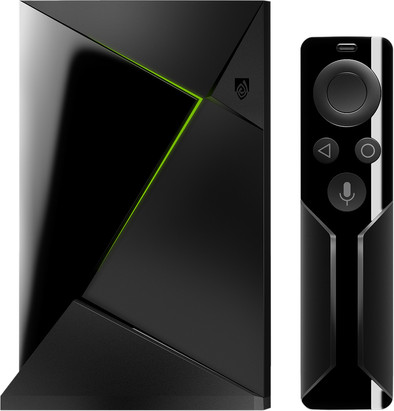
NVIDIA SHIELD TV with Remote Control

Never available again
View alternatives in the sidebar
View alternatives in the sidebar
Product number | 794770 | |
|---|---|---|
Manufacturer code | 945-12897-2505-100 | |
Brand | NVIDIA | |
Warranty | 2 years | |
Processing of your defect | Carry-in warranty |
Type of image definition support | Ultra HD (4K) | |
|---|---|---|
Parental controls | ||
Internal RAM | 3 GB | |
Built-in WiFi | ||
Operating system | Android | |
Android One | ||
Android OS version | Android 7.0 Nougat | |
Web browser |
Processor brand | NVIDIA |
|---|
Supports Netflix | ||
|---|---|---|
Supports Torrents | ||
Internet radio | ||
Streaming services | Apple Music, Kodi, NPO Uitzending Gemist, Netflix, Pathé Thuis, Plex, RTL Gemist, SBS Gemist, Spotify, TADAAM, Videoland, YouTube | |
Displays photos | ||
Photo file format | BMP, JPEG, PNG | |
Plays music | ||
Audio file format | M4A, MP3, MPEG 4, Ogg, Ogg vorbis, WMA, aac, aac+, amr, dd+, dts, eaac+, flac, pcm, wma pro | |
Plays videos | ||
Video file format | 3GP, ASF, AVCHD, AVI, DivX, DivX HD, H.263, H.264, H.265, MKV, MOV, MOV (H.264), MPEG-1, MPEG-2, MPEG-4, MTS, VC-1, VP8, VP9, WMV9, Xvid |
AirPlay | ||
|---|---|---|
DLNA | ||
SonosNet | ||
Spotify Connect | ||
Google Cast | ||
UPnP AV support | ||
Miracast | ||
Plex support |
Built-in hard drive | ||
|---|---|---|
SD card slot |
Headphone jack | ||
|---|---|---|
Microphone connector | ||
HDMI connector | ||
Network connector |
Height | 2,593 cm | |
|---|---|---|
Width | 15,9 cm | |
Depth | 9,8 cm | |
Weight | 250 g | |
Color | Black |
Controls via app | ||
|---|---|---|
Controlled via Apple app | ||
Controlled via Android app | ||
Smart home platform | Google Assistant |
anything for a smile
HDMI connector | ||
|---|---|---|
Type of image definition support | Ultra HD (4K) | |
Streaming services | Apple Music, Kodi, NPO Uitzending Gemist, Netflix, Pathé Thuis, Plex, RTL Gemist, SBS Gemist, Spotify, TADAAM, Videoland, YouTube | |
Supports Netflix | ||
Built-in hard drive | ||
Built-in WiFi | ||
Network connector |
According to our media player expert
Watch series and movies in 4K quality via Netflix, PLEX, Videoland, and YouTube.
Search your content using voice control.
The media player supports Dolby Atmos and HDMI 2.0b.
Streaming games via GeForce NOW is free for the first month, after which you pay € 9.99 per month.
An HDMI cable isn't included, check out our bundles.
You can turn any television into a smart TV with the NVIDIA SHIELD TV with remote control. This smart media player allows you to watch 4K movies in the highest quality, with HDR support for better color representation. You can stream your favorite series via Netflix and rent movies via Google Play Store. This media center has an integrated Chromecast, so you can also use your smartphone or tablet to stream to the TV. Do you want to play your movies straight from the SHIELD TV? Simply connect an external hard drive to one of the two USB 3.0 connectors. Thanks to the powerful Tegra X1 Quad-Core processor, even movies of the highest quality will play without buffering.
We live in 2018. 2018 is the year in which almost every TV has chromecast functionalities. In 2018 you can also watch Netflix on almost every TV, but here is the NVIDIA Shield TV, the best media player on the market.
Before I bought the Shield TV I had a cheap media box from some well-done Chinese brand, this worked but had some problems playing media. Such as framedrops and some formats that could not be played. I like to watch my content in high quality without frame drops and without having my Plex transcode it (converting an unplayable format into a playable format) and this is possible in 99.9% of the cases with the Shield TV (recommended to use SPMC for your media, a modified Kodi version especially for Android TV).
The Shield TV also contains the functionalities of a Chromecast that my old box could not, with this I can actually do almost everything that I can with a Chromecast and that is of course a nice bonus when you are quietly drinking beer with a number of friends in the living room so that anyone with a smartphone can quietly put his or her number in the queue.
The Shield TV runs Android, or rather Android TV. This is basically just Android but with some TV features like a changed layout and a custom play store for apps made for Android TV. Android TV is in a word "slick", it works. Only by adjusting the app store a number of apps such as "KPN Interactive TV" have not yet been made available for the Shield TV and that is a shame if you actually want to do everything with a box or if you have several TVs in the house. so you can't connect a box to all TVs. However, I personally do not experience this as too big a problem because I hardly watch TV anymore and almost everything I watch is offered online by, for example, the NPO app, which you can then cast to the Shield.
Part of the Shield's expensive price is justified by the fact that you can stream games on it in various ways. You can use a service to deposit ten euros to be able to stream games via a reserved computer from NVIDIA, but I have not tested this, because of the other possibility. This option is streaming games via your own computer, please note that this is only supported if you have an NVIDIA graphics card that is above the GTX 700 series. This is something that works quite well, but you need a good internet connection to be able to use it properly, if you want to do this, ethernet instead of wifi is recommended. Only when you play games that expect a quick response, you can experience that this goes with delay and therefore have a less good experience while playing a game.
What is nice about this, however, is that the Shield supports a large number of controllers such as the PS3, PS4 and Xbox controller and these are controllers that almost every gamer has at home.
NVIDIA also offers a lot of support through updates. Every 2 months there is an update to fix problems and add new functionalities, NVIDIA also ensures that the latest Android version is made available. At the moment my Shield is still running Android 7 but Android 8 is coming soon.
Bottom line, the NVIDIA Shield TV is a beautiful device. However, it is not for everyone. If you sometimes watch a YouTube video and occasionally watch a series via Netflix, there are much cheaper options that offer the same and the Shield TV is not for you. If you really like quality and want to be able to play your media in the perfect way, then the Shield TV is for you!
Cees Verhoeven
12 March 2018
Automatically translated from Nederlands
Meanwhile my 3rd Shield (other 2 also work perfectly but now have 1 Shield per TV) This is really the best Android TV device on the market. Built-in Android TV in the TV itself is usually slower and less responsive. This is of course due to the powerful Tegra X1 chip. The Shield is also a Spotify Connect and a Chromecast device. So casting works perfectly. 4K HDR works without difficulty, I have already tried Kodi, Netflix and Youtube and all 4K HDR 60hz without a problem.
In terms of software, Android TV is very basic and intuitive. What works:
The Shield will play any format media in my opinion.
The software is still properly updated by Nvidia so the device remains current.
Sideloading software works flawlessly if you have some knowledge. Root not required.
gaming: Choice of games from the Playstore, NVIDIA GameStream, Geforce Now, and eg emulators.
Playstore: Just download and play with a controller, keyboard, mouse or your phone as a controller via an app.
NVIDIA Gamestream: Playing games from your PC on the shield also works if your PC has the necessary hardware. I tested it with Assassin's Creed Origins (Steam) and my PC has an Nvidia GTX1080. Via the Shield, the controller was detected in the game and the game automatically adapted to a controller instead of a keyboard. Worked perfectly!
Geforce Now: actually a kind of Netflix service but for play. Also works without problems.
Emulator: NES, SNES, etc. RetroArch works best and fastest for this.
The game controller works the fastest anyway. The controller also works without problems in Windows 10 when connected via USB. Also plug & play
An all-rounder and perfect device for me. Does what it's supposed to do, plays everything, doesn't crash, etc.
The only downside I sometimes find is that when the remote has not been used for a while, for example while watching a movie, it has to wake up exactly. As a result, it sometimes takes a while before you can give a command.
The Shield also has an IR receiver. I use this in combination with my Logitech Harmony remote. This also works smoothly and perfectly.
Keith Suy
2 May 2018
Automatically translated from Nederlands
After years of using Kodi on a Raspberry Pi and Netflix via Chromecast, finally switched to an all-in-one device. The relief is great! Much smoother operation, better image quality, great remote. The only downside I can think of is that you have to install an app to be able to use your own photo screensaver again, while this was standard in Chromecast and via a plugin in Kodi. Anyway, at this price it does not come to € 2.89 for an app. In any case, I am satisfied. Kodi, Netflix and YouTube are now more pleasant and faster to use.
Guy Verschuere
24 May 2018
Automatically translated from Nederlands