Tristar VE-5891
Never available again
View alternatives in the sidebar
View alternatives in the sidebar
According to our fan expert
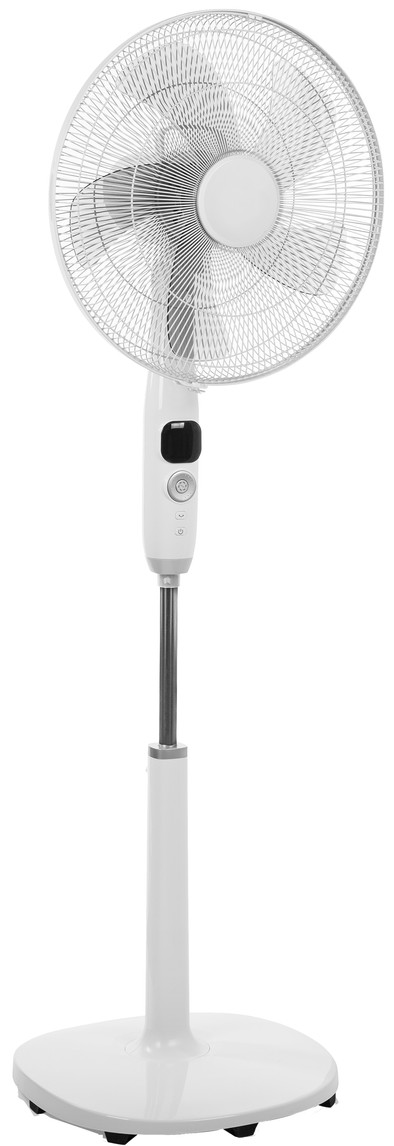
Decide for yourself how hard or soft the breeze in your room is with the Tristar VE-5891. This fan has 12 different air settings. You can control the fan with the included remote control or via the buttons on the device itself. The fan is self-rotating at an angle of 85 degrees, so the air travels into several directions. Thanks to the timer, the fan runs for a preset time. The height of the fan can also be adjusted to your own preferences from 103 to 120 centimeters.
Type of fan | Tripod fan | |
|---|---|---|
Remote control | ||
Timer | ||
Self-rotating | ||
Number of settings | 12 | |
Tiltable |
5 stars
5
4 stars
3
3 stars
0
2 stars
0
1 star
0
This fan comes packaged in parts, so assemble yourself. Box has a handy handle. User manual is scant but it is absolutely not difficult to assemble all parts. Please note that the large (plastic) nut that holds the impellers must be tightened counterclockwise. This is to prevent possible loosening (fan rotates clockwise). The description of Bol itself about this product is extensive and accurate. Everything you can do with the remote control can also be done directly via the display of the fan itself. Some additional details, -To activate the controls, you must first press any key, then perform the action you intended. -Display will turn off by itself shortly after it has been used, this is extremely useful if the fan is placed in the bedroom. -The interval for the timer is of half hours, this is shown in decimal value (so half hour = 0.5) -When pressing the preference button (button with waves) you switch between the predefined modes normal, natural or sleep mode. If you choose one of the first two, you can still vary between three positions (1, 2 and 3 by means of the arrow buttons up and down), this setting will then be saved for future use. Sleep mode does not have this option. -Personally I find the first 3 positions quiet enough to have on while sleeping, but up to is very personal. It is clear that there is always a position that is quiet enough for the user. -To activate the timer from the fan itself, keep the middle button of the round control pressed, then turn the outer round knob to select the desired time and confirm by pressing the central button again. -A plastic bracket is also included. I have not been able to find what it is for in the description, but it can only be done to prevent the lower part of the leg from touching the locking screw of the upper part, see photo for clarification.
So far a great product, but not yet in use for a long time. If I have to think of a minus is that the cord could have been a little lower. By the way, there is also a retro version. This one is silver and looks nice, I've been dubbing between silver and white.
to comment on the product ordered. The delivery was slightly different, had to be there 16 hours after ordering, but was there (after 2x notification of delay) finally after 64 hours (2 days later).
R. Moleveld
28 July 2019
Automatically translated from Dutch
This fan comes packaged in parts, so assemble yourself. Box has a handy handle. User manual is scant but it is absolutely not difficult to assemble all parts. Please note that the large (plastic) nut that holds the impellers must be tightened counterclockwise. This is to prevent possible loosening (fan rotates clockwise). The description of Bol itself about this product is extensive and accurate. Everything you can do with the remote control can also be done directly via the display of the fan itself. Some additional details, -To activate the controls, you must first press any key, then perform the action you intended. -Display will turn off by itself shortly after it has been used, this is extremely useful if the fan is placed in the bedroom. -The interval for the timer is of half hours, this is shown in decimal value (so half hour = 0.5) -When pressing the preference button (button with waves) you switch between the predefined modes normal, natural or sleep mode. If you choose one of the first two, you can still vary between three positions (1, 2 and 3 by means of the arrow buttons up and down), this setting will then be saved for future use. Sleep mode does not have this option. -Personally I find the first 3 positions quiet enough to have on while sleeping, but up to is very personal. It is clear that there is always a position that is quiet enough for the user. -To activate the timer from the fan itself, keep the middle button of the round control pressed, then turn the outer round knob to select the desired time and confirm by pressing the central button again. -A plastic bracket is also included. I have not been able to find what it is for in the description, but it can only be done to prevent the lower part of the leg from touching the locking screw of the upper part, see photo for clarification.
So far a great product, but not yet in use for a long time. If I have to think of a minus is that the cord could have been a little lower. By the way, there is also a retro version. This one is silver and looks nice, I've been dubbing between silver and white.
R. Moleveld
31 July 2019
Automatically translated from Dutch
The fan blows well at an acceptable noise level, but can also be very quiet (and therefore blow less hard). With the 12 positions, you can always find a setting where the ratio of sound and wind is fine for the time of day.
Ronald Hiemstra
31 July 2019
Automatically translated from Dutch
Product number | 835596 | |
|---|---|---|
Manufacturer code | VE-5891 | |
Brand | Tristar | |
Warranty | 2 years | |
Processing of your defect | Via Coolblue |
Width | 40 cm |
|---|---|
Height | 137 cm |
Depth | 17 cm |
Diameter | 40 cm |
Weight | 7 kg |
Material | Plastic |
Finish | Matte and glossy |
Power | 25 W | |
|---|---|---|
Type of fan | Tripod fan | |
Remote control | ||
Timer | ||
Adjustable in height | ||
Tiltable | ||
Ways of tilting | Horizontal tilt, Vertical tilt | |
Self-rotating | ||
Variable speed | ||
Number of settings | 12 | |
Display | ||
Touchscreen |