Cricut Explore 3
Never available again
View alternatives in the sidebar
View alternatives in the sidebar
anything for a smile
Connection type | Wired, Wireless | |
|---|---|---|
Portable (mobile use) | ||
Cutting length | 360 cm | |
Number of supported materials | 100 | |
Maximum width of material | 33 cm | |
Support for smart materials |
According to our cutting machine expert
You can use over 100 materials for your design.
With the 'Print Then Cut' function, you can cut out your printed images right away.
There are 6 tools to cut, write, fold, and apply foil.
If you want more options, like engraving or making double folds, choose the Cricut Maker 3.
The higher speed of the Cricut Explore 3 only works with smart materials.
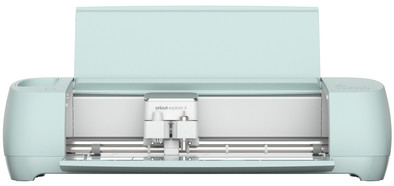
With the Cricut Explore 3, you can cut out your creations even faster. From the thinnest paper to tied jute, you can cut more than 100 different materials with the Cricut Explore 3. If you use Cricut Smart Materials, you can even do so 2 times faster than with regular materials. And you can make cutouts of up to 3.6m with the Cricut Explore 3. The Cricut Explore 3 measures whether you have enough material for your creation beforehand. There are 6 different available tools for the Cricut Explore 3 to add a little something to your creations. Your phone or tablet stands firmly in the docking slot.
You can create your designs with the free Design Space software. Cricut Design Space is the design program by Cricut. A couple of ready-made projects are available for free. Do you want access to thousands of ready-made projects, images, and fonts? You need a paid subscription with Cricut Access. Or, upload a free design from the internet. You can use the canvas and create your own design with various shapes. Cricut Design Space guides you through your entire project.
Nice and quality cutting plotter. Cut out all your creations in detail and quickly. The original accessories such as tools and cutting mats are pricey, but they do offer you the space to buy cheaper foils. All in all an excellent device for both starters and experienced users of cutting plotters.
Ab
22 July 2021
Automatically translated from Nederlands
I doubted for a long time whether I should buy this Cricut machine or not. After comparing the different machines that Coolblue offers, I went for the explore 3 and have not regretted it for a second! This machine is so versatile and super easy to use. Highly recommended for anyone who likes to get creative!
Kimberly
12 August 2021
Automatically translated from Nederlands
Bought our Cricut on the second chance from Coolblue, super satisfied. Very safe delivery, was very well packed. You can get started right away because it comes with a starter package of foils.
Lien
21 July 2023
Automatically translated from Nederlands
Product number | 884495 | |
|---|---|---|
Manufacturer code | 2008338 | |
Brand | Cricut | |
Warranty | 2 years | |
Processing of your defect | Via Coolblue |
Color | Blue | |
|---|---|---|
Height | 24 cm | |
Width | 61 cm | |
Depth | 24 cm | |
Weight | 7,3 kg | |
Portable (mobile use) | ||
Maximum width of material | 33 cm | |
Maximum thickness of material | 2 mm | |
Cutting length | 360 cm | |
Connection type | Wired, Wireless | |
Bluetooth | ||
Controls via app | ||
Compatible with operating system | Android, Windows, iOS, iPadOS, macOS |
Workshops possible | ||
|---|---|---|
Works with card mat | ||
Also works without a cutting mat | ||
Support for smart materials | ||
Number of supported materials | 100 | |
Number of tools | 6 | |
Functionality of the tools | Create folding lines, Cutting, Foil, Writing |