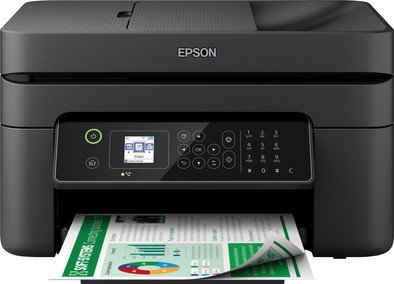
Epson Workforce WF-2840DWF
Never available again
View alternatives in the sidebar
View alternatives in the sidebar
Product number | 893403 | |
|---|---|---|
Manufacturer code | C11CG30406 | |
Brand | Epson | |
Warranty | 2 years | |
Processing of your defect | Via Coolblue |
Printer size | Extra large | |
|---|---|---|
Width | 37,5 cm | |
Depth | 30 cm | |
Height | 21,8 cm | |
Color | Black | |
Weight | 5,2 kg |
Printer type | All-in-one | |
|---|---|---|
Photo printer | ||
Portable (mobile use) | ||
Recommended for use printers | Printing at home |
Cartridge line | Epson 603 | |
|---|---|---|
Print technology | Inkjet | |
Number of cartridges/toner cartridges | 4 | |
Color printer | ||
Print speed black (ISO) | 10 ppm | |
Print speed color (ISO) | 5 ppm | |
First black page ready after | 10 seconds | |
Speed class | Standard | |
Maximum print resolution height | 1440 dpi | |
Maximum print resolution width | 5760 dpi | |
Maximum print size | A4 | |
Automatic duplex printing | ||
Borderless printing | ||
Maximum print size duplex printing | A4 |
Scan functionality | ||
|---|---|---|
Maximum optical scan resolution width | 1200 dpi | |
Maximum optical scan resolution height | 2400 dpi | |
Scanner type | File scanner, Flatbed scanner | |
Maximum scan size | A4 (21x29.7cm) | |
Automatic document feeder (ADF) | ||
Maximum paper size ADF | A4 | |
Scan sizes | A4 | |
Scan speed (PPM) | 5 ppm | |
Color depth output | 24 bpp | |
Scan to | App, Application, Cloud, Dropbox, Email, Email address, Email server, FTP, File, Folder, Image, Network, PC (local), PDF, PDF/A, Secured PDF, USB | |
ADF capacity | 30 | |
OCR |
Copying functionality | ||
|---|---|---|
Copy speed black (ISO) | 4 ppm | |
Copy speed color (ISO) | 4 ppm | |
Maximum copy resolution height | 1440 dpi | |
Maximum copy resolution width | 5760 dpi |
Fax functionality | ||
|---|---|---|
Color fax |
Built-in screen | ||
|---|---|---|
Color screen | ||
Touchscreen |
Suitable for Epson ReadyPrint |
|---|
Compatible with operating system | Android, ChromeOS, Linux, Windows, Windows Phone, iOS, macOS | |
|---|---|---|
Connection type | Wired, Wireless | |
Apple AirPrint | ||
Email print | ||
WPS (Wireless Protected Setup) | ||
Female standard USB-A port version | 2.0 | |
Number of Ethernet ports | 0 | |
NFC | ||
Built-in WiFi | ||
WiFi direct | ||
Bluetooth | ||
USB port |
Manual input tray | ||
|---|---|---|
Photo paper drawer | ||
Output capacity output drawer | 30 | |
Maximum print size standard paper tray | A4 | |
Input capacity standard paper tray | 100 | |
Number of standard paper trays | 1 |
Memory card reader |
|---|
anything for a smile
Print technology | Inkjet | |
|---|---|---|
Printer type | All-in-one | |
Color printer | ||
Automatic duplex printing | ||
Maximum print size | A4 | |
Automatic document feeder (ADF) | ||
WiFi direct |
According to our printer expert
It's a 4-in-1 printer, so you can scan, copy, and fax in addition to printing.
Thanks to the automatic document feeder (ADF), the printer scans, copies, and faxes a stack of paper in one go.
This printer supports a Epson ReadyPrint subscription, so you no longer need to purchase the cartridges separately with this ink subscription.
If you want to scan or copy a stack of paper in duplex, choose a printer with a duplexing automatic document feeder (DADF).
The printer doesn't have an Ethernet port, so you can't connect the printer with a network cable.
With the Epson Workforce WF-2840DWF 4-in-1 printer, you have everything you need for your home office. You can automatically print documents in duplex and save a lot of time thanks to the automatic document feeder (ADF). That's because the scan, fax, and copy function can process a stack of 30 sheets of paper in one go. You can connect the printer to WiFi or WiFi Direct. With WiFi Direct, you can connect your mobile device to the WiFi network of the printer itself directly. So you can also work in places without a WiFi network. And you can control the printer with the app, the included software, or the LCD screen.
This printer is suitable for Epson ReadyPrint. Epson ReadyPrint is a print plan that can be canceled monthly. When your ink is almost empty, your printer will automatically order new cartridges from Epson. This way, you never run out of ink. Want to learn more about Epson ReadyPrint? Read our advice article.
Just finding out how it works with the cartridges
Gerda Kazen
17 August 2022
Automatically translated from Nederlands
Connecting the printer to a laptop is drama, printer does connect to WiFi but remains offline on the laptop. Even with a cable, it remains offline.
lars botden
20 September 2022
Automatically translated from Nederlands
No experience gained yet
Macdre
30 November 2022
Automatically translated from Nederlands