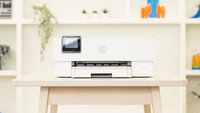
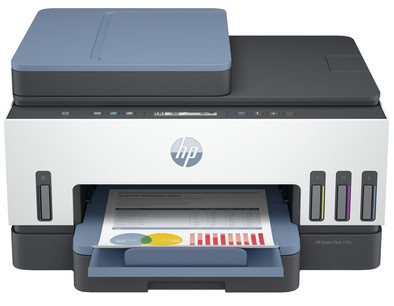
HP Smart Tank 7306 All-in-One

Never available again
View alternatives in the sidebar
View alternatives in the sidebar
Product number | 893441 | |
|---|---|---|
Manufacturer code | 28B76A | |
Brand | HP | |
Warranty | 2 years | |
Processing of your defect | Via Coolblue |
Printer size | Large | |
|---|---|---|
Width | 42,75 cm | |
Depth | 36,4 cm | |
Height | 19,86 cm | |
Color | Blue | |
Weight | 6,38 kg |
Printer type | All-in-one | |
|---|---|---|
Photo printer | ||
Portable (mobile use) | ||
Recommended for use printers | Printing at home |
Cartridge line | HP 31 / 32XL | |
|---|---|---|
Print technology | Inkjet | |
Type of ink | Ink bottles | |
Number of cartridges/toner cartridges | 4 | |
Color printer | ||
Print speed black (ISO) | 15 ppm | |
Print speed color (ISO) | 9 ppm | |
First black page ready after | 14 seconds | |
Maximum print resolution height | 1200 dpi | |
Maximum print resolution width | 4800 dpi | |
Maximum print size | A4 | |
Automatic duplex printing | ||
Borderless printing | ||
Maximum print size duplex printing | A4 |
Scan functionality | ||
|---|---|---|
Maximum optical scan resolution width | 1200 dpi | |
Maximum optical scan resolution height | 1200 dpi | |
Scanner type | File scanner, Flatbed scanner | |
Maximum scan size | A4 (21x29.7cm) | |
Automatic document feeder (ADF) | ||
Maximum paper size ADF | A4 | |
Scan sizes | A4 | |
Scan speed (PPM) | 8 ppm | |
Color depth output | 24 bpp | |
Scan to | Cloud, Email, Email address, File, Image, PC (local), PC (network), PDF, Printer | |
ADF capacity | 35 | |
OCR |
Copying functionality | ||
|---|---|---|
Copy speed black (ISO) | 13 ppm | |
Copy speed color (ISO) | 6 ppm | |
Maximum copy resolution height | 600 dpi | |
Maximum copy resolution width | 600 dpi |
Fax functionality |
|---|
Built-in screen | ||
|---|---|---|
Color screen | ||
Touchscreen |
Compatible with operating system | Android, ChromeOS, Linux, Windows, Windows Phone, iOS, macOS | |
|---|---|---|
Connection type | Wired, Wireless | |
Apple AirPrint | ||
Email print | ||
WPS (Wireless Protected Setup) | ||
Number of Ethernet ports | 1 | |
NFC | ||
Built-in WiFi | ||
WiFi direct | ||
Bluetooth | ||
USB port |
Manual input tray | ||
|---|---|---|
Photo paper drawer | ||
Output capacity output drawer | 100 | |
Maximum print size standard paper tray | A4 | |
Input capacity standard paper tray | 250 | |
Number of standard paper trays | 1 |
Memory card reader |
|---|
Quality mark sustainable company | CDP A List, EcoVadis Platinum, Responsible Business Alliance, Science Based Targets initiative (SBTi) | |
|---|---|---|
Green production features | Environmentally-friendly package |
Print technology | Inkjet | |
|---|---|---|
Printer type | All-in-one | |
Color printer | ||
Automatic duplex printing | ||
Maximum print size | A4 | |
Automatic document feeder (ADF) | ||
WiFi direct |
According to our printer expert
This is an all-in-one printer, which means you can also scan and copy in addition to printing.
With a full ink reservoir, you can print thousands of pages and you can easily refill it when it's empty.
Thanks to the automatic document feeder (ADF), the printer scans and copies a stack of paper in one go.
Choose a printer with DADF if you want automatic duplex scanning.
If you want to print more than 10 pages per minute in color, choose a printer with a higher print speed.
5 stars
5
4 stars
8
3 stars
2
2 stars
0
1 star
0
The installation of the HP Smarttank 7306 was very easy via the HP Smart app. Filling the ink tanks was also fairly easy and stain-free. The first prints were a few loose documents on standard paper and that went fine, as expected. The surfaces are nicely evenly colored and the letters are clear (although not ultra sharp).
The first major print job was an 80-page manual (PDF) in landscape format. I printed this via HP smart where I chose:
Printing went without problems but took over 20 minutes. In my opinion that is on the long side, but that will also have to do with the double-sided printing. Here too the print quality was as described above. The end result is unfortunately disappointing: on the left side of every page, the first 2 centimeters are not printed, so that the first 1 or 2 letters of each line have been omitted. Apparently the printer needs this margin for duplex printing (to be able to "retrieve" the sheet of paper) and it can print up to 2 centimeters from the edge. With the "fit to page" the HP smart software should have taken this into account. This problem does not occur when printing the same pages single-sided.
I also notice that it often takes a while before the printer can be found on the network. It also happened once that the printer was not found at all. Then it turned out that the printer had not reconnected to the WiFi network after being disconnected from the power. I have not been able to reproduce this behaviour.
Given the high purchase price, a color (touch) screen would have been appropriate instead of a poorly legible 1-line LCD display. This means that you are also forced to use the HP smart software on your computer or telephone for a simple scan or copy. This software is clear and works well. All in all, I only recommend this printer if you really print a lot (because of the low cost per print). For normal home use, there are better choices.
Jeroen
2 June 2022
Automatically translated from Nederlands
quality of the print work is excellent and the printer is fast
william wellemans
25 January 2022
Automatically translated from Nederlands
Is and evolution compared to previous printer. Especially when it comes to scanning documents.
Johan
29 April 2022
Automatically translated from Nederlands